Mastering On-Screen Takeoff for Electrical Plans: A Step-by-Step Guide for 2026
How much money are you leaving on the table because of a single math error in your conduit lengths? It’s a painful reality for many electrical contractors who still rely on paper plans and manual scales. You already know the industry is moving faster than ever. With the 2026 National Electrical Code (NEC) introducing complex new load calculation rules under Article 120, the margin for error has disappeared. Staying competitive requires more than just a highlighter; it requires modern electrical bid preparation software that works as hard as you do.
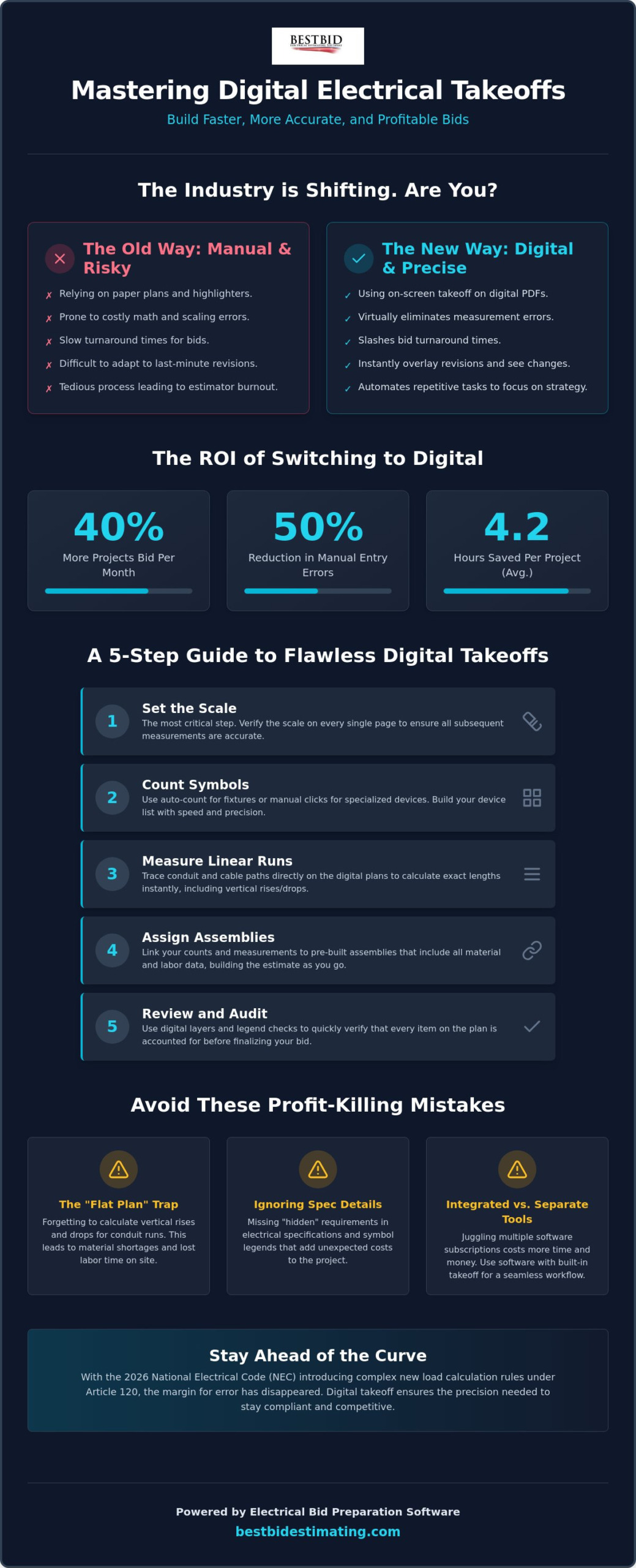
We understand the daily grind. You’re likely fed up with monthly software subscriptions that feel like a second mortgage and the constant pressure to turn around bids. Research shows that digital takeoff saves an average of 4.2 hours per project, yet many still struggle with the transition.
This guide will teach you how to master a streamlined digital takeoff process. You’ll gain a repeatable workflow and the confidence that every foot of wire is accounted for. We’re going to walk through the exact steps to build a digital project model that ensures your bids are fast, accurate, and profitable.
Key Takeaways
- Transition from manual highlighters to a digital workflow that slashes turnaround times and virtually eliminates measurement errors.
- Learn a 5-step digital takeoff method that ensures precision, starting with the most critical task: verifying the scale on every single page.
- Avoid the “flat plan” trap by correctly calculating vertical rises and drops so you never come up short on wire or conduit.
- Understand the financial and operational benefits of using electrical bid preparation software with built-in takeoff rather than juggling multiple subscriptions.
- Spot “hidden” details in electrical specifications and symbol legends that others miss, protecting your bottom line from unexpected costs.
What is On-Screen Takeoff and Why is it Essential for Electricians?
On-screen takeoff is the process of measuring and counting electrical components directly on digital PDF blueprints. It replaces the old school method of rolling out massive paper prints and marking them up with highlighters and architectural scales. While many of us grew up in the trade using physical drawings, the industry has shifted. In 2026, paper bids are becoming obsolete in commercial and industrial sectors as general contractors demand faster turnarounds and digital integration. Accuracy in your initial construction takeoff is the foundation of a profitable electrical bid. If your counts are off by even a small margin, your entire estimate is built on a lie.
The 2026 National Electrical Code (NEC) has introduced structural changes, such as moving load calculations to Article 120. These updates mean your bids require more precision than ever. You can’t afford to guess. Using modern electrical bid preparation software ensures that you’re not just counting symbols, but building a digital model of the project that accounts for every wire nut and foot of conduit. This transition isn’t just about keeping up with technology; it’s about protecting your bottom line from the rising costs of materials and labor.
To better understand how these digital processes help you break into larger, more profitable commercial projects, watch this helpful video:
Digital vs. Manual: The Speed and Accuracy Gap
Digital tools eliminate the “scaling errors” common with physical rulers. When you use a manual scale, a slight slip of the hand or a poorly printed plan can lead to missing feet of expensive copper. Digital takeoff locks the scale to the PDF itself.
This becomes even more critical when the GC sends a last minute revision. Instead of starting from scratch on a new set of paper plans, you can overlay the new digital file and see exactly what changed in seconds. Using digital takeoff reduces manual entry errors by at least 50% compared to traditional paper and pencil methods.
The ROI of Switching to Digital Takeoff Tools
The return on investment for switching to digital is immediate. You’ll see your bidding time drop from hours to minutes, allowing you to bid on 40% more projects per month. Beyond the numbers, there’s a massive psychological benefit. Manual counting is tedious and leads to estimator burnout. Digital electrical bid preparation software automates the repetitive parts of the job, letting you focus on the strategy of the bid. When your takeoff is accurate, your material procurement and field labor management become seamless. You won’t have crews standing around waiting for a conduit shipment that you forgot to count, and you won’t have thousands of dollars in surplus material sitting in the shop.
A 5-Step Guide to Performing a Digital Electrical Takeoff
Transitioning to a digital workflow doesn’t have to be overwhelming. It’s about following a logical sequence that ensures nothing is missed. When you use electrical bid preparation software, you’re not just looking at a screen; you’re building a bill of materials in real-time. Here is how you do it correctly.
- Step 1: Setting the Scale. This is the most critical part of any takeoff. If your scale is wrong, every measurement that follows is worthless.
- Step 2: Counting Symbols. Use auto-count features for repetitive fixtures or manual digital clicks for specialized devices and panels.
- Step 3: Measuring Linear Runs. Trace your conduit and cable paths directly on the screen to calculate lengths instantly.
- Step 4: Assigning Assemblies. Link your digital clicks to real-world labor and material data to build your costs as you go.
- Step 5: Review and Audit. Use “hidden” layers or legend checks to verify every item is accounted for before finalizing the numbers.
Mastering the Scale and Calibration
Never trust the scale printed on the drawing. A professional electrical bid preparation software allows you to calibrate the drawing by clicking two points of a known distance, such as a doorway or a dimension line. This is vital because PDFs can be distorted during the scanning or exporting process. You also need to understand the difference between vector and raster files. Vector PDFs are sharp and allow the software to “snap” to lines, while raster files are just images that require more manual precision. Always maintain scale across multiple plan sheets. A lighting plan might be 1/8 inch while the power plan is 1/4 inch. Mixing these up is a fast way to lose your shirt on a project.
The Power of Assembly-Based Counting
Effective electrical takeoff software changes the game by using assemblies. Why spend time counting “outlets” as single items? In one click, you should be accounting for the box, the bracket, the device, the wire nuts, and the faceplate.
This level of detail is why modern tools are so effective at reducing labor. It does the heavy lifting for you by calculating the small parts that often get forgotten in manual bids.
Best Bid’s assembly structure is designed to morph to your specific project needs. You don’t have to search through thousands of irrelevant items to find what you need. You can Learn more about Best Bid Next Generation’s assembly workflow to see how it simplifies complex commercial bids. This approach ensures that your material list is ready for procurement the moment you win the job. If you want to see how this fits into your business, you can explore our full range of estimating tools designed for the modern contractor.
Beyond Counting: Automating Conduit and Wire Length Calculations
The “Flat Plan” Trap is a silent killer for electrical profits. When you measure a line on a digital blueprint, you’re only seeing the horizontal distance from point A to point B. You aren’t seeing the drop from the bar joist to the light switch or the rise from the floor slab to the transformer. If you only bid what you see on the 2D surface, you’re essentially donating wire to the project. Modern electrical bid preparation software solves this by looking past the two-dimensional surface and accounting for the vertical reality of a job site.
Automation doesn’t stop at simple lines. It should handle the “make-up” logic for every junction box and panel. Professional tools calculate the extra six inches of wire needed for a device connection or the three feet required for a panel tub automatically. This ensures that your material list isn’t just a rough guess, but a precise reflection of what your crew will actually install. By using “Home Run” automation, you can calculate the distance from the last device in a circuit back to the panel instantly, saving you from the tedious task of tracing every individual run by hand. For a deeper dive into closing the gap between your drawings and your final estimate, see our 2026 guide on how to improve electrical takeoff accuracy and protect your margins on every project.
Accounting for Vertical Rises and Drops
To get a true material count, you must add the “Z-axis” to your 2D drawings. Most estimators know they need to add a few feet for every wall-mounted device, but doing this manually for 500 receptacles is a recipe for mistakes. In a dedicated electrical takeoff environment, you can set standard “add-on” lengths for different types of equipment.
When you click a symbol, the software automatically adds the vertical footage to your total. Ignoring vertical drops can lead to a 10-15% error in wire estimates, which effectively wipes out your profit on material costs. It’s these hidden feet of copper that often make the difference between a profitable job and a break-even disaster.
Calculating Complex Conduit Runs
A line on a screen represents more than just a length of pipe. It represents elbows, couplings, and support hardware that must be bought and paid for. High-quality electrical bid preparation software translates your on-screen traces into a detailed material list that includes these essential fittings. Instead of guessing how many couplings you need per 100 feet of EMT, the system calculates it based on industry standards. When combined with NetPricer integration, these calculated lengths are immediately paired with real-time market pricing. This means your bid reflects the actual cost of materials the day you submit it, not what they cost three months ago. This level of precision is exactly what Best Bid Next Generation was built to handle, giving you a competitive edge without the manual headache.
Download as HTML
4 Common Takeoff Mistakes That Kill Electrical Profit Margins
Even the most powerful electrical bid preparation software is only as reliable as the estimator behind the screen. Technology streamlines the process, but it doesn’t replace the need for a veteran’s eye. If you aren’t careful, small oversights during the takeoff phase can balloon into massive financial losses once the project hits the field. You’ve worked too hard to let a simple oversight erase your hard-earned profit.
Here are four mistakes that consistently drain margins for electrical contractors:
- Failing to verify the scale on every page. Never assume the entire set is uniform. A site plan might be 1 inch = 20 feet while the floor plan is 1/4 inch = 1 foot. If you miss that change, your conduit counts will be a disaster.
- Missing ‘hidden’ notes and legends. Engineers often tuck critical requirements into the symbol legend or general notes. A tiny “note 4” next to a motor might mean you’re responsible for a specialized disconnect not shown elsewhere.
- Double-counting between plans. It’s common to see the same piece of equipment on both the Power and Systems sheets. If you count it twice, your bid will be bloated, and you’ll likely lose the job to a more observant competitor.
- Over-relying on ‘Auto-Count’. AI symbol recognition is a massive time-saver, but it isn’t perfect. A symbol that is rotated or slightly obscured by a leader line might be skipped. Always perform a manual verification pass.
The Danger of the ‘Copy-Paste’ Mentality
Typical floor plans are a common trap. While levels two through five might look identical, slight variations in building orientation or site conditions can change your conduit paths and wire lengths. Don’t fall into the habit of counting one floor and simply multiplying the total. Each sheet deserves its own set of eyes to ensure you aren’t missing a structural change that forces a longer run. Check our FAQ for more estimating tips on how to handle repetitive project elements without sacrificing accuracy.
Specification Creep: When the Drawing Doesn’t Match the Book
In a legal dispute, the project specifications almost always override the drawings. If the plan shows standard EMT but the spec book calls for rigid conduit in that area, you’re on the hook for the price difference. We recommend using digital PDF tools like Accura Cadd to highlight these discrepancies early. It allows you to mark up the plans with spec-specific requirements so they are visible during the takeoff. The veteran’s rule is simple: trust the counts, but verify the specs. Ensuring your electrical bid preparation software is loaded with the correct material types from the start is the only way to protect your margin. If you’re ready to stop guessing and start winning, see how our professional tools can protect your business.
Built-in vs. Third-Party Takeoff: Finding the Best Value
Choosing the right electrical bid preparation software often comes down to a single question: do you want to rent your tools or own them? While a marketplace like Life4Rent is perfect for renting physical items you only need temporarily, your core business software should be an asset you own. Many contractors get stuck using “Frankenstein” systems. They use a generic third-party takeoff tool alongside a separate estimating program. This requires you to manually sync data between two different platforms, which is a massive waste of time. We call this the “Integration Tax.” Every minute you spend mapping a symbol from an external platform to your bid is a minute you aren’t winning new work.
The hidden cost of this approach is even more frustrating. You end up paying for two separate monthly subscriptions for tools that should be part of the same package. For small to mid-sized contractors, a built-in, “Buy it and Own it” model is the only way to ensure long-term profitability.
You need a system where the takeoff and the estimate live in the same house, sharing the same database and the same logic. This eliminates the headache of software companies that don’t understand the specific needs of an electrical shop.
The True Cost of Subscriptions in 2026
Let’s look at the math. If you pay a $150 monthly subscription for your software, you’ve spent $9,000 over five years. That is money that never comes back to your business. In contrast, a one-time purchase allows you to treat your software as an asset rather than a recurring bill. Lifetime updates are the key to avoiding software obsolescence. You get the latest features and NEC compliance without the constant financial burden. You can find more details in The Ultimate Guide to Non-Subscription Electrical Estimating.
The Advantage of a Single-Platform Workflow
When you use electrical bid preparation software that combines takeoff and estimating, like Best Bid Hybrid Pro, everything happens on one screen. There is no data “drift” because the software isn’t trying to translate information between two different companies’ databases. When you click a symbol on the PDF, the material and labor costs are already there. It is a seamless transition from plan to proposal. This workflow reduces overhead and gives you the confidence that your numbers are solid. To see how this fits your budget, view our one-time fee pricing model and see the difference that total ownership makes for your bottom line.
Take Control of Your Bidding Accuracy Today
Success in 2026 requires moving beyond the highlighter and the manual scale. You’ve seen how digital takeoff eliminates the “Flat Plan” trap and ensures your conduit lengths account for every vertical drop. By mastering these steps, you aren’t just saving time; you’re building a more profitable business. The key to long-term success is choosing an electrical bid preparation software that works for you, not one that drains your bank account every month with endless subscriptions.
Whether you are managing complex electrical systems or building custom outdoor living spaces with a firm like BigDecks, having a solid plan and the right tools is essential for a profitable outcome.
Best Bid was founded by Steve Griffin, a 50-year industry veteran who understands the daily grind of the trade. We believe you should own your tools, which is why we offer a one-time purchase with lifetime ownership. Our built-in takeoff means there are no extra programs to buy and no messy data syncing between different platforms.
It’s a straightforward system built for professionals who value transparency and precision. It is time to stop being a tenant to your software and become an owner instead.
Stop paying monthly fees and own your estimating future; Get Best Bid today
You have the expertise and the drive to win more jobs. Now, you have the roadmap to back it up with a reliable digital workflow. We’re here to help you make that transition with confidence and start bidding with the accuracy your business deserves.
Frequently Asked Questions
Can I use on-screen takeoff software on a Mac?
You can use our software on a Mac by running a Windows environment such as Parallels or Boot Camp. Best Bid is natively designed for Windows to ensure maximum stability and performance for heavy graphical takeoff tasks. While we don’t offer a native macOS app, many of our users successfully bid projects using these virtualization tools without any loss in functionality.
How long does it take to learn digital electrical takeoff?
Most estimators get comfortable with the basics in just a few days. Complete mastery of digital takeoff usually takes a few weeks of consistent bidding. To shorten this curve, we provide the Online School for Electrical Estimating. This resource helps you move from manual counting to a professional digital workflow quickly so you can start seeing a return on your investment.
Do I still need to print plans if I use takeoff software?
You don’t need to print physical plans once you transition to a digital environment. Using electrical bid preparation software allows you to perform every measurement and count directly on your monitor. This eliminates the high cost of large format printing and the physical clutter of paper rolls in your office. You’ll have everything you need in a high-resolution PDF format.
What is the difference between Best Bid Next Generation and Hybrid Pro?
Best Bid Next Generation is our flagship estimating platform designed for comprehensive project management. Best Bid Hybrid Pro is a specialized tool that combines the takeoff and estimating functions into a single, streamlined screen. Hybrid Pro is ideal for contractors who want to see their material costs and labor units update instantly as they click symbols on the drawing.
Is on-screen takeoff accurate enough for large industrial projects?
Digital takeoff is actually more accurate for large industrial projects than manual scaling. When you’re dealing with massive site plans or complex industrial plants, a small manual measurement error can lead to a shortage of thousands of feet of conduit. Our software handles these large scales with precision and automatically accounts for the vertical rises and drops that manual estimators often miss.
Does the software update material prices automatically during the takeoff?
Yes, the software updates material prices in real-time through our NetPricer integration. This is a critical feature for electrical bid preparation software in today’s volatile market. You don’t have to worry about your bid being based on outdated costs from six months ago. The system pulls the latest pricing from your preferred suppliers so your margins remain protected.
Can I share my digital takeoff files with my project manager or field foreman?
You can easily share your takeoff results with your project manager or field foreman by exporting the data. Most of our tools allow you to generate detailed PDF reports or Excel spreadsheets that show exactly where materials are located on the plans. This creates a bridge between the office and the field, ensuring your crew knows exactly how the job was bid.
What happens if the PDF plans are not to scale?
If your PDF plans aren’t to scale, you can use the built-in calibration tool to set a custom scale. Simply click two points on the drawing with a known distance, such as a doorway or a dimension line, and the software will calculate the correct scale for the entire page. This ensures accuracy even when drawings have been distorted or scanned incorrectly.