Moving from Manual Estimating to Electrical Estimating Software: Compare Costs and ROI

Software doesn’t automatically make an estimate accurate; it makes accurate work easier to repeat, review, and revise. When moving from manual estimating to software, the biggest gain is consistency: digital takeoffs and automated calculations can reduce measurement and math errors, but estimators still need to enter the right quantities and verify the scope. Manual methods can remain practical for small, straightforward jobs.
It makes sense to weigh the cost of a new tool against a process you already know. Manual estimating has a lower upfront cost, while software takes time to set up and learn. But repeated measuring, data entry, document checks, and reworking estimates after design changes also take time. The better choice depends on your bid volume, project complexity, and the effort your current workflow requires.
This comparison covers accuracy, costs and return on investment, collaboration, and the role of an experienced estimator. It also shows how to assess the transition for your electrical work, where software can help, and where plan-reading and human review still matter.
Key Takeaways
- Compare the time spent measuring, entering quantities, revising bids, and reconciling files to see where your current workflow is costing you effort.
- Assess software ROI against your bid volume and project complexity, including setup and training alongside potential time savings.
- Choose a workflow that keeps estimate versions clear and makes it easier for the team to share updates.
- Use software to support takeoffs and calculations, while relying on estimator judgment to validate scope, pricing, and final bids.
- Match the estimating method to the job: manual tools can suit simple work, while repeatable, more involved bids may benefit from a digital workflow.
Q: How accurate is software estimating compared to manual?
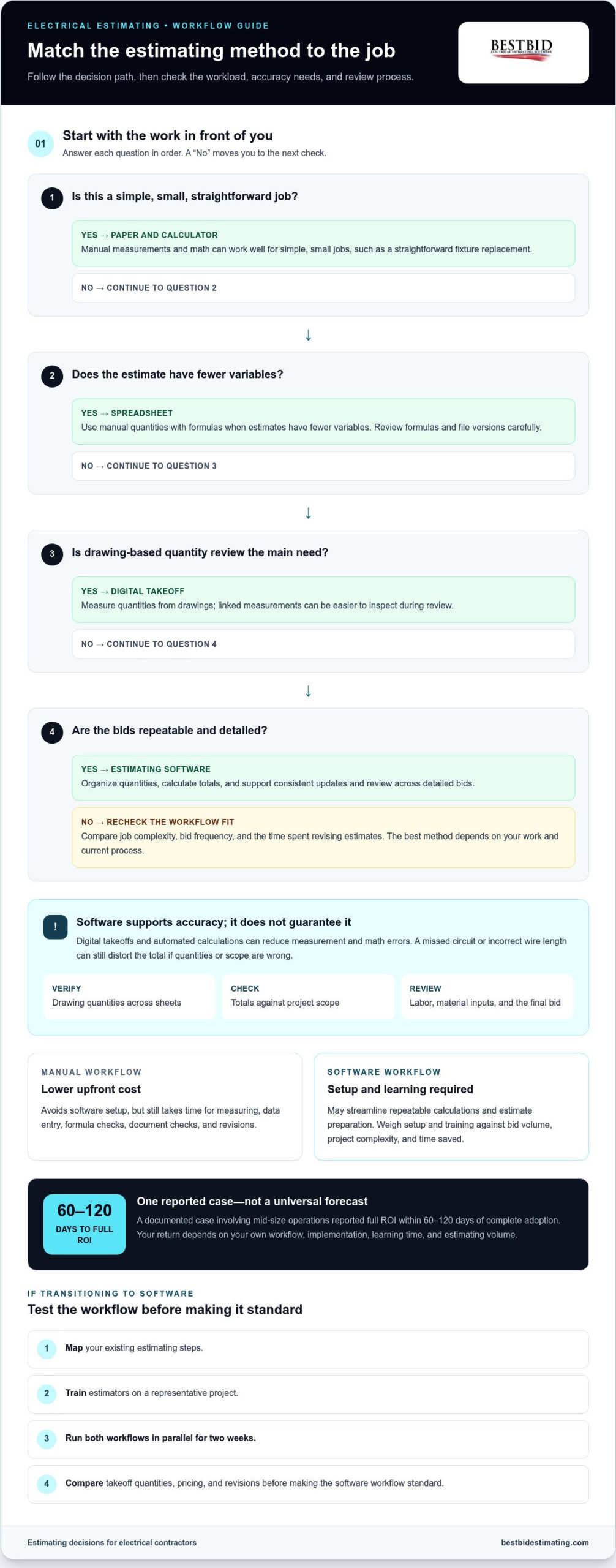
Estimating software can improve consistency and reduce calculation errors, but it cannot guarantee an accurate bid on its own. Accuracy depends on correct drawing measurements, complete scope, and realistic labor and material inputs. A missed circuit or incorrect wire length, for example, can still distort a software-generated total.
Manual estimating often involves measuring paper plans with scales and rulers, counting components, then calculating with a calculator or spreadsheet. This hands-on workflow can work well for a simple fixture replacement. On a larger commercial electrical job, repeated measuring and data entry take longer, while revisions may mean remeasuring and recalculating quantities.
Traditional digital estimating may still rely on manual measuring, counting, and spreadsheet entry. Digital files are easier to share, but separate versions and handoffs can introduce inconsistencies. A more streamlined process connects takeoff measurements to the drawings, then organizes quantities before pricing. This gives the estimator a chance to catch missing items before they affect the bid.
| Estimating option | Measurement and calculation | Revision and review | Best fit |
|---|---|---|---|
| Paper and calculator | Manual measurements and math | Remeasure affected areas | Simple, small jobs |
| Spreadsheet | Manual quantities with formulas | Formula and version checks | Estimates with fewer variables |
| Digital takeoff | Measures quantities from drawings | Linked measurements are easier to inspect | Drawing-based quantity review |
| Estimating software | Organizes quantities and calculates totals | Supports consistent updates and review | Repeatable, detailed bids |
Compare job complexity, bid frequency, and the time spent revising estimates. Don’t assume every digital tool works the same way.
What security, privacy, and compliance requirements should estimating software meet? Before adopting a system, review its documented access controls, data handling, retention, and export practices. Identify which customer and pricing records need restricted access, then match the system’s safeguards to your business obligations.
How do you transition from manual estimating to estimating software? Map your existing steps, train estimators on a representative project, and run both workflows in parallel for two weeks. Compare takeoff quantities, pricing, and revisions before making the software workflow standard.
What features should estimating software include? Look for drawing-based takeoff, organized quantities, calculation tools, estimate reports, and ways to review revisions. For electrical work, on-screen takeoff and conduit and wire length calculations can support the measurement process.
What data and processes should be prepared before adopting estimating software? Gather current labor and material pricing, labor productivity assumptions, waste factors, and indirect costs. Define how estimators name, review, and approve bid versions so the new workflow follows consistent steps.
How do you migrate existing estimates, pricing, and customer data into estimating software? Sort records by project type, remove outdated entries, and transfer usable estimate and pricing data into consistent fields. Test a completed estimate against its original drawings, then review customer records and access permissions before broader use.
For drawing-based quantity work, electrical estimating software can connect takeoff measurements with the estimating workflow. Keep the estimator in control: verify drawing quantities across sheets, check totals against project scope, and review the final bid before it goes out.
Estimating software costs and return on investment
Compare the full cost of each workflow, not just the software. For an electrical contractor, the key question is whether time saved and better bid control offset setup, training, and ongoing estimating effort.
Software Costs and Potential Savings
Software adds implementation and learning costs, then can streamline repeatable calculations and estimate preparation. Its return depends on how often your team bids and how much time each estimate consumes. A documented case involving mid-size operations reported full ROI within 60-120 days of complete adoption. Treat that as one case, not a forecast for every contractor.
Manual Estimating Costs and Inefficiencies
Manual methods avoid software setup, but still require time for measuring, spreadsheet entry, formula checks, and bid revisions. A design change, for example, may require an estimator to update quantities and totals across several worksheets. That time matters, especially if it delays other bids or leaves less capacity to review scope and pricing.
Learning Curve and Software Costs
Training and setup affect the early economics of a software transition. During the learning period, estimators may work more slowly as they adapt templates, enter quantities, and check calculations. Set aside time to practise on a completed project, compare the output with the original estimate, and refine the workflow before relying on it for active bids.
Price each estimate consistently. First, measure quantities from drawings, then apply the relevant unit costs for labor and materials. Add project-specific waste factors and indirect costs where they apply.
Software can calculate totals from these inputs, but it cannot make incomplete quantities or unrealistic rates accurate. Review the assumptions behind every major cost category.
To estimate your own ROI, record the hours spent preparing and revising bids, then compare them with software costs, setup, and training. Include the value of bids your team can complete with the time recovered. One market recommendation points businesses sending 10-40 bids per month toward estimating software, but project complexity and workflow inefficiencies also affect the decision.
What are common risks and mistakes when switching to estimating software? Common mistakes include importing outdated rates, skipping training, and trusting calculated totals without reviewing scope. Test the process on a completed estimate, check quantities and unit costs, then follow the same review steps for new bids.
For a practical starting point, map your current estimating steps and identify where repeated entry or rework consumes time. Explore electrical estimating tools as you compare workflows and plan a transition that fits your bidding needs.
Team collaboration and file versioning
Estimating involves multiple handoffs: an estimator measures quantities, a project manager reviews scope, and field staff may flag job conditions. When updates sit in separate spreadsheets or email attachments, teams can lose track of which estimate reflects the project. A shared digital workflow gives everyone a clearer reference point.
Cloud-enabled estimating software can let estimators, project managers, and field teams view or update estimates in real time. Teams can also store takeoff and estimating files in the cloud, work remotely, and sync changes. This can reduce file handoffs between offices, but cloud-based tools rely on a stable internet connection.
Version confusion is a practical risk with shared Excel estimates. An estimator might revise conduit quantities in one copy while a project manager changes material costs in another. Combining these versions can introduce errors or leave the team reviewing outdated quantities. A common interface helps keep updates connected to the estimate under review.
Real-time collaboration is most useful when a change affects several parts of a bid. If revised drawings alter feeder routes, the estimator can update takeoff quantities while the project manager reviews scope implications. Field input can help clarify installation conditions. The team still needs an agreed review process so everyone understands changes before the estimate moves forward.
Set clear responsibilities before teams share active bids. Assign who enters quantities, reviews pricing, and approves revisions. Use consistent project names and file labels, and record the reason for each significant change. These practices make it easier to distinguish a drawing update from a pricing adjustment.
- Keep one working estimate: Store the current bid in the shared workflow rather than circulating multiple active copies.
- Make changes traceable: Note which scope item or quantity changed and why.
- Review together: Have the estimator and project manager compare the updated estimate with the latest drawings.
- Plan for connectivity: Confirm the team can access the cloud workflow where estimate updates are made.
Collaboration does not remove the estimator’s responsibility. Automated calculations can organize updates, but people must check whether quantities match the drawings and the scope is complete. A revised lighting plan, for example, should prompt a review of fixture counts and related wiring, not just a quick update to one total.
For electrical contractors, the right collaboration setup depends on project complexity, team roles, and how often drawings change. A shared workflow can make remote review and synchronized updates easier; a defined approval step helps ensure the final estimate reflects actual project requirements.
Can estimating software replace an experienced estimator?
No. Estimating software can speed up repetitive calculations and bid preparation, but an experienced estimator still interprets drawings, checks scope, and owns the final review. In electrical work, software can help count items across drawing sheets; it cannot judge whether the estimate reflects the project requirements.
Turnaround time can improve when a digital workflow reduces repeated entry and calculation. One ROI case study reported that moving estimates online reduced quote turnaround from 24 hours to 2 hours. That result illustrates a possible process improvement, not a guaranteed outcome for every contractor or bid.
Bid capacity depends on more than faster totals. Estimators still need time to read drawings, resolve scope questions, select labor and material assumptions, and review revisions. Software can organize repetitive work through templates, but an incomplete template can repeat the same omission across projects. Review templates against each job before using them.
A practical division of work keeps the estimator responsible for judgment while software handles structured tasks:
- Prepare: Organize the latest drawing sheets and identify the estimate scope.
- Measure: Record quantities and check them against related drawings.
- Calculate: Apply the project’s labor and material assumptions consistently.
- Review: Confirm scope, pricing, and final approval before sending the bid.
Accuracy still depends on the inputs. If a feeder route changes between drawing revisions, the estimator must recognize the change and update the quantities. Automated calculations can then recalculate affected totals. A software result that looks precise can still be wrong if someone missed a scope item, labor assumption, or material quantity.
Protect profit by using saved time for review, not simply adding more bids to the queue. After software calculates a lighting package, for example, an estimator can compare fixture quantities with the lighting plan and check related wiring assumptions. That review catches gaps before they shape the bid.
Experienced estimators also bring project knowledge that templates cannot fully capture. They recognize unusual access conditions, incomplete drawings, and scope boundaries that need careful treatment. Software supports their work by organizing information and reducing repetitive tasks; it does not replace the person who decides whether an estimate makes sense.
Expand estimating capacity with software only after the team has a reliable review process. Track quote turnaround, corrections, and missed scope items across actual projects. These measures show whether the workflow is improving, while estimator oversight keeps speed connected to accuracy.
Manual versus software-based estimating
For electrical contractors moving from manual estimating to software, the choice comes down to project complexity, bid frequency, and the work involved in preparing reliable quotes. Compare how each approach handles takeoff, pricing, revisions, and review before deciding what belongs in your workflow.
How does software estimating compare with spreadsheets and manual estimates? Manual estimates rely on hand measurements and calculations, while spreadsheets organize entered quantities and formulas. Estimating software can automate takeoffs and calculations, but every method still depends on complete scope and accurate inputs.
Manual Estimates
A manual estimate starts with drawing review, measured quantities, and labor and material calculations. For a small fixture swap, a contractor might count items from plans and work out costs without setting up a digital takeoff. That can be direct and familiar, but revisions may mean remeasuring affected areas and updating totals by hand.
Spreadsheets add formulas and organized cost categories, but estimators still enter quantities and maintain calculations. A changed drawing can leave a copied value or separate file out of sync. Manual methods may suit simple work or infrequent bids, but detailed commercial takeoffs require more tracking across components and cost categories.
Software-Based Estimates
Software-based estimates organize measured quantities, apply unit costs, and generate totals or reports. Digital takeoff tools can calculate quantities from project plans, while electrical estimating software can support labor and material cost breakdowns. These steps can make repeatable bids more consistent, but estimators must still verify scope and inputs.
When drawings change, digital quantities can be updated and reviewed against the plans instead of rebuilding every calculation. Stored estimates can also inform future bids for similar project types. Moving from manual estimating to software changes how quickly a contractor can revise and reuse information; it does not determine the labor assumptions or materials in a quote.
Use this decision guide:
- Choose manual methods for straightforward jobs, such as a small outlet replacement, or infrequent bids where setup outweighs the task.
- Choose spreadsheets when estimates have few variables and formulas can be reviewed consistently.
- Choose estimating software when recurring takeoffs, frequent revisions, and repeatable project types make manual entry a bottleneck. One recommendation points businesses submitting more than 10 bids per month toward software, while manual estimating can work below that level.
Bid volume is only one factor. Compare project complexity, how often drawings change, and the time spent correcting mistakes. A contractor handling custom scopes may value hands-on flexibility, while repeatable quotes may benefit more from standardized calculations. Moving from manual estimating to software makes sense when those workflow demands justify the transition.
For electrical contractors weighing a digital option, explore electrical estimating software options and compare the workflow with your current takeoff and quote process.
Best Bid: Best Bid Next Generation
Best Bid Next Generation gives electrical contractors a dedicated workflow for moving takeoff and bid preparation beyond manual calculations. Best Bid software includes on-screen takeoff, automatic conduit and wire length calculations, and tools for creating detailed project bids.
It may suit contractors who regularly estimate electrical projects and want to organize quantities and bid details in one workflow. Best Bid uses a one-time purchase model with lifetime updates and support, rather than recurring subscription fees. The estimator still reviews drawings, confirms scope, and checks pricing before submitting each bid.
If you’re ready to compare your current process with a software-based approach, visit Best Bid’s website to learn more.
Make your next estimate the start of a better workflow
The best time to improve your estimating process is before another rushed bid exposes the same bottleneck. Choose a representative upcoming project and define what a better workflow should deliver: clear ownership of each review step, dependable records, and enough time for considered decisions. This gives your team a practical way to judge whether moving from manual estimating to software supports how your electrical business bids.
Keep the goal grounded in your operation. A tool should support the estimator’s judgment and help the team work with greater clarity, not add complexity for its own sake. As you plan the next step, consider the electrical projects you estimate and the process your team wants to improve first.
Best Bid serves electrical contractors with estimating tools designed for electrical work. Contact Best Bid to discuss estimating and consider which workflow may fit your next project. A thoughtful change can make the work ahead feel more manageable.
Frequently Asked Questions
Is estimating software worth it for small contractors?
It can be, especially when recurring estimates take time away from reviewing plans or managing jobs. A small electrical contractor handling similar service upgrades, tenant improvements, or lighting projects may benefit from reusable estimate structures. For occasional, simple work, manual methods may remain efficient. Compare the time and rework involved in actual bids with the setup and training a new tool requires.
What are the biggest drawbacks of manual estimating?
The main drawbacks are repeated data entry, slower revisions, and greater reliance on individual checks. A spreadsheet, for example, may contain a copied formula that no longer matches a revised quantity. Manual files can also make past project information harder to reuse consistently. These issues matter most when estimates have many components, multiple reviewers, or frequent drawing changes.
So, what’s better: manual estimating or software?
Neither method suits every contractor. Manual estimating can make sense for straightforward work and infrequent bids, while software can help organize repeatable estimates and reduce repetitive calculations. Decide by reviewing the projects you bid, how often scope changes, and where your current process loses time. Keep estimator review central whichever method you choose.
Do you need manual takeoff skills if you’re planning to use software anyway?
Yes. Manual takeoff skills help estimators understand how quantities relate to drawings and identify omissions in digital results. Knowing how to trace a circuit path, for instance, helps you question a wire quantity that seems inconsistent with the plan. Software can assist with measurement, but users still need to recognize what belongs in scope and whether the output makes sense.
How much manual practice do beginners actually need before software makes sense?
Beginners are ready to use software when they can read basic plans, measure common items, and explain how they arrived at a quantity. Practise on representative drawings, then compare the manual count with the digital result. If the totals differ, trace the discrepancy back to the drawing or measurement method. The goal is sound judgment, not a fixed amount of practice.
Should you upgrade from Excel to construction estimating software?
Consider upgrading when spreadsheet work becomes difficult to review or maintain. Signs include repeated formula corrections, several active versions of the same bid, and difficulty reusing past project details. Before changing tools, list the spreadsheet steps your team depends on, such as labor extensions or material summaries. Then compare those needs with the software workflow and test a representative estimate.
How much does estimating software cost for small businesses?
Costs depend on the tool and the workflow. Relevant factors include licensing structure, number of users, functionality, setup, and training. For a small business, compare the full ownership cost with the time required to prepare and revise estimates. Also consider whether the tool includes the takeoff and reporting capabilities your workflow needs.
What are the best estimating software options for construction businesses?
The right option depends on your trade and estimating tasks. Electrical contractors can compare Best Bid Next Generation and Best Bid Hybrid Pro for electrical estimating, while Accura Cadd PDF Draw supports PDF drawing work. Best Bid Next Generation includes on-screen takeoff and conduit and wire length calculations. Review how each option fits your estimating workflow, drawing process, and team’s experience.