Automating Circuit Length Calculations for Estimators

What if automating circuit length calculations made takeoffs faster without turning routing assumptions into a black box? Measuring every run by hand across a large plan set takes time, but a calculated length is only useful when it reflects the route intended for the job. Estimators need a faster process and a clear way to check the result.
If you’ve questioned whether a takeoff includes the route you intended, look beyond the final quantity. Digital takeoff tools can calculate conduit and wire lengths from routes traced on plans, while you stay in control of how those routes are interpreted and reviewed.
This article explains how to set up circuit length takeoffs, identify assumptions that affect quantities, and review results before they reach a bid. It also compares manual measuring, standalone digital tools, and integrated estimating software. Best Bid electrical estimating software supports automatic conduit and wire length calculations, keeping estimator judgment at the center of the process. The goal is a repeatable workflow: trace, calculate, review, and carry checked quantities into your estimate.
Key Takeaways
- Automating circuit length calculations can streamline takeoffs, but reliable quantities still depend on clear routing assumptions and estimator review.
- Prepare drawings and verify their scale before measuring. Drawing quality, route interpretation, and project scope all shape the result.
- Compare manual measurement, standalone digital tools, and integrated estimating software to find a method that fits your takeoff workflow.
- Separate lengths measured directly from plans from allowances that require project-specific judgment, then document and check both.
- Built-in on-screen takeoff and automatic conduit and wire length calculations can connect measuring with electrical estimating.
Why Automate Circuit Length Calculations in Electrical Takeoffs?
Automated circuit length calculation uses digital takeoff tools to measure a route traced on an electrical plan and calculate its length using the drawing scale. It can make repeated measuring more consistent, but it doesn’t decide which route to trace. That depends on the estimator’s interpretation of the plans and project scope.
Think of automation as a way to apply a measurement method consistently, not as a substitute for interpreting the job. If two estimators trace a route differently, software can calculate each measurement while producing different quantities. Reliable takeoffs start with clear assumptions about where a circuit begins and ends, how it moves through the building, and which plan details define its path.
What does a circuit length calculation measure?
A circuit route is the distance traced across the drawings between defined points, following the path shown or assumed for the installation. That distance is not automatically the total wire footage, conduit quantity, or project material. For example, a measured pathway may carry multiple conductors, while wire quantities depend on conductor count and the project’s circuit requirements. Labor calculations involve additional estimating judgments.
Plan detail matters, too. A drawing may show a route clearly or leave portions open to interpretation. The electrical length described in electrical engineering relates a conductor’s physical length to signal wavelength. An estimating takeoff, by contrast, measures a physical route from construction drawings. Keep those meanings distinct and focus the quantity review on the installation shown and the scope being priced.
Where do manual circuit takeoffs become difficult?
Manual work gets harder as routes cross floors, continue between sheets, or repeat across similar circuits. The estimator must track endpoints, scale, and routing conventions while transferring measurements into the takeoff. Each step creates another opportunity for an assumption to shift, especially when several people measure the same plan set or revisit it at different stages of a bid.
Inconsistent assumptions can complicate review. One takeoff may include a route to a panel, while another stops at a junction point. A third may interpret an unclear corridor path differently.
The issue isn’t simply that a measurement was made by hand. Undocumented choices make it difficult to compare quantities and understand why they differ.
Automating circuit length calculations gives estimators a repeatable way to measure traced routes, but the output is only as useful as its inputs. Check the drawing scale and route, then separate measurable path length from conductor counts, pathway requirements, and allowances that depend on scope. Automation handles repeatable measurement while estimator judgment stays in charge of what the bid includes.
How Does Automated Circuit Length Measurement Work?
Automated measurement turns a route traced on a calibrated drawing into a plan-based length. The software calculates the distance represented by the traced path, but the estimator still decides which path reflects the intended installation and what belongs in the project scope.
Use a consistent sequence. If the drawing scale is wrong or route interpretation changes between circuits, the calculated output won’t be a dependable basis for review.
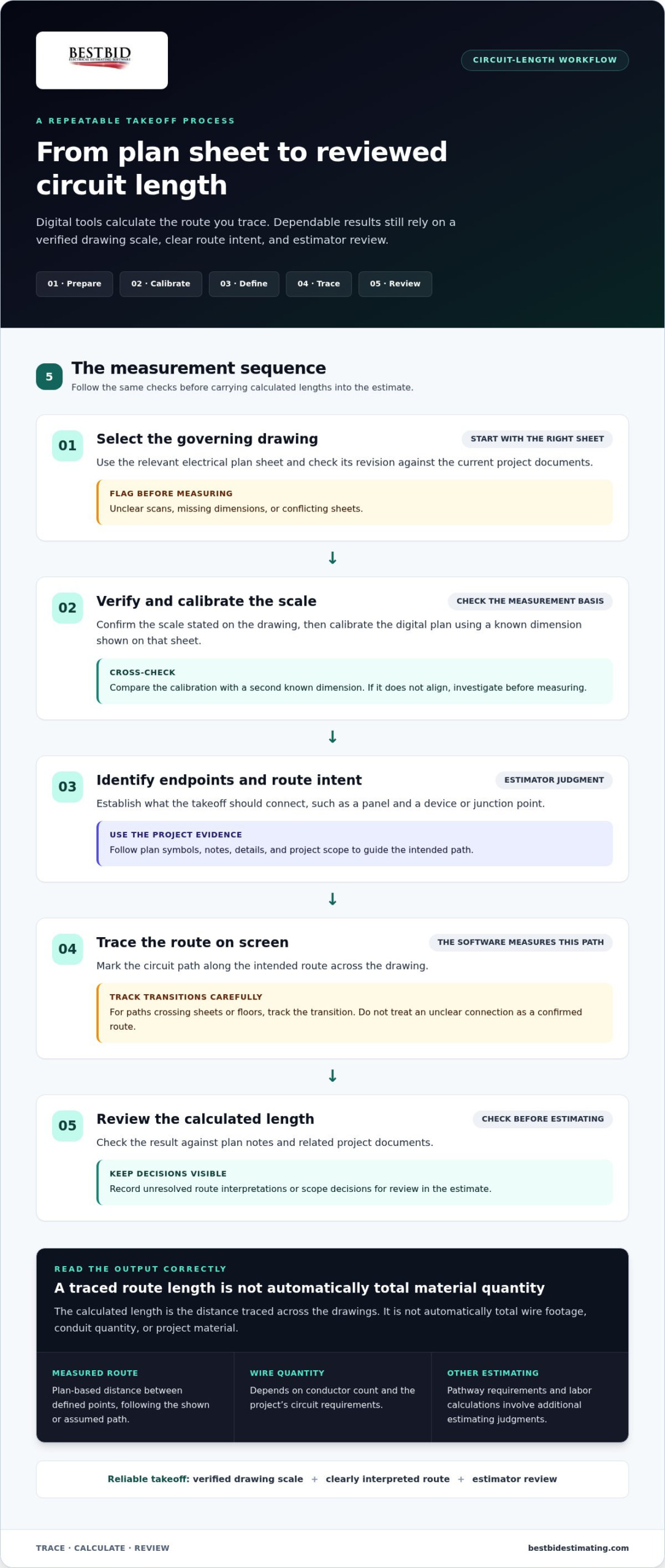
- Select the governing drawing. Use the relevant electrical plan sheet and check its revision against the current project documents. Note unclear scans, missing dimensions, or conflicting sheets before taking off routes.
- Verify and calibrate the scale. Confirm the scale stated on the drawing, then calibrate the digital plan using a known dimension shown on that sheet. If the calibration doesn’t align with a second known dimension, investigate before measuring.
- Identify circuit endpoints and route intent. Establish what the takeoff should connect, such as a panel and a device or junction point. Use plan symbols, notes, details, and project scope to guide the path.
- Trace the route on screen. Mark the circuit path along the intended route across the drawing. Where a path crosses sheets or floors, track the transition and avoid treating an unclear connection as a confirmed route.
- Review the calculated length. Check the result against plan notes and related project documents. Record unresolved route interpretations or scope decisions for review in the estimate.
Prepare and calibrate the electrical drawing
Calibration connects a drawing’s digital measurement to its stated or printed scale. If a plan dimension is labeled, use that known distance to set the scale before tracing a route. A revised sheet, distorted scan, or cropped detail can undermine that reference, so flag the issue rather than assuming the displayed plan is reliable.
Drawing quality affects how confidently you can follow symbols and route lines. If key dimensions are hard to read or sheets appear inconsistent, resolve what you can from the project documents and make any remaining uncertainty visible in your takeoff notes.
Trace routes and review calculated lengths
On-screen takeoff measures the path you draw, not every condition an installer may encounter. Review vertical transitions between floors, changes in route direction, and sections where the drawings don’t clearly show the intended pathway. Decide whether drops, offsets, or other project-specific allowances belong in the estimate instead of treating them as automatically measured plan distance.
Scope matters. A route may be shown only in part, or a drawing note may direct the work differently from the apparent line on the plan. Compare calculated lengths with relevant notes, schedules, and project documents, then separate the measured path from allowances requiring judgment. This makes the quantity easier to explain and revise if the drawings change.
For estimators building this process into a broader digital workflow, electrical estimating tools can bring plan takeoff closer to the estimating work that follows.
Manual, Digital, or Estimating Software: Which Method Fits Circuit Takeoffs?
The right method depends on the job and how your estimating work is organized. A small, straightforward area may be easy to measure manually. A standalone digital takeoff tool can make drawing-based measurement easier to repeat, while integrated electrical estimating software can keep takeoff quantities closer to the estimate. None removes the need to interpret the plans.
| Method | Repeatability | Review effort | Workflow handoffs | Estimator control |
|---|---|---|---|---|
| Manual measurement | Depends on a consistent method and documentation | Recheck the route and recorded figures | Measurements may need to be transferred into estimating records | Direct control over each measurement |
| Standalone digital takeoff | Supports repeated on-screen measuring when drawings and assumptions are consistent | Review calibration, traced routes, and output | Quantities may need to move into a separate estimating workflow | Estimator defines and checks the route |
| Integrated electrical estimating software | Connects takeoff and estimating steps within one workflow | Review measurements and estimating assumptions | Can reduce separate transfer steps | Estimator remains responsible for scope and interpretation |
These are workflow differences, not guarantees of accuracy or speed. A well-documented manual takeoff can be useful, and digital tools still depend on sound plan calibration and clear route assumptions. For a wider look at how estimating platforms fit into contractor workflows, explore this electrical estimating tools guide.
When is manual measurement still useful?
Manual checks have a place. An estimator might use them to verify a short route in a small equipment room, resolve an unusual path around a plan detail, or interpret a note that doesn’t clearly connect to the drawn circuit. Working through that area directly can help clarify what the drawing intends before quantities are carried forward.
Manual measurement isn’t inherently inaccurate or outdated. It simply requires a repeatable method and clear records, especially when several routes or sheets must be reconciled.
What changes with integrated digital takeoff?
On-screen takeoff lets an estimator measure directly on the drawing instead of recording every distance separately for later entry. With integrated electrical estimating software, measured information can sit closer to the estimating work that uses it. That may reduce handoffs, but it doesn’t remove review.
The estimator still checks the route, scope, and assumptions. Features differ across software, so compare the actual workflow rather than assuming every platform calculates the same quantities.
For automating circuit length calculations, consider where repeated work occurs and where information gets transferred. If the main challenge is a few ambiguous routes, keep manual review central. If measurements are repeated across plan sheets, digital takeoff can support a more consistent process. If takeoff and estimating are separate stages, an integrated workflow may help connect them. Choose the method that keeps assumptions visible and makes quantities straightforward to review.
How to Build a Reliable Circuit-Length Automation Workflow
A dependable workflow makes each measured length traceable, repeatable, and easier to review. Set the rules before takeoff begins, keep plan measurements separate from estimating allowances, and preserve enough context for another estimator to understand the quantity later.
- Confirm the drawing set. Identify the current electrical sheets and revisions that govern the takeoff. Check that the digital scale is calibrated to a known dimension, and flag unclear scans or conflicting information before measuring.
- Agree on route conventions. Decide how the team will trace paths, handle risers and floor changes, and connect routes that continue across sheets. Use the project drawings and specifications to define included scope rather than relying on an unstated team habit.
- Trace and classify each length. Measure the route shown or interpreted from the drawing. Record plan-measurable distance separately from drops, offsets, or other allowances that require project-specific judgment.
- Document the measurement basis. For each route or group of similar routes, note the drawing sheet, scale, endpoints, route basis, and any unresolved interpretation questions. Add relevant assumptions so the quantity can be reviewed without reconstructing the original takeoff.
- Review before estimating. Compare representative routes with the source sheets and project notes. Recheck affected measurements whenever a drawing revision, scale change, or scope clarification changes the basis of the takeoff.
Set consistent measurement rules before takeoff
Keep the rules practical and specific. For example, define whether a route follows the pathway drawn on the plan or an interpreted path where the drawing is incomplete. Clarify how risers and transitions between sheets are recorded, and identify which project-specific allowances are added outside the measured route. Applying the same conventions across similar circuits makes differences easier to spot and explain.
Separate what the drawing supports from what the estimate assumes. A traced plan route is a measured quantity; an allowance for an unclear transition is a judgment call. Record them separately instead of blending them into one unexplained length.
Check outputs before quantities enter the bid
Review a selection of routes against their original sheets, including routes that cross floors or continue between drawings. Confirm the scale and trace, then compare the result with relevant notes and specifications. If a sheet is revised, identify which affected routes need to be measured again rather than carrying forward a quantity tied to an outdated plan.
A measured quantity should retain its drawing and assumption context so reviewers can understand what it includes and revise it when the plans or scope change. Keep unresolved questions visible for coordinated estimating review. Don’t let an uncertain interpretation appear as a settled plan measurement.
Make this reviewable process part of your estimating workflow with electrical estimating software that brings on-screen takeoff and estimating closer together.
How Best Bid Supports Automated Circuit Length Takeoffs
Once the workflow is clear, the next question is how to keep measuring connected to the estimate. Best Bid electrical estimating software includes built-in on-screen takeoff, direct screen-based measuring, and automatic conduit and wire length calculations. Trace routes on the plans, and the software calculates lengths from those paths. The result supports the takeoff, while decisions about drawing interpretation, scope, and allowances remain with the estimator.
Keep takeoff and estimating work connected
Measuring directly on the electrical drawing can avoid a separate sequence of recording route distances by hand and transferring them into another estimating step. Keeping takeoff within electrical estimating software connects the plan-based quantity to the broader bid workflow. It also makes it easier to see where a calculated length came from and review it alongside the estimate.
Automation doesn’t make an unclear plan clear. A route still needs to be traced using the correct scale and a consistent interpretation of the drawings. Review the measured path against relevant notes and scope, and account for project-specific allowances separately. That’s how automating circuit length calculations can support a controlled takeoff without suggesting that software makes every estimating decision.
The electrical estimating software overview describes Best Bid’s broader estimating tools, including its integrated takeoff capabilities. Consider how direct measuring and calculated conduit and wire lengths fit into the way your team reviews quantities and prepares bids.
Apply field experience to software decisions
Best Bid’s practical approach is grounded in founder Steve Griffin’s trade background. He entered the electrical trade in 1973 and brings more than 50 years of trade and estimating experience. That experience informs software built around electrical estimating: drawings provide measured information, but estimator knowledge is still needed to interpret routes and judge what belongs in the bid.
That balance matters in day-to-day use. A calculated route can provide a consistent measurement basis, while the estimator checks whether the traced path reflects the project documents. If a drawing leaves a transition open to interpretation, note the assumption rather than treating the software’s output as a decision about scope. Clear review keeps the estimator in control of the quantity that moves forward.
Ownership matters, too. Best Bid software licenses are purchased once and include lifetime updates and support, with no recurring subscription fees. That’s a straightforward ownership model for estimators considering how takeoff software will fit into their ongoing workflow. It doesn’t replace review of the measurement itself.
If you’re ready to connect on-screen takeoff with electrical estimating, explore Best Bid and see how its tools fit your bid workflow.
Make Your Next Takeoff a Better Starting Point
Your next bid is an opportunity to turn a useful measurement approach into a team habit. Choose an upcoming plan set and note where manual steps slow the work, where assumptions need clearer documentation, and how reviewers prefer to trace quantities back to the drawings. Use those observations to refine your estimating process around what your team needs.
The goal of automating circuit length calculations isn’t to remove estimator judgment. It’s to give that judgment a more consistent foundation, so your team can spend less effort repeating routine steps and more attention on the decisions that shape a sound bid. Start with a workflow your estimators can understand, review, and carry forward from project to project.
Ready to connect on-screen takeoff with your estimating process? Explore Best Bid electrical estimating software and see how its tools can fit into your takeoff workflow.
Frequently Asked Questions
Can software automatically calculate electrical circuit lengths from a plan?
Yes. Electrical estimating software can measure a route traced on a calibrated digital drawing and calculate its plan-based length. The result depends on the drawing scale, how the route is interpreted, and what the estimate includes.
For example, two traced paths may differ if one follows a corridor and another assumes a direct path. Before quantities enter a bid, compare representative results with the source plans and record the assumptions behind them.
How do I make sure an automated circuit length calculation is accurate?
Start with the correct drawing revision and verify the scale against a known dimension. Trace routes in line with project documents, and flag unclear transitions instead of silently choosing a path. Check a sample of routes against the original sheets, including one with a change in direction or floor. Preserve the sheet reference and measurement basis so another estimator can see what the calculated length includes and review it consistently.
What information do I need before automating circuit length takeoffs?
Gather the current electrical drawings, a verified scale for each sheet, relevant project specifications, and enough circuit information to interpret the intended route. Check revision dates and identify where endpoints or transitions are unclear. For example, a plan may show a device location but leave the pathway to a junction point open to interpretation. Record that uncertainty and keep it separate from measured length until the scope is resolved.
Does circuit length automation calculate wire and conduit quantities too?
Sometimes, depending on the software and the information entered. Route length measures the path, while wire quantity can also depend on conductor count and circuit details. Conduit quantity relates to the pathway included in the project scope.
Before using calculated values in a bid, confirm what the tool is measuring and how its quantity is derived. Label route length, wire quantity, and conduit quantity separately in your takeoff records.
Can I automate circuit lengths from scanned or revised electrical drawings?
A scanned plan can be used if its dimensions and route details are clear enough to calibrate and read. A blurry scan, altered page size, or changed scale can affect the measurement basis. For revised drawings, confirm which sheets govern the estimate and compare them with the prior set. If a revision moves a panel or changes a pathway, recalibrate if needed and recheck the routes affected by that change.
Does automated takeoff replace an electrical estimator’s judgment?
No. Automation can help measure and organize drawing-based quantities, but the estimator still interprets scope, resolves unclear routing, and reviews project documents. For instance, software can calculate a traced route, but it can’t determine whether an incomplete drawing implies a particular field route.
Keep assumptions visible and review them before finalizing bid quantities. The tool supports a consistent measurement process; professional judgment remains essential to the estimate.
What is the difference between circuit length and wire length?
Circuit length is the measured route represented on the drawing, while wire length is the conductor quantity required for the circuit. Those figures can differ because a route may include multiple conductors, and project details influence the wire quantity. For example, a single traced path doesn’t by itself tell you how many conductors the circuit requires. Label each figure clearly in the takeoff so reviewers don’t mistake route distance for total wire footage.