2026 Guide: PDF Drawing Tools for Electricians

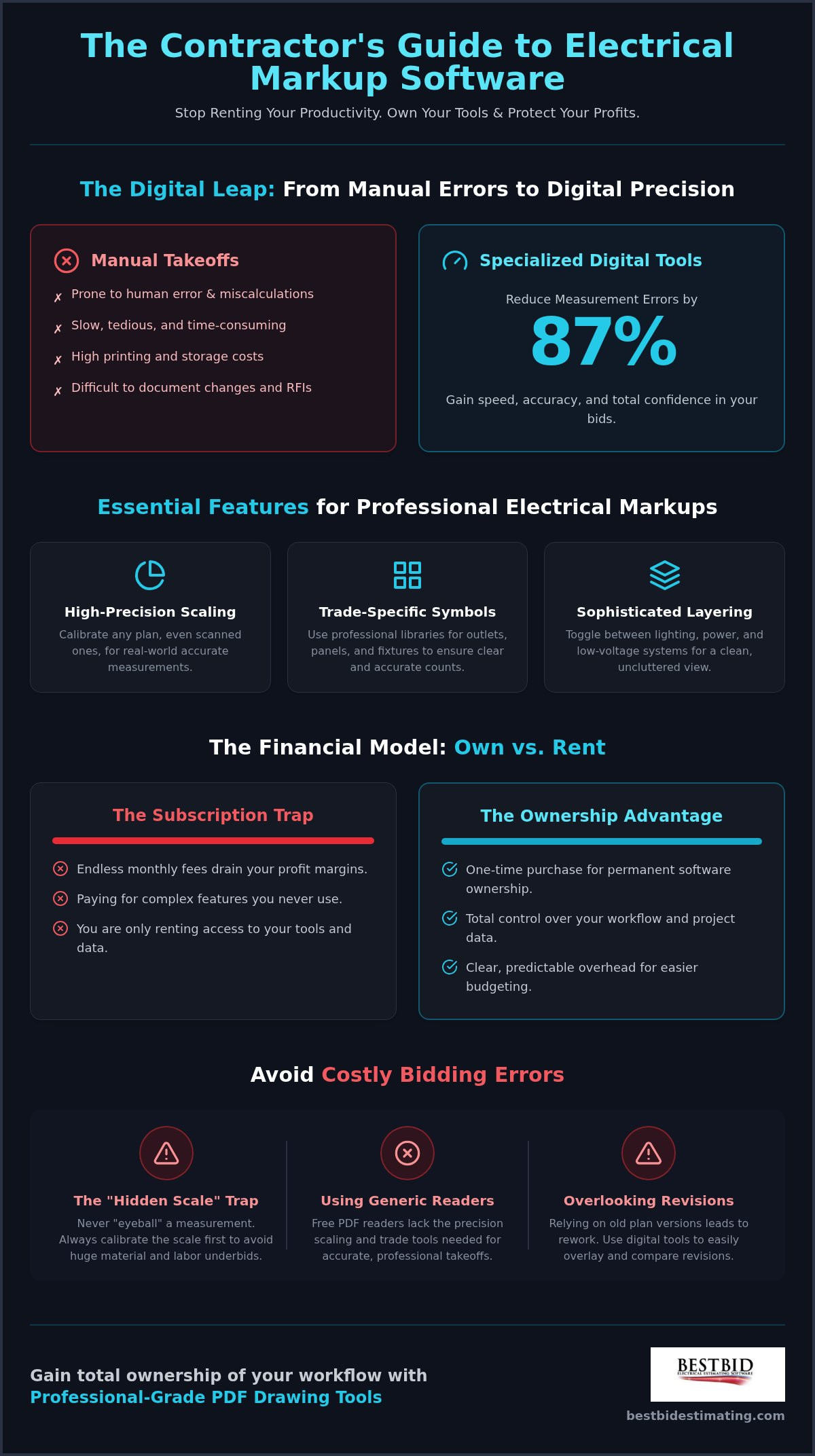
How much of your hard-earned profit is currently being swallowed by monthly subscription fees for software features you never even touch? For many contractors, the transition to digital tools has felt less like an upgrade and more like a recurring tax on their business. You already know that manual takeoffs are a recipe for disaster; in fact, digital tools can reduce measurement errors by as much as 87 percent. However, finding the right electrical markup software shouldn’t mean signing a lifelong lease on your own data.
We understand the frustration of paying for complex, generic editors when all you need is precision and speed. It’s time to stop renting your productivity. This 2026 guide will teach you how to leverage specialized PDF tools to create professional electrical drawings, improve your bid accuracy, and finally eliminate those recurring software fees.
We will walk through the latest industry standards, compare ownership models, and provide a clear path to faster bidding and total tool ownership. You’ll see exactly how to produce high-quality as-builts while keeping your overhead low and your profits where they belong.
Key Takeaways
- Stop wasting money on generic PDF editors and learn why specialized tools are essential for protecting your profit margins in a digital-first industry.
- Discover the essential features of professional electrical markup software, including high-precision scaling tools and trade-specific symbol libraries.
- Master a foolproof step-by-step process for calibrating your digital canvas to ensure every measurement on your plan is real-world accurate.
- Identify and avoid the most common bidding pitfalls, such as the “Hidden Scale” trap and overlooked plan revisions.
- Learn how to gain total ownership of your workflow with professional-grade tools that eliminate the burden of recurring monthly software fees.
Why Every Modern Electrician Needs Dedicated PDF Drawing Tools
Think of your blueprints as raw data. On their own, they are just lines on a page. Dedicated PDF drawing tools act as the essential bridge that turns those raw lines into an accurate, profitable bid.
If you are still dragging a scale ruler across a physical table, you are likely leaving money on that table too. Moving from paper to digital isn’t just about following a trend; it’s about protecting your margins. Manual methods are slow and prone to human error, whereas digital systems can slash measurement mistakes by as much as 87 percent.
It is that simple.
Beyond the bid, these tools are your best friend during project closeout. Creating professional as-built drawings shouldn’t be a weekend-long headache. With the right electrical markup software, you are documenting changes in real-time as the project evolves. This level of clarity makes life easier for your field crews and keeps inspectors happy. When everyone sees exactly where a run was moved or where a junction box was added, the friction disappears and the project moves forward.
The Financial Impact of Digital Documentation
Printing costs are an invisible drain on your bank account. For a typical 100-sheet commercial plan, the price of physical sets adds up fast. Digital tools eliminate this waste immediately.
They also revolutionize the RFI process. Instead of writing a long, confusing email about a conflict in the mechanical room, you can send a clear, visual annotation. This speed prevents delays that eat your profit.
Perhaps most importantly, timestamped digital markups protect you against scope creep. When a general contractor claims a change was part of the original plan, your digital trail provides the proof you need to get paid for your extra work.
Beyond Basic Readers: The Contractor Advantage
You might think a free PDF reader is “good enough.” It isn’t. Generic readers fail because they aren’t built for the field. They can’t handle high-precision scaling or calibration, which means your measurements will always be a guess. While engineers might use a comprehensive list of electronic design software for original circuit design, a contractor needs something specifically tuned for plan markups and takeoffs. You need tools designed by people who have actually stood on a job site.
Specialized electrical markup software allows for sophisticated layer management. You can toggle between lighting, power, and low-voltage systems without cluttering your view. It also provides high-resolution electrical symbols that look professional to your clients. You aren’t just drawing lines; you are building a digital twin of the project. This ensures every wire and fixture is accounted for before the first hole is drilled, giving you total confidence in your numbers.
Key Features to Look for in Electrical PDF Markup Software
Choosing the right electrical markup software is about more than just finding a digital pen. It’s about securing a tool that works as hard as you do without demanding a monthly tribute. Many contractors fall into the subscription trap, paying forever for features they only use once a month. Real efficiency comes from a one-time purchase model that gives you total ownership of your software and your data. This transparency allows you to budget your overhead with total clarity. Beyond the price tag, you need a tool that handles the specific language of our trade: high-precision scaling, linear wire run measurements, and conduit lengths.
Accuracy isn’t a suggestion; it’s the foundation of your bid. You need software that allows for granular calibration, especially when dealing with scanned plans or those without a clear scale. Using digital tools that provide electrical-specific symbol libraries for outlets, panels, and fixtures ensures your markups look professional and your counts are dead-on every time. If you’re ready to move away from generic editors, Accura Cadd PDF Draw offers the professional precision you need without the recurring fees.
Calibration and Scaling Essentials
Scale calibration is the first step in any digital takeoff. Without it, you’re essentially guessing. Eyeballing a measurement on a PDF might seem fast, but it’s the quickest way to underbid a project and eat a loss on materials. Precision is also a matter of compliance. Inaccurate conduit runs can lead to layout issues that conflict with critical safety standards, causing failed inspections and expensive rework. Look for tools that allow you to set a custom scale based on a known measurement, such as a doorway or a column line, to ensure every subsequent click is grounded in reality.
Annotation and Symbol Management
Efficiency in the office translates to speed in the field. Your electrical markup software should allow you to create custom tool chests for the components you use every day. Instead of hunting through menus, you can simply drag and drop your standard symbols onto the plan. Color-coding is your best friend here. By assigning different colors to power, lighting, and low-voltage systems, you make the plans readable for your crew at a glance. Consider these essential annotation habits:
- Clouding: Use cloud shapes to highlight revisions or areas that require an RFI.
- Legend Creation: Automatically generate a legend so field teams know exactly what your symbols mean.
- Layering: Keep your markups organized so you can toggle visibility between different electrical systems.
These features turn a simple PDF into a living document. When you use professional-grade tools, you aren’t just marking up a plan; you’re creating a roadmap for a successful, profitable installation.
Step-by-Step: How to Accurately Mark Up Electrical Plans
Real-world accuracy isn’t an accident. It’s the result of a disciplined workflow. When you transition from paper to digital, the goal is to create a repeatable process that saves time without sacrificing precision. Importing your files into your electrical markup software is just the beginning. You need a solid foundation before you ever place a single symbol. This starts with organizing your project folders so you aren’t hunting for revisions or RFI responses in the middle of a takeoff.
Phase 1: Preparation and Calibration
Start by importing your PDF drawings and checking for resolution issues. If the plan is blurry, your measurements will be too. Once the file is open, find a known dimension to verify the scale.
A standard doorway or a column-to-column measurement works best. Calibrate your digital canvas based on this real-world distance. Locking the background layer is your next priority.
This prevents the frustration of seeing your entire markup shift two inches to the left because of one misplaced click. It ensures your work stays exactly where you put it.
Phase 2: Adding Symbols and Runs
Now, you can execute the markup using your standardized tool chest. Place your device counts first. Whether you are counting outlets, panels, or fixtures, using professional electrical markup software makes this process seamless. After the counts are in, draw your conduit paths. This isn’t just for show; it allows the software to calculate total wire lengths based on your calibration. Add text callouts for specific circuiting or unique installation notes. As highlighted by Electrical Contractor Magazine, maintaining a standardized approach to documentation is a core business best practice that ensures your field crew understands your intent perfectly.
Phase 3: Review and Export
Never send a bid without a final review. Use the markups list to verify every item has been accounted for. This list acts as a digital inventory of your project.
If something looks off, you can click the item in the list to jump straight to that point on the plan. Once you are satisfied, flatten the PDF. Flattening “bakes” your symbols and annotations into the document, ensuring they remain visible and unmovable on any device, whether it’s a desktop in the office or a tablet on the job site.
Finally, export the document for submission or share it through your project management portal. You now have a professional, accurate as-built that is ready for the field.
Avoiding the Mistakes That Lead to Costly Bidding Errors
Profit isn’t just about winning the job; it’s about keeping the money you’ve earned. Even the most sophisticated electrical markup software can’t save you if you fall into common bidding traps. One of the most dangerous is the “Hidden Scale” trap. Just because page one of a set is scaled at 1/8 inch doesn’t mean the enlarged mechanical room on page twenty follows suit. Checking every single page for scale changes is a non-negotiable step. If you miss a change, you aren’t just off by a few feet; you’re potentially underestimating your material and labor by hundreds of percent.
Another silent profit killer is overlooking revisions. When a general contractor sends a “minor” update, comparing the new version to your old markup manually is a recipe for disaster. You need a way to overlay drawings to spot what changed instantly. Generic electrical markup software that lacks a direct link to your estimating database forces you to double-check every entry, which wastes hours of time. This disconnect creates a massive opening for errors, especially when you ignore labor factors for complex conduit runs. A hundred feet of pipe in an open warehouse doesn’t cost the same to install as a hundred feet in a crowded hospital ceiling.
The Problem with Manual Data Re-entry
Transferring numbers from a PDF markup to a spreadsheet is where many bids go to die. Every time you “fat-finger” a quantity or miss a decimal point, your accuracy takes a hit. This is why many contractors are moving toward electrical estimating tools that integrate PDF markups directly into the workflow. By reducing the “clicks per bid,” you don’t just work faster; you work safer. You eliminate the need for manual re-entry, which naturally increases your winning percentage by ensuring your bids are grounded in precise, verified data.
Software Overcomplication
We’ve all seen software that looks like it requires a degree in computer science to operate. Feature bloat slows you down and creates a steep learning curve that most busy contractors can’t afford. You need a system with a low-to-medium learning curve that focuses on the practicalities of the trade. A reliable tool should offer 1-click backups for your digital project files, ensuring your hard work is never lost to a system crash or a corrupted file. If you want to see how a streamlined, trade-specific system can transform your bidding, check out Best Bid Next Generation for an all-in-one takeoff and estimating solution.
Transitioning to Professional-Grade Tools with Best Bid
We’ve spent this guide talking about the pitfalls of generic tools and the “hidden scale” traps that eat your profit. Now, it’s time to talk about the solution. Best Bid doesn’t just provide software; we provide a way to reclaim your time and your bottom line. Accura Cadd PDF Draw is our answer for contractors who need a professional electrical markup software that doesn’t require a CAD degree. It’s built for the way you actually work, focusing on the specific symbols and measurements that matter to an electrician in the field.
If you’re looking to bridge the gap between your markups and your final bid, Best Bid Next Generation takes it a step further. It combines high-precision PDF takeoff with our industry-leading estimating engine. This eliminates the data re-entry errors we discussed in the previous section.
You move from marking up a circuit to seeing its cost in a single, unified workflow. It is a seamless transition from a digital drawing to a professional bid that you can submit with total confidence.
Why One-Time Licensing Wins for Small Contractors
Renting your tools is a losing game. When you calculate the long-term ROI of owning your software, the numbers are clear. Subscription fees might look small on a monthly statement, but over five or ten years, they become a massive, unnecessary overhead. We believe in total ownership. You buy the tool, you own the tool. This includes access to updates and support without the stress of a recurring bill hitting your credit card every month. You can see the full breakdown of this ownership model on our pricing page to see how much you’ll save over time.
Field-Tested Reliability
Our software wasn’t built by corporate developers who have never held a pair of linesman pliers. It was designed by Steve Griffin, a Master Electrician with over 50 years of field experience. This “trenches-first” philosophy is why our electrical markup software feels intuitive from the first click. For those truly complex projects that require more than just a standard takeoff, our electrical shop drawing services provide the professional drafting support you need to stay on schedule and under budget.
Transitioning to a new system can feel daunting, but you aren’t alone. We offer specialized training through the Online School for Electrical Estimating to ensure you hit the ground running. It’s time to join the thousands of contractors who have ditched the subscription model in favor of a fair, transparent, and powerful system. You deserve tools that work for you, not tools that you work to pay for every month.
Take Charge of Your Bidding Future
Transitioning to a digital workflow shouldn’t feel like a recurring burden on your bank account. You’ve seen how the right electrical markup software can eliminate measurement errors and significantly speed up your bidding process. By moving away from manual takeoffs and generic editors, you’re choosing a future defined by precision and professional as-builts. It’s about more than just drawing lines; it’s about protecting your profit margins and owning your data.
It’s time to stop paying a subscription tax on your business growth. With Best Bid, you get a 5-star rated workflow speed and built-in On-Screen Takeoff with no monthly fees, ever. We believe you should own your tools for life, not rent them from a corporation that doesn’t understand the trade. Your expertise deserves a system that matches your hard work and provides total financial clarity.
Stop renting your software-own your electrical tools today!
Your next winning bid is just a few clicks away. We’re here to help you make the switch and secure the long-term success of your business. Let’s get to work.
Common Questions About Electrical PDF Drawing Tools
What is the best PDF drawing tool for electricians on a budget?
Accura Cadd PDF Draw is the top choice for those watching their bottom line. It provides professional precision without the recurring “subscription tax” that drains your profits every month. You get a permanent license for a one-time cost, giving you total ownership of your tools from day one.
Can I use a regular PDF editor for electrical takeoffs?
While you can technically use a generic editor, it is rarely a good idea for professional bidding. Standard editors lack the high-precision calibration and trade-specific symbol libraries found in dedicated electrical markup software. This often leads to “eyeballed” measurements that result in underbidding and lost revenue.
How do I scale an electrical drawing on a PDF?
Scaling starts with the calibration tool. You find a known dimension on the plan, such as a standard 36 inch doorway or a column line measurement, and tell the software exactly what that distance represents. This ensures every subsequent click and line you draw is real-world accurate.
Do I need CAD experience to use electrical markup software?
You don’t need any CAD experience to master these tools. We’ve designed electrical markup software like Accura Cadd PDF Draw to be intuitive for the person who actually works in the field. It replaces complex engineering jargon with practical, trade-standard symbols and straightforward measurement tools that any electrician can pick up quickly.
What is the difference between a PDF reader and a PDF markup tool?
A PDF reader is simply for viewing a document; a markup tool is for interacting with it. For your business, a markup tool is the difference between just looking at a blueprint and actually building a bid. It allows you to place symbols, measure lengths, and track counts directly on the digital page.
How do I calculate wire lengths from a PDF plan?
After you’ve calibrated the drawing, use a linear measurement tool to trace the path of your conduit or wire runs. The software automatically calculates the total distance based on the scale you’ve set. This eliminates the guesswork and helps you order exactly what you need for the job.
Is there electrical estimating software with no monthly fees?
Yes, Best Bid Next Generation and Best Bid Hybrid Pro are built on a “buy it and own it” philosophy. We never charge monthly fees. This model provides financial clarity for your business, as you aren’t stuck paying a lifelong lease on your own estimating data.
Can I create as-built drawings with PDF tools?
Creating as-built drawings is one of the best uses for this technology. You can mark up changes in real-time as the project progresses and then flatten the PDF to lock those changes in place. This provides a professional, clean document for project closeout that inspectors and clients will appreciate.




 Electrical contractor reviewing project costs after winning a construction bid