Best Bid Next Generation Tutorial: Master Electrical Estimating in 2026
How much did your business pay in software “rent” last year just to keep your estimating department running? If you’re feeling the weight of subscription fatigue, it’s because you’ve been forced into a cycle of permanent overhead. This Best Bid Next Generation tutorial is designed for the contractor who is tired of corporate giants treating their profit margin like a personal piggy bank. You didn’t get into the trade to become a software expert or to pay for features you’ll never use. You deserve a tool that works as hard as you do, without a monthly bill that never goes away.
We agree that manual takeoff errors are the fastest way to kill a project before it even starts, and that high-end corporate software often comes with a learning curve that feels like a second job. In this guide, we’ll show you how to master a system that you own for life. You’ll learn how to use the built-in takeoff tools to eliminate third-party plugins, integrate real-time pricing, and produce professional bids in minutes rather than hours. We’re going to walk through the entire workflow, from your first PDF import to the final proposal, so you can stop renting and start owning your success.
Key Takeaways
- Understand the “Buy it and Own it” model that eliminates monthly subscription fees and keeps your overhead predictable.
- Follow this Best Bid Next Generation tutorial to master built-in digital takeoff features, removing the need for costly third-party OST software.
- Learn how to use “Assembly Morphing” to quickly customize standard parts, allowing you to build highly accurate estimates in record time.
- Discover how to integrate real-time material pricing to ensure your bids remain competitive and profitable in a shifting market.
- Explore resources like the Online School for Electrical Estimating to sharpen your skills or leverage freelance services during busy seasons.
Getting Started with Best Bid Next Generation: The Ownership Advantage
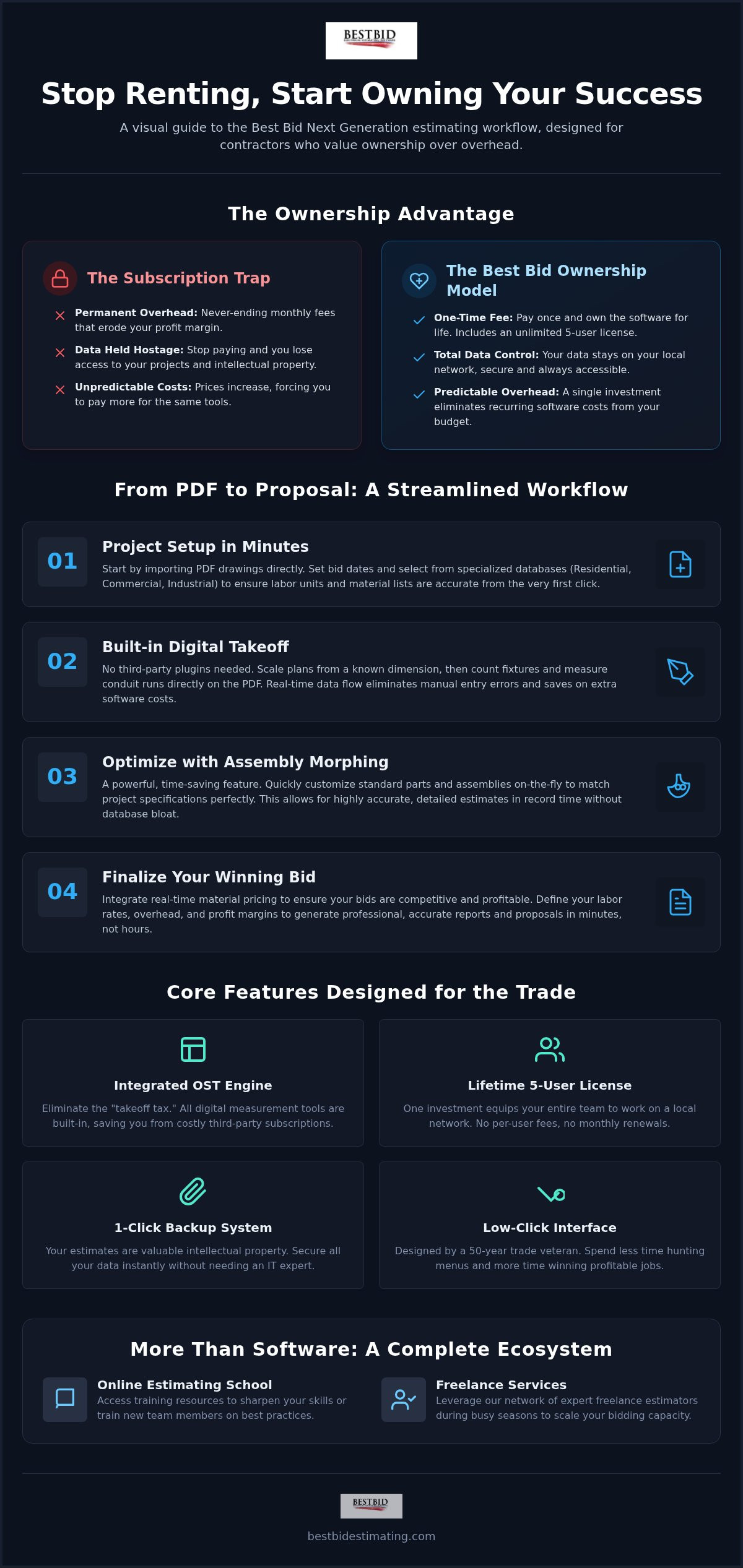
Software companies have spent years trying to convince you that renting your tools is a benefit. It’s not. When you subscribe to a service, you’re essentially paying a tax on your own productivity. This Best Bid Next Generation tutorial starts with the most important feature: total ownership. Most software today is a never-ending bill. You pay every month, and if you stop, you lose access to your data. We don’t believe in that. When you invest in Best Bid Next Generation, you get an unlimited 5-user license for a one-time fee. This reflects the philosophy of our founder, Steve Griffin. With over 50 years in the trade, Steve built this tool for the trenches. He knows that contractors need a system that is reliable, fast, and, most importantly, paid for. The interface focuses on low-click navigation, meaning you spend less time hunting through menus and more time winning jobs.
Navigating the Main Dashboard
The Project Manager screen is your command center. It organizes your bids in a clean, intuitive interface designed for people who hate wasting time on nested menus. You’ll want to start by setting up your company profile.
This section allows you to define your default labor rates, overhead, and profit margins. By establishing these defaults once, you ensure that every new estimate is consistent with your specific business costs. Don’t overlook the 1-Click backup system.
It provides instant data security, ensuring your intellectual property is safe without requiring you to be an IT expert. Activation is simple, and because the license covers five users, your entire team can get up and running on a local network without the burden of ongoing monthly costs.
Setting Up Your First Project
Creating your first bid follows a logical, step-by-step process. First, you name your project and set the critical bid dates to keep your calendar organized. Next, you’ll import your PDF drawings directly into the system.
There’s no need for expensive conversion tools or third-party plugins that complicate the workflow. Finally, you select your starting database. Whether you’re working on a small residential upgrade, a commercial fit-out, or a massive industrial complex, choosing the right database ensures your labor units and material lists are accurate from the jump.
This targeted approach prevents the database bloat that often slows down enterprise-level software. This setup takes minutes, moving you quickly into the actual work of estimating.
Mastering Digital Takeoff with Built-In OST
One of the biggest hidden costs in electrical estimating is the “takeoff tax.” Most platforms force you to buy a separate license for general-purpose digital measurement tools just to read your drawings. Best Bid Next Generation changes that by building the OST engine directly into the software. You don’t need a third-party plugin or a separate subscription to get the job done.
This integration means your takeoff data flows perfectly into your estimate without the risk of manual entry errors. When you own your tools, you stop worrying about whether your various software licenses are talking to each other or if a subscription renewal will block your access to a bid.
Accuracy depends on your scale. In this Best Bid Next Generation tutorial, we emphasize that precision starts the moment you open a PDF. You simply find a known dimension on the plan, like a door opening or a grid line, and click two points. The software calculates the scale for the entire sheet in seconds. Once scaled, you’re ready to start counting and measuring with total confidence. You’ll see the results in real-time, allowing you to catch discrepancies before they turn into expensive mistakes on the job site.
Performing a Digital Count
Counting fixtures and devices shouldn’t be a chore. You select a symbol from your plan, assign it to a database item, and start clicking. The software marks each item clearly so you can visually verify your progress against the original PDF. To speed things up, use hotkeys to switch between different device types. This allows you to count receptacles, data ports, and switches without ever taking your eyes off the drawing. If you’re ready to move away from manual counting, you can explore the full feature set of our integrated takeoff system. This visual verification ensures zero misses, which protects your profit margins on every bid.
Measuring Conduit and Wire Lengths
Measuring linear runs is where manual takeoff usually fails. With the built-in OST, you simply draw the path of your conduit or branch wiring. The software doesn’t just measure the flat line on the page.
It allows you to account for vertical drops for switches and panels, and it automatically calculates wire make-up at each box. Once you’ve finished your paths, you can transfer all that data to the main estimate with a single click. This eliminates the “fat-finger” mistakes that happen when moving numbers from a scratchpad to a proposal.
It’s a faster, cleaner way to handle feeders and branch circuits without the headache of manual math.
Optimizing Your Estimate: Assemblies and Database Morphing
How many times have you scrolled through a list of 10,000 items just to find one specific connector? It’s a waste of your time. This Best Bid Next Generation tutorial focuses on the “Assembly-Structure” workflow, a method designed to slash your click-count and keep you focused on the bid logic rather than data entry. Instead of building an estimate piece-by-piece, you use pre-constructed groups of parts that naturally go together. The real magic, however, happens through a feature called “Database Morphing.” This allows you to take a standard assembly and transform it into a custom item on the fly, ensuring your bid is exactly what the project requires without the need for manual recalculations.
Using Pre-Built Electrical Assemblies
Accessing common assemblies for lighting, power, and low-voltage systems is the backbone of a fast workflow. Industry data suggests that using assemblies can reduce data entry time by up to 70% compared to traditional item-by-item methods. In Best Bid Next Generation, you can pull a standard assembly into your estimate and then adjust individual components. Maybe you need a different mounting bracket or a specific grade of wire. You change it within the specific bid without altering your master template. This gives you the speed of a template with the flexibility of a custom estimate.
Customizing Your Database
Your database should be an asset, not a burden. While the software comes pre-loaded with items based on Steve Griffin’s field-tested labor standards, you have total control to add unique gear or specialized products. Adding a new item is straightforward, allowing you to include custom vendor pricing or specialized labor units that reflect your crew’s actual performance.
Organizing these items into logical folders makes retrieval nearly instantaneous. Because you own the software, your custom database grows with your business, becoming a more valuable tool every year you use it.
Finally, no two job sites are the same. A bid for a clean-room laboratory requires different labor considerations than a warehouse. Best Bid Next Generation allows for global labor adjustments.
You can fine-tune the entire bid for site difficulty, height requirements, or occupied-space constraints with a single percentage shift. This ensures your final number isn’t just a guess; it’s a precise calculation based on the actual conditions your team will face in the field. This level of control is what separates a professional estimator from someone just throwing numbers at a wall.
Finalizing the Bid: Pricing, Labor, and Professional Reports
You’ve done the heavy lifting of takeoff and assembly building. Now, it’s time to turn those quantities into a winning number. This part of the Best Bid Next Generation tutorial covers the final financial polish. It’s where you account for the market’s volatility and your own business overhead. Unlike SaaS tools that hide these settings in complex menus, our interface keeps your profit and tax calculations front and center. You need to know exactly where your money is going before you hit send. This transparency is what gives you a competitive edge when margins are tight.
Real-Time Pricing with NetPricer
Copper and steel prices can swing significantly in a single week. You can’t rely on database prices from six months ago if you want to stay profitable. By connecting your software to NetPricer, you get instant, local material pricing updates.
This integration allows you to pull current costs from your specific suppliers on “Bid Day.” It eliminates the guesswork and protects you from price spikes that could eat your entire profit margin. You can even compare multiple supplier quotes side-by-side within the interface to ensure you’re getting the best deal available from your local vendors.
Generating the Final Proposal
A messy bid document suggests a messy job site. General Contractors want to see a clear scope of work, detailed exclusions, and firm payment terms. The Next Generation interface allows you to customize the look and feel of your proposals to match your brand. You can export these reports to Excel for your own internal tracking or as a polished PDF for the client. Including specific exclusions is vital for protecting your business from scope creep; the software makes it easy to add these standard clauses with a few clicks. If you’re ready to stop renting your software and start owning your estimates, view our one-time pricing options for a 5-user license today.
Before you finalize, take a moment to review the labor summary. This screen compares your total man-hours against the projected project timeline. If the software calculates 600 hours but your schedule only allows for four weeks with a two-man crew, you’ll see the discrepancy immediately.
This reality check ensures your bid is competitive but realistic. It’s about more than just numbers. It’s about knowing you have the labor capacity to finish the job on time and under budget.
Once you’re satisfied, generating the final report takes seconds, leaving you ready to move on to the next project.
Scaling Your Skills: Training and Support Ecosystem
Mastering the software is just the first step toward reclaiming your time and profit. To truly dominate your local market, you need to sharpen your estimating logic. This Best Bid Next Generation tutorial has shown you how the tool works, but our ecosystem is designed to teach you how a successful estimator thinks. We don’t just sell you a license and walk away. We provide a complete support structure designed to grow with your business, moving you from a single-van operation to a multi-crew powerhouse without the burden of monthly fees.
Best Bid Academy: Beyond the Software
The Online School for Electrical Estimating, also known as Best Bid Academy, is where theory meets the field. Steve Griffin’s courses focus on the practical realities of labor management, risk mitigation, and sustainable business growth. These aren’t generic business classes; they’re tailored modules designed to help you avoid the decades of unnecessary mistakes that sink most shops. Whether you need to train a new junior estimator or refine your own strategy for complex industrial bids, these resources provide the specialized expertise that generalist competitors simply cannot match.
Support and Community
When you have a technical question, you shouldn’t have to wait 48 hours for a ticket response or navigate a confusing corporate phone tree. We offer free lifetime technical support because we’re invested in your long-term success. You can easily schedule a screen-share for direct, one-on-one help from a professional who knows the software inside and out. For quick answers at any hour, our extensive FAQ and video library are always available. You’re joining a community of contractors who have decided to own their future, and we’re here to make that transition as smooth as possible.
What happens when you’re buried in work? Instead of turning down profitable projects, you can leverage our Freelance Estimating and Freelance Drafting services to handle project overflows. This allows you to scale your capacity instantly without the overhead of a full-time hire. For those who need advanced plan markup capabilities, integrating Accura Cadd PDF Draw allows for professional-grade revisions and annotations directly on your plans. By combining these advanced tools with the knowledge from this Best Bid Next Generation tutorial, you build a business that is resilient, accurate, and entirely under your control.
Take Control of Your Estimating Future
Mastering your workflow is about more than just speed; it’s about reclaiming the profit that monthly subscriptions have been draining from your business. This Best Bid Next Generation tutorial has outlined a path from manual, error-prone spreadsheets to a professional, integrated system that you own for life. By utilizing built-in OST and database morphing, you can now produce bids with a level of precision that used to require a team of specialists. You’ve seen how easy it is to integrate real-time pricing and generate reports that win over general contractors.
The choice is simple. You can keep paying a “rent tax” on your software, or you can invest in a permanent asset for your company. With a 5-user license available for a one-time fee, you get a professional tool that includes built-in OST at no extra charge and free lifetime updates. Ready to stop renting your software? Get Best Bid Next Generation for a one-time fee today. We’re here to help you build a more profitable, secure future for your trade.
Frequently Asked Questions
Is Best Bid Next Generation a one-time fee or a subscription?
Best Bid Next Generation is strictly a one-time fee model. You won’t find any monthly subscription plans here because we believe you should own your tools rather than renting them. Once you pay the initial cost for your 5-user license, the software belongs to your company forever. This approach eliminates the recurring overhead that eats into your profit margins and ensures you always have access to your data without a recurring bill.
Does Best Bid Next Generation include on-screen takeoff (OST)?
Yes, it includes built-in on-screen takeoff (OST) as a core feature. You don’t have to buy separate plugins or pay for third-party software. This integrated engine allows you to scale drawings, count fixtures, and measure conduit runs directly within the interface. By keeping everything in one platform, this Best Bid Next Generation tutorial helps you eliminate manual entry errors and save thousands in annual software fees compared to buying separate tools.
Can I use Best Bid Next Generation on multiple computers?
Your license allows for installation on multiple computers within a 5-user limit. This is ideal for single-location shops where several team members need to collaborate on bids or access the database simultaneously. The software is designed to work across your local network, giving your office the flexibility to scale up without needing to purchase individual licenses for every single workstation or estimator you eventually bring on board your team.
How does the NetPricer integration work for material costs?
The NetPricer integration provides real-time, local material pricing updates directly within your estimate. It connects your software to your specific suppliers, allowing you to pull current costs for copper, steel, and other volatile materials on bid day. This protects your business from sudden price spikes that happen between the takeoff and the final proposal. You can compare supplier quotes instantly to ensure your bid remains both competitive and profitable in your market.
Is there a learning curve for switching from manual estimating?
There is a learning curve, but it’s significantly shorter than enterprise-level corporate software. Most contractors can learn the basics in one to three days, compared to the six weeks often required for complex platforms. This Best Bid Next Generation tutorial is part of that process. We’ve designed the interface for speed and low-click navigation, making it much easier for those moving away from paper plans or basic spreadsheets for their daily work.
What kind of technical support is included with the license?
Every license comes with free lifetime technical support and updates. You aren’t just buying software; you’re gaining a partner in the trade. If you run into a technical hurdle, you can schedule a screen-share for direct help from our team.
We also maintain an extensive video library and FAQ section. This ensures you’re never left struggling with a technical question when a major bid deadline is looming over your head at the office.
Can I run Best Bid Next Generation on a Mac?
Best Bid Next Generation is built specifically for the Windows environment. If you prefer using a Mac, you’ll need to use a Windows emulation program like Parallels or Boot Camp to run the software. This is a standard requirement for most professional electrical estimating tools. Once Windows is running on your Mac, you’ll have full access to all the features, including the built-in takeoff tools and real-time pricing integrations for your bids.
Does the software handle commercial and industrial electrical bids?
The software is fully equipped to handle complex commercial and industrial electrical bids. It includes specialized databases and assemblies tailored for large-scale projects beyond simple residential work. You can apply global labor adjustments to account for site difficulty, height requirements, or occupied-space constraints. This flexibility ensures your bids are accurate whether you’re estimating a small office fit-out or a massive industrial facility with thousands of feet of conduit and specialized gear requirements.