Electrical Estimating Software One-Time Purchase: 2026 Buyer’s Guide

What if your estimating software could be a lasting tool, not another recurring bill? An electrical estimating software one-time purchase gives you a defined payment model and fewer ongoing software costs to plan around. But the license is only part of the decision. You also need to understand which updates and support are included and whether the system fits the way you build bids.
A one-time license should support accurate estimates without forcing you to give up useful tools or disrupt an established workflow. This guide explains how one-time licensing works, what to compare across takeoff, estimating, pricing, and database features, and how to decide whether this model suits your business. Best Bid Next Generation combines a one-time purchase with lifetime software updates and technical support, built-in on-screen takeoff, NetPricer real-time pricing integration, and a user-controlled database. Compare the ownership terms with the day-to-day workflow to find a system that helps you prepare electrical bids with confidence.
Key Takeaways
- Compare license duration, update access, technical support, and future version terms separately to understand what ownership means over time.
- Evaluate the electrical estimating software one-time purchase model alongside the tools you need. Billing structure and estimating capabilities are separate decisions.
- Use bid volume, estimate complexity, and team size to narrow your options before changing an established workflow.
- Map your current takeoff, material pricing, database, and backup steps to identify where software could simplify the estimating process.
- Best Bid’s electrical-focused workflow brings together on-screen takeoff, NetPricer integration, a user-controlled database, and one-click backup.
Why electrical estimating software with a one-time purchase attracts contractors
Electrical contractors manage costs that shift with workload, materials, staffing, and project timing. Another recurring software charge can make it harder to forecast the cost of estimating tools over time, particularly when bid volume changes. An electrical estimating software one-time purchase appeals to contractors who want a defined payment model and a clearer view of their software commitment.
The billing model alone does not make software a good investment. A tool that reduces friction in takeoff and estimate preparation may serve your business better than one that simply avoids recurring charges. Compare the license terms with workflow fit, support, updates, and control over estimating data before deciding.
What does one-time-purchase electrical estimating software mean?
A one-time purchase means paying upfront for a license rather than paying an ongoing subscription fee to keep using the software. The license terms determine the right to use the software. “One-time” describes the billing structure, not necessarily every benefit or permission that comes with the purchase.
Read the terms as separate questions: How long can you use the licensed version? Are software updates included, and for how long? Is technical support included?
What rights apply to user accounts and estimating data? How can you back up or access that data later? A single upfront payment does not automatically answer these questions.
Understanding the details helps you compare the value of a license instead of relying on its label.
Why recurring software commitments concern electrical contractors
Ongoing payments can be harder to plan around when project schedules and bid workloads change. A contractor may need estimating software year-round, while the number and complexity of bids vary. Recurring charges remain part of the budget, so some buyers prefer paying once and knowing what ongoing obligations remain.
Subscriptions can also include services some contractors value, such as continuing updates, technical support, or cloud-based access and collaboration. Those features may suit teams that prioritize shared access or ongoing service delivery. The right model depends on how your business estimates, what support it needs, and how it prefers to manage software costs. Neither billing structure is automatically right for every shop.
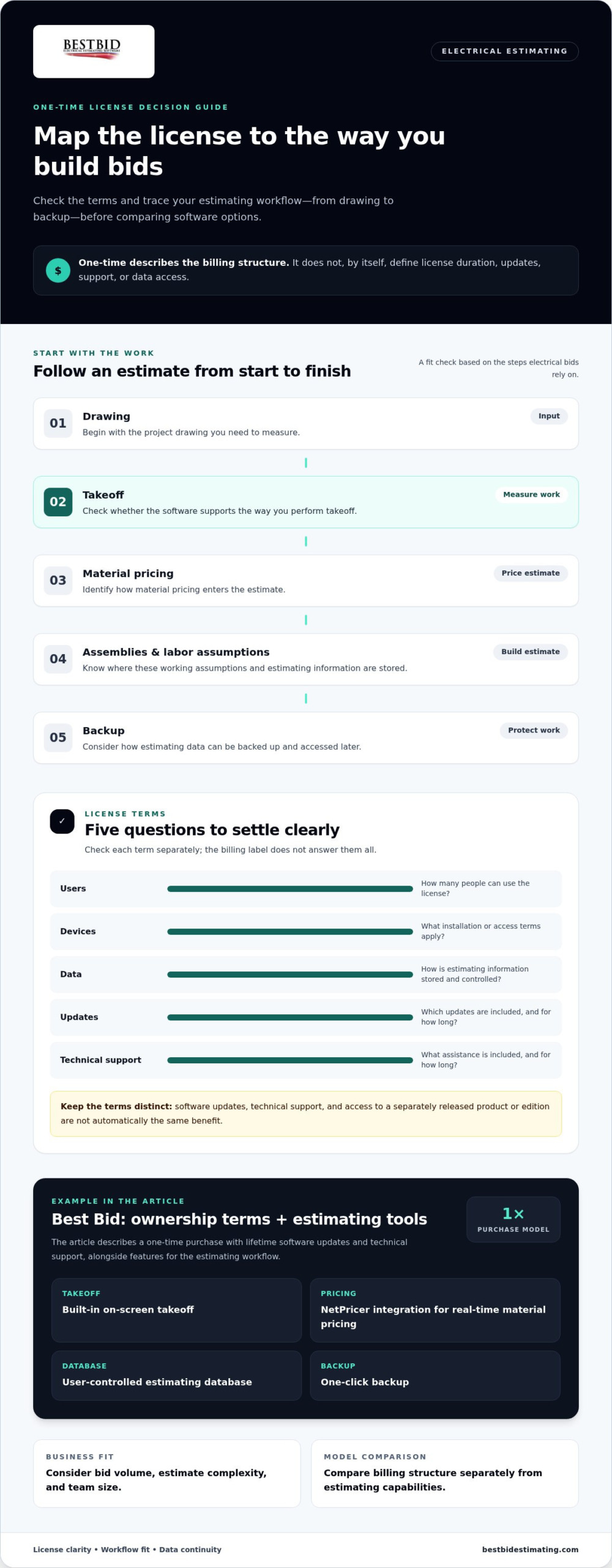
Start with your workflow. Map how a drawing becomes a takeoff, how material pricing enters the estimate, where assemblies and labor assumptions are stored, and how files are backed up. Then consider whether a license supports those steps without forcing a disruptive change. A general overview of construction estimating software can help explain the role of digital tools. Electrical estimating also requires attention to the trade-specific work behind each bid.
Best Bid’s electrical estimating software uses a one-time purchase model with lifetime software updates and technical support included. Its features include built-in on-screen takeoff, NetPricer integration for real-time material pricing, a user-controlled database, and one-click backup. These are practical criteria to weigh as you explore electrical estimating software options. Next, examine what the license covers and how its terms support your workflow over time.
What to check in a one-time electrical estimating software license
A one-time payment can make software ownership feel straightforward, but the license terms determine what the purchase provides. Look beyond the billing label. Separate how long you may use the licensed software from the length of update access, the availability of technical support, and any terms for future versions. These details affect whether your estimating process can keep running smoothly over time.
Make a short checklist before comparing options. Look for clear answers on:
- Users: How many people can use the license?
- Devices: What terms apply to installing or accessing the software on your computers?
- Data: How is your estimating information stored and controlled?
- Updates: Which updates are included, and for what period?
- Support: What technical assistance comes with the license, and for how long?
Clear terms help you plan for your actual bid workflow instead of discovering limitations after the software is established in your shop. Digital tools have a growing role in construction training and practice, including digital estimating processes in construction. For electrical contractors, how a system handles trade-specific estimating matters as much as the license structure.
Updates, support, and version access are not the same term
Updates may improve or maintain the software you already own. Technical support helps you address questions or problems while using it. Access to a separately released product or edition can be a different matter.
Do not assume one term includes the others. Best Bid’s one-time purchase includes lifetime software updates and technical support. Compare the scope of each benefit, not just the word “lifetime.”
Data control, backup, and license use
Your electrical database holds working information that can shape future estimates, so consider who controls it and how you can protect it. A dependable backup process matters too. If a computer needs attention or your workflow changes, an accessible backup can help preserve continuity.
Understand the software’s stated user and device permissions as well. Do not assume that a license can be moved between systems or shared in ways its terms do not specify.
Best Bid includes a user-controlled, unlimited database and one-click backup. These features address two practical evaluation points: control over estimating information and a straightforward backup action. Alongside built-in on-screen takeoff and assembly-based estimating, they help you assess how software supports everyday bid work, not just what the license costs over time.
As you compare electrical estimating software one-time purchase options, write down the license terms and map them against your team’s needs. For a closer look at Best Bid’s electrical estimating approach and ownership model, explore electrical estimating software information.
One-time purchase vs. subscription: compare the estimating workflow
A billing model tells you how you pay, not how well the software handles a bid. A one-time license may fit a contractor who wants defined ownership terms. A subscription may suit a team that values ongoing services or particular access arrangements.
In either case, compare the license and workflow features. The right choice depends on your estimating process, team, and support needs, not the label alone.
Use this table as a starting point. Details vary by product and license, so treat each row as a point to evaluate rather than an assumption about every system.
| Factor | One-time purchase | Subscription |
|---|---|---|
| Billing model | Typically an upfront license payment; check the duration and usage terms. | Recurring billing; check how billing periods and continued access are defined. |
| Updates | Included updates depend on the license terms. | Update access depends on the subscription terms. |
| Support | Support may be included for a stated period or longer; review the terms. | Support access varies by plan and agreement. |
| Tools | Takeoff, estimating, and pricing features depend on the product. | Compare the same capabilities, not just the billing model. |
| Database | Check how data is controlled, stored, and backed up. | Check the same points, including how your team accesses its data. |
| Workflow | Assess fit with your current bid process and team setup. | Assess fit with your current bid process and team setup. |
Compare estimating and takeoff capabilities
Start with the drawing. Is on-screen takeoff built into the estimating software, or does your process require a separate tool? Then trace a takeoff quantity into the estimate.
Does it carry through to the relevant material, labor, or assembly calculations, or does someone need to enter it again? Each handoff affects how your team prepares and checks a bid.
Best Bid includes built-in on-screen takeoff, with quantities transferring directly into the estimate. Its assembly-based estimating connects takeoff and estimate preparation. Compare those steps against a typical bid from your business instead of judging software by a feature list alone.
Compare pricing data, database control, and team workflow
Next, follow how material pricing reaches the estimate. If your process relies on current pricing, assess whether the software integrates pricing into estimating or leaves more manual steps. Best Bid integrates with NetPricer for real-time material pricing. Also consider whether the database can be controlled and adjusted to match your company’s estimating approach, and how backups fit into routine work.
Finally, match user access to the team that will prepare and review bids. A solo estimator has different coordination needs from a shop with several estimators. The electrical estimating software one-time purchase decision should account for these practical requirements alongside updates and support. Compare products using the same sample project and workflow, then weigh the license structure separately from the capabilities your team will rely on.
How to decide whether one-time electrical estimating software fits
A license model only works if the software can handle the bids your team actually prepares. Use this five-step checklist to connect the ownership decision to your workload and everyday estimating process.
- Count your bids and size up their complexity. Note how often you estimate, whether projects use repeatable assemblies or varied systems, and where detailed labor adjustments matter.
- Account for your team. Identify who builds takeoffs, prepares estimates, reviews bids, and needs access. A solo estimator and a team sharing bid work may have different requirements.
- Map your current workflow. Trace a drawing from takeoff through material pricing, database lookup, labor calculations, estimate review, and backup. Mark duplicate entry or tool switching that slows the process.
- Separate must-haves from nice-to-haves. Prioritize the functions your bids depend on, such as takeoff, assemblies, database flexibility, pricing integration, and backup. Set aside features that will not improve your work.
- Assess the transition and ongoing terms. Consider the learning curve, available training, support access, update terms, and license permissions. Choose a system your team can adopt while maintaining bid accuracy.
Match software capability to the contractor’s daily work
Test essential functions against a representative estimate, not a feature checklist in isolation. If takeoff happens in one tool and estimating in another, see whether built-in takeoff could simplify the handoff. Check how quantities feed into assemblies, whether labor can be adjusted to your estimating method, and whether the database can reflect the materials and work in your bids. Optional tools matter when they solve a real need.
Plan a practical transition to a new estimating tool
Before switching, write down your current steps and the specific improvement you expect, such as fewer manual transfers or a clearer review process. Identify who needs training and when they can practice without disrupting active bids. Review the product’s learning curve and support access, then use relevant training, including Best Bid’s Online School for Electrical Estimating, to build familiarity with electrical estimating concepts.
Judge the electrical estimating software one-time purchase option against both its license terms and the workflow you have tested. A defined purchase model can suit a contractor seeking ownership and predictable software costs, but the system still needs to support the team’s estimating work. Keep the decision practical: can your estimators learn it, prepare accurate bids with it, and manage the data in a way that fits the business?
Explore Best Bid electrical estimating software as you compare your workflow requirements with a specialized estimating option.
How Best Bid brings one-time ownership into electrical estimating
Best Bid offers electrical estimating software through a one-time purchase model, pairing ownership with tools designed for electrical bid work. That gives contractors a way to assess more than billing: consider how takeoff, material pricing, assemblies, and estimating data fit together in the workflow. The one-time purchase includes lifetime software updates and technical support, along with features for everyday estimating tasks.
Founder Steve Griffin entered the electrical trade in 1973 and brings more than five decades of trade and estimating experience. That background provides practical context for software built around electrical estimating needs. As you evaluate the fit, compare the license model with the steps your team follows to build, review, and preserve bids.
Best Bid features that support electrical estimating ownership
Built-in on-screen takeoff lets estimators work with drawings as part of the estimating process. NetPricer integration supports real-time material pricing, while the user-controlled, unlimited database gives contractors control over estimating information. Assembly-based estimating provides a structured way to build estimates, and one-click backup offers a clear action to include in continuity planning.
Together, these capabilities give buyers concrete criteria to test against their current process: how quantities are captured, how material costs enter an estimate, how reusable estimating information is managed, and how bid data is backed up. They do not remove the need to evaluate license terms or workflow fit, but they make that evaluation specific. Consider a representative electrical bid and note where each feature fits into your team’s existing steps.
Explore the software and licensing details
Review the Best Bid electrical estimating software overview alongside your workflow checklist. Then examine the Best Bid licensing information to understand the purchase model and the terms presented for the software. Keeping product capabilities and license details side by side helps you make a grounded comparison instead of judging by payment structure alone.
For an electrical estimating software one-time purchase, the right fit brings clear ownership terms together with tools your estimators can use consistently. Before deciding, choose a typical bid, trace its takeoff and pricing steps, and consider how your database and backups will be handled. This practical test can reveal whether the software supports your work without forcing unnecessary changes.
Explore Best Bid for your electrical estimating workflow: view the electrical estimating software and compare its tools with the requirements you have identified.
Make your next estimate the test
Put your workflow at the center of the decision. Before committing, select a representative electrical bid and trace the work from drawing review to final estimate. Note where your team needs control, where tasks slow down, and which handoffs should remain familiar. Then compare those needs with the license terms and the software’s capabilities.
An electrical estimating software one-time purchase should make sense beyond the appeal of a single payment. It should support how you estimate, give your team a workable path to adoption, and fit your expectations for ongoing use. That is a practical standard to use in any software evaluation.
Ready to see how Best Bid could fit your estimating process? Explore Best Bid electrical estimating software and take the next step toward a workflow built around your bids. With clear requirements, you can choose your tools with confidence and focus on preparing accurate electrical estimates.
Frequently Asked Questions
What is electrical estimating software?
Electrical estimating software helps contractors turn project plans and scope information into organized bids, including material quantities, labor, and pricing. For example, an estimator preparing a lighting bid can use software to keep fixture counts and related estimate details together instead of tracking them across disconnected files. Tools vary, so compare how each handles your typical projects and the steps your team follows from plan review to bid preparation.
Is a one-time purchase the same as a lifetime license?
No. A one-time purchase describes the billing arrangement, while the license spells out permitted use and duration. For an electrical estimating software one-time purchase, read the terms for continued access, user permissions, updates, technical support, and separately released versions.
For example, a license may allow ongoing use of a purchased version while treating future product releases differently. Clear terms help you understand what the initial purchase covers.
Can electrical estimating software help reduce takeoff mistakes?
It can help organize plan counts and measurements, but it cannot replace careful review by an estimator. Compare the software’s device and fixture counts with your plan review, then verify quantities against the project scope and drawings. Review assemblies and labor assumptions before finalizing the bid as well. Consistent digital records can make review easier, but the estimator remains responsible for catching missed scope or incorrect inputs.
How often should an electrical estimating database be updated?
Review material cost information for each bid, especially when supplier quotes or project timing have changed since your last estimate. There is no single update schedule for every contractor: a long-running project and a bid with recently quoted materials may rely on different information. Record the source and date of pricing used, then check that estimate assumptions still match the information available before submitting the proposal.
Is built-in on-screen takeoff useful for a small electrical contractor?
It can be useful if plan counts currently happen in one tool and estimate entry in another. For example, a solo estimator may benefit from keeping drawing measurements close to the bid rather than re-entering quantities later. The benefit depends on the project mix and existing process. Try representative plans to see whether takeoff fits naturally into estimating or adds steps your shop does not need.
What should an electrical contractor prepare before switching estimating software?
Document the current bid process before changing tools. Note how your team handles takeoff, assemblies, labor assumptions, pricing sources, database records, and backups. Keep source documents and a completed estimate available for comparison, and identify who will use the new system.
Then prepare a test bid using a familiar project and allow time for training. Comparing the result with your current process can reveal missing steps before active bids depend on the new workflow.