How to Document Electrical Projects for Clear Client Pricing

A clear electrical submittal package starts with the project specifications, not just a stack of drawings. Knowing how to document electrical projects for clients means organizing material submittals, shop drawings, equipment information, and method statements around the requirements they address. This gives reviewers a clear basis for checking the proposed work and clients a useful record for later reference.
It’s easy to focus on the initial bid and overlook how much project clarity depends on the details behind it. A careful review of the specifications connects equipment selections and drawings to the agreed scope. Consistently recording approved changes also keeps pricing and project documents aligned as the work progresses.
This guide covers the process: extract requirements from the specifications, assemble drawings and equipment details, label and submit the package, document scope changes and pricing, and organize closeout records for maintenance and troubleshooting. The aim is practical: make each decision easier to trace, from the first review through handover.
Key Takeaways
- Start with the project specifications to identify what the submittal package needs to address.
- Keep drawings and equipment details aligned with approved project requirements as decisions change.
- Use clear cover sheets and transmittals to identify what’s being sent and track receipt or sign-off.
- Record each scope change and its pricing impact so the final project cost has a clear paper trail.
- Organize closeout records so clients and maintenance teams can find useful project information later.
Maintaining records for troubleshooting and maintenance
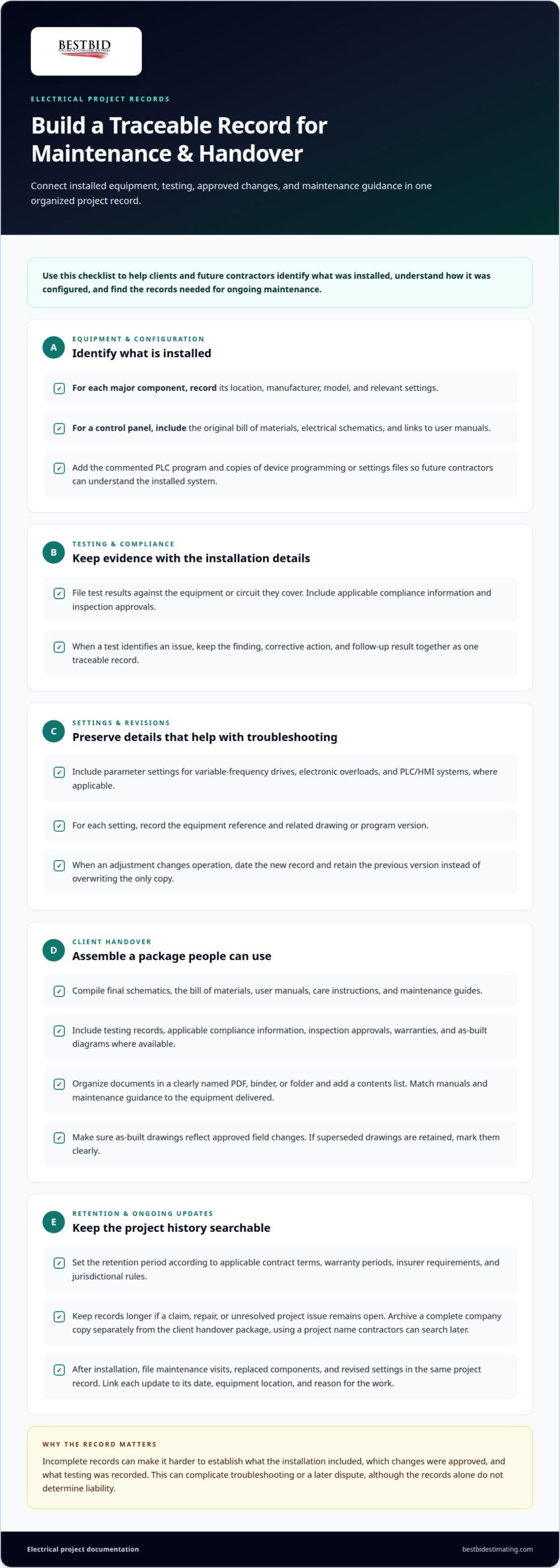
Build a project record that connects installed equipment, testing, approved changes, and maintenance guidance. A clear handover helps clients and future contractors trace what was installed and how it was configured.
- Record installed equipment and its configuration. Identify each major component by location, manufacturer, model, and relevant settings. For a control panel, include the original bill of materials, electrical schematics, and links to user manuals. Add the commented PLC program and copies of device programming or settings files so future contractors can understand the installed system.
- Keep testing and compliance records with the installation details. File test results against the equipment or circuit they cover, and include applicable compliance information and inspection approvals. If a test identifies an issue, record the finding, corrective action, and follow-up result together. This creates a traceable record for maintenance teams instead of a set of disconnected notes.
- Preserve settings that matter for troubleshooting. Include parameter settings for variable-frequency drives, electronic overloads, and PLC/HMI systems, where applicable. Record the equipment reference and related drawing or program version for each setting. If a later adjustment changes operation, date the new record and retain the previous version rather than overwriting the only copy.
Assemble the Client Handover Package
Compile the handover package with final schematics, the bill of materials, user manuals, care instructions, and maintenance guides. Include testing records, applicable compliance information, inspection approvals, warranties, and as-built diagrams where available. Organize the documents in a clearly named PDF, binder, or folder, and add a contents list. Mark superseded drawings clearly if you retain them alongside current records.
For the client handover, include the records needed to identify, operate, and maintain installed equipment. Match manuals and maintenance guidance to the equipment delivered, and make sure as-built drawings reflect approved field changes.
Retain Records for Future Reference
Set the retention period according to applicable contract terms, warranty periods, insurer requirements, and jurisdictional rules. Keep records longer if a claim, repair, or unresolved project issue remains open. Archive a complete copy in company records, separate from the client’s handover package, using a project name that contractors can search later.
Incomplete records can make it harder to establish what the installation included, which changes were approved, and what testing was recorded. This can complicate troubleshooting or a later dispute, although the records alone don’t determine liability.
After installation, file maintenance visits, replaced components, and revised settings in the same project record. Link each update to its date, equipment location, and reason for the work. For example, if a client reports an intermittent control issue, a history of the original PLC settings and later adjustments can help maintenance teams distinguish the installed design from subsequent changes.
Preparing drawings and equipment specifications
Keep drawings, equipment selections, and project scope aligned from the estimate through installation. Use consistent revisions so electrical contractors can distinguish current plans from superseded details.
Define Scope and Equipment Specifications
Start with a written scope, then connect each included task to its drawing and equipment specification. Describe the work, selected equipment, quantities, assumptions, and exclusions so the estimate and proposal communicate the same scope. Replace broad labels such as “electrical work” with a specific description, such as lighting, power, panels, or another defined system.
Choose software and templates that support consistent takeoff records, plan references, and revision tracking. Accura Cadd PDF Draw is one option for electrical contractors working with PDF drawings. Best Bid’s electrical estimating and drawing tools can be a relevant next step when building a more consistent estimating workflow.
- Map the permit set to the project’s actual electrical systems. It may include a legend and general notes, lighting and power plans, a single-line diagram, panel schedules, and electrical details. In the United States, permit, inspection, and code documentation requirements depend on the project scope and applicable jurisdiction. Keep permit records, inspection approvals, and compliance reports with the project documents.
Record Site Photos and As-Built Details
Take site photos at useful installation milestones, such as before concealed wiring is covered and after equipment is mounted. Label each image with its location, date, and drawing reference. Update as-built drawings to show actual routes, equipment locations, panel identifiers, and approved field changes. Don’t leave a marked-up field copy as the only record.
Compile Documentation by Project Stage
Organize records by stage: proposal and scope documents before work; reviewed submittals and current drawings during installation; and revised as-builts, inspection approvals, and closeout documents at completion. Keep revision dates visible. This structure helps clients trace decisions from the original scope to the installed system.
- For the scope, estimate, and proposal, list the work, quantities, equipment specifications, assumptions, and exclusions together. Tie each estimate item to a drawing or scope reference, then identify proposed equipment clearly. This makes the pricing basis understandable without asking the client to infer what an item covers.
- Maintain one current drawing set for field use and mark replaced versions as superseded. When equipment or project requirements change, update affected drawings, calculations, and specifications together. For example, moving a panel may affect the layout and related circuit references. Record the approved revision so the final set reflects the installation, not an earlier design.
Clear documentation ensures that everyone understands what each particular line item covers. Include supporting schedules and cut sheets so selections can be checked against the drawings and scope. One lighting cut sheet can describe 15 to 80 fixture types, so identify the applicable fixtures clearly and keep selections coordinated with the lighting plan.
For control-panel work, electrical control-panel handover documentation can include a complete set of electrical schematics, such as one-lines, I/O drawings, and panel layouts. Keep these records with the final equipment information so installers and owners can follow the intended configuration and compare it with the installed system.
Cover sheets and transmittals
Use the cover sheet to orient reviewers and the transmittal to record what was sent between project parties. For each construction package, make the recipient, purpose, document list, and revision status easy to identify.
- Create a cover sheet with the project name, site or building, submitting contractor, recipient, package title, and issue date. Add a contact name and a concise description of the requested review. For example, label a package “Lighting shop drawings, review” rather than “Electrical documents.” Clear labels help reviewers understand the package before opening the drawings.
- List each enclosed document by title, drawing or specification reference, revision, and status. Give a material submittal, shop drawing, and method statement separate entries when included. Add page counts or file names for digital packages. This checklist lets the recipient compare the transmittal with the files and spot a missing panel schedule or cut sheet.
- Assign a consistent identifier to each transmittal and link it to the project record. Include the issue date, sender, recipient, package purpose, and any requested response. Use the same identifier in the email subject, cover sheet, and register. If a revised lighting plan follows, issue it as a distinct revision rather than silently replacing the earlier file.
- State the action expected from the reviewer and identify linked documents. For a shop drawing package, name the relevant specification section and note whether it is for review, approval, or record. Electrical engineers may return reviewed submittals as approved, approved as noted, or revise and resubmit. Record the response against the original transmittal so comments remain traceable.
- Send the package through the agreed project channel and preserve evidence of delivery. Record the date sent, recipient, file names, and receipt confirmation in the transmittal register. After delivering a closeout package, obtain confirmation of receipt or final sign-off. This shows which documents reached the client and supports a clear handover.
- Close the loop when comments arrive. Match each comment to the relevant drawing or specification, then record the disposition and revised submission. If a reviewer requests a panel schedule correction, identify the new revision and resubmit the affected file with an updated transmittal. Link comments to the package record instead of leaving them buried in an email thread.
Keep the register current throughout construction, not just at closeout. A project manager can use it to see which packages are pending, returned, or reissued. Consistent cover sheets and transmittals make submissions searchable and support clear reviews, orderly revisions, and accountable document delivery.
Documenting outstanding change orders and final pricing
Tie each scope change to its approval, pricing basis, and effect on the final project total. A clear workflow distinguishes proposed work from approved and completed work.
- Open a change record as soon as a client request or site condition alters the original scope. Give it a unique identifier and note the date, requester, affected area, and reason. For example, record an added EV charger separately from the original panel work. Keep the request distinct from an approved change so it cannot be mistaken for authorized work.
- Describe the change in plain, measurable project terms. Identify affected equipment, labor activities, drawings, and specifications, then state what remains unchanged. If a replacement inverter affects compatibility or electrical capacity, document the equipment change and related design review. This gives the client a clear basis for understanding the requested adjustment.
- Build the proposed price from identifiable estimate components. Show added or removed materials, labor tasks, equipment, and relevant credits as separate line items. Explain each item’s pricing basis, such as a revised quantity or different specified component. Avoid blending new scope into the original contract total, where the cost impact is harder to trace.
- Route the change for review and record the decision before treating it as approved. Keep the client’s written approval, rejection, or request for revision with the change record. A field change request can propose a design or scope modification and seek approval. Update the status when the decision arrives, and retain the previous proposal for an accurate history.
- Track open changes in a register that supports the project’s pricing workflow. Include each identifier, short description, current status, proposed amount, approval date, and related estimate revision. Separate pending requests from approved changes. Before preparing final pricing, verify that rejected or unapproved work hasn’t entered the approved contract total.
- Reconcile the final price with the completed scope and approved change records. Compare original contract items with additions, deductions, and documented credits. For example, if a specified fixture was removed and replaced, show both the credit and replacement item. Explain unresolved differences clearly, and keep supporting estimates and approval records with the final statement.
- Close each change record with its final disposition and link it to the relevant project documents. Note whether the work was completed, omitted, or superseded, then align the final pricing record with that outcome. If an approved change alters an electrical drawing, identify the corresponding revision. This leaves a traceable path from the request to the price and installed work.
Extracting requirements from project specifications
Teams learning how to document electrical projects for clients can start with a traceable specification register. Connect each requirement to its source section, drawing reference, estimate item, and project document.
- Build the register before beginning the takeoff. Record each relevant specification section, requirement, and related drawing reference. Electrical work is categorized under Division 26 in the construction specifications discussed here, while CSI MasterFormat numbering provides a shared way to tag submittals. Use those identifiers to connect requirements to estimate items and package documents.
- Review the specification by topic, not only by page order. Look for equipment, installation methods, testing, documentation, approved manufacturers, and closeout details. Manual cross-referencing may mean checking an estimate package against a 50-page project specification. Mark each requirement as addressed, not applicable, or awaiting clarification, and retain its exact section reference.
- Translate each requirement into a specific estimate or submittal action. Link equipment characteristics to the proposed item and its supporting technical information. If the specification calls for shop drawings, material submittals, or method statements, list each required document. This gives every requirement a deliverable rather than leaving it buried in an attachment.
- Compare the register with the drawings and project scope. Flag conflicts, missing equipment information, and unclear installation instructions before pricing affected work. If a panel schedule and equipment specification describe different configurations, record both references and the precise conflict. Don’t silently choose one interpretation and build it into the estimate.
- Use a request for information when drawings, specifications, or instructions are ambiguous. State the location, document references, and exact clarification needed. Keep the response with the related requirement, then update the estimate or project documents if the answer changes the scope. A focused RFI gives the general contractor a clear issue to resolve.
- Prepare submittals to address the requirements they must satisfy. Electrical engineers review submittals against contract documents, checking technical data, approved manufacturers, and code compliance. Record the response as approved, approved as noted, or revise and resubmit. For a revised package, identify the requirement addressed and what changed from the earlier submission.
- To decide how to document electrical projects for clients, finish with a cross-check. Compare the register against estimate items, submitted documents, approved responses, and completed records. Resolve open clarifications and identify requirements changed through approved revisions. To organize electrical takeoff and estimating records, explore electrical estimating tools as part of your workflow.
During construction, a work release form formally authorizes specific tasks or activities and is intended to prevent work from starting without approval. A material inspection request is used to check that delivered site materials comply with specifications and standards before installation. A UL product listing is a common certification required by electrical specifications, so check its status against the relevant requirement.
When equipment or project requirements change during construction, review and update the relevant drawings, calculations, and specifications. Use CSI MasterFormat numbering to maintain a consistent link between a submittal and its specification section. A non-conformance report documents work or materials that fail to meet approved specifications or standards, identifies quality issues for correction, and helps teams track them to resolution.
Best Bid: Online School for Electrical Estimating
Best Bid’s Online School for Electrical Estimating offers electrical contractors a focused way to strengthen their estimating knowledge. Apply what you’ve learned about project records alongside a disciplined estimating process: clear takeoffs and detailed bids help connect project scope with pricing.
Consider the school if reviewing electrical plans, organizing estimate details, or preparing bids is a challenge in your workflow. Its practical learning supports more consistent work, while project-specific documentation and approvals remain essential.
For electrical estimating education that fits your professional development goals, contact Best Bid.
Make your next project easier to track
For electrical contractors deciding how to document electrical projects for clients, the next step is to make the process repeatable across jobs. Set a consistent approach for connecting estimate decisions, project documents, and later revisions. Your team can then spend less time reconstructing how a number or scope decision was made and more time moving work forward.
Best Bid offers Best Bid Next Generation, Best Bid Hybrid Pro, and Accura Cadd PDF Draw for electrical estimating and drawing workflows. Choose the tools that fit how your team prepares and manages project information, then build a consistent documentation habit around them.
Ready to explore a practical next step for your estimating workflow? Contact Best Bid to discuss your project. Clear records are built one consistent decision at a time, and your next project is a good place to start.
Frequently Asked Questions
What goes into an electrical submittal package?
An electrical submittal package contains the documents needed to review proposed materials and work against project requirements. Depending on the scope, include equipment cut sheets, shop drawings, material information, and method statements. Add a contents page that connects each item to its specification reference. If a proposed product differs from the specified selection, identify the deviation clearly so reviewers can assess it without searching unrelated pages.
What documents should an electrical contractor provide to a client for a project?
Provide a client-ready package that matches the project’s equipment and agreed deliverables. An index can show where to find operating information, maintenance guidance, inspection records, and final drawings. Include a concise project summary that names the systems covered and points out documents tied to specific equipment. This helps facilities staff locate the right records without needing to understand the contractor’s internal filing structure.
What software and templates are best for electrical project documentation?
Choose software and templates that support consistent takeoff records, plan references, and revision tracking. Accura Cadd PDF Draw provides PDF drawing tools, while Best Bid’s electrical estimating software supports the estimating workflow.