PDF Tools for Electricians: 2026 Bidding & Markups

Why should you pay a monthly toll just to open, mark up, and estimate your own blueprints? If you are tired of recurring subscription fees draining your hard-earned profits while you wrestle with bloated programs, you aren’t alone. Finding reliable pdf drawing tools for electricians shouldn’t force you into a permanent rental cycle or trap you at a desk with highlighters and scale rulers. You already know how easily a single missed symbol or flawed material count can wipe out your job margin.
It’s time for a better way to bid. You will discover how to master the digital tools needed to mark up plans, perform rapid takeoffs, and create crisp, professional as-builts without the burden of monthly subscription fees. Ahead, we break down the must-have features for electrical contractors, explore true software ownership, and share practical workflows to speed up your bid turnaround starting today.
Key Takeaways
- Learn why generic office PDF software creates costly takeoff errors and how electrical blueprints demand purpose-built trade precision.
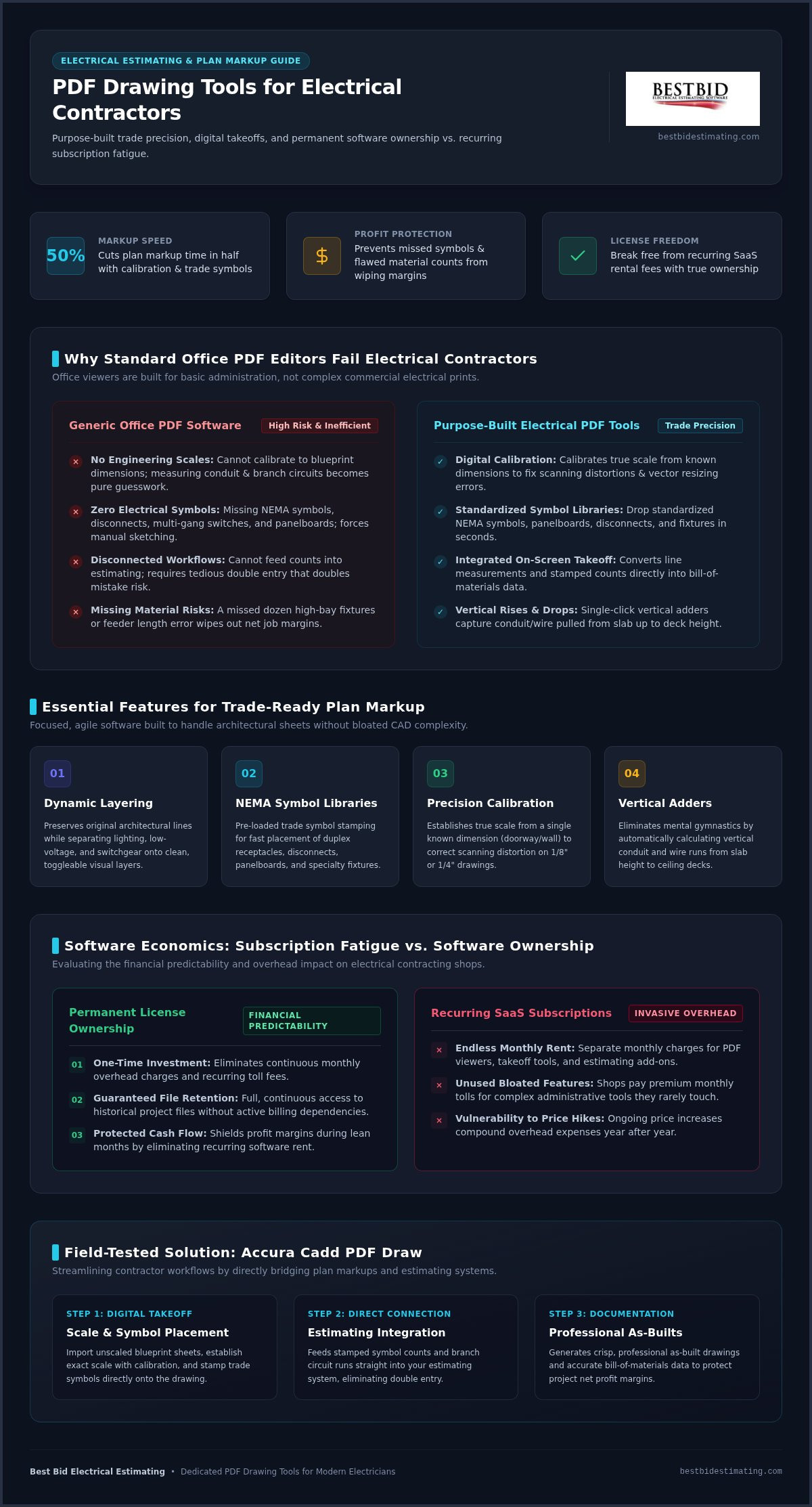
- Discover how dedicated pdf drawing tools for electricians use digital calibration and trade symbol libraries to cut plan markup time in half.
- Break free from recurring SaaS rental fees by evaluating the true long-term savings of software ownership versus endless monthly bills.
- Master a step-by-step digital takeoff workflow that produces accurate material counts and clean, professional as-builts.
- See how field-tested solutions like Accura Cadd PDF Draw simplify your workflow by connecting drawing markups directly to your estimating system.
Why Standard PDF Editors Fail the Modern Electrical Contractor
Office PDF programs work fine for signing contracts or highlighting text in an invoice. Try using them on a 40-page set of commercial electrical prints, though, and you hit a wall immediately. General PDF software is built for administrative clerks, not for tradespeople calculating branch circuits, sizing conduit, or tracing homerun runs across an unscaled floor plan. Attempting to force an office editor into the electrical estimating workflow turns simple tasks into high-risk manual labor.
The true cost of using underpowered software shows up on your balance sheet. During the standard construction takeoff process, an estimator needs to capture precise quantities for devices, wire, and fittings. Manual takeoff errors are brutal; missing a dozen high-bay fixtures or underestimating feeder lengths can wipe out the net margin on an entire job. Relying on makeshift office apps or paper drafting tables burns hours of valuable time and leaves your bids wide open to expensive material miscounts.
The Limitations of Generic Markup Tools
Generic document tools actively fight the electrical workflow. They lack the trade-specific architecture you need to deliver accurate figures:
- No engineering scales: Standard editors cannot calibrate to blueprint dimensions. Measuring a curved conduit run or branch circuit becomes pure guesswork.
- Zero electrical symbols: You won’t find duplex receptacles, disconnects, or multi-gang switch symbols in an office PDF viewer, forcing contractors to waste time sketching digital icons by hand.
- Disconnected workflows: You cannot feed counts into your estimating program. This disconnect requires tedious double entry, doubling your chance of a costly mistake.
Purpose-built pdf drawing tools for electricians solve this disconnect by combining scale calibration, built-in symbol stamping, and direct takeoff capabilities in one platform.
Subscription Fatigue in the Electrical Trade
Monthly recurring software fees have quietly become an invasive overhead expense. Electrical shops frequently pay separate SaaS subscriptions for PDF viewers, takeoff add-ons, and estimating platforms. These recurring monthly charges add up fast, draining cash flow during lean months while providing features you rarely touch.
The ownership model is the trade contractor’s antidote to constant SaaS price hikes and endless software rent. When you own your software through a permanent license, you secure financial predictability. You invest once, retain full access to your historical project files, and bid your jobs with dedicated pdf drawing tools for electricians that work for your bottom line, not against it.
Essential Features of Professional PDF Drawing Tools for Electricians
Most digital drawing programs fall into two bad extremes. They are either rigid office viewers with zero trade awareness or massive CAD platforms burdened with org charts, mind maps, and months of training overhead. Electricians need a middle ground: focused, agile software built to handle architectural sheets without unnecessary friction. Dedicated pdf drawing tools for electricians deliver that balance by pairing core drawing functions with trade-specific takeoff capabilities.
A true electrical PDF tool must handle several fundamental tasks right out of the box:
- Dynamic layering: Keeps original architectural line work intact while you separate lighting, low-voltage, and gear onto clean, toggleable visual layers.
- Trade-specific symbol libraries: Lets you drop standardized NEMA symbols, panelboards, disconnects, and specialty fixtures straight onto the drawing in seconds.
- Integrated on-screen takeoff: Converts line measurements and stamped counts directly into bill-of-materials data without third-party plugins.
Precision Scaling and Measurement
Standard architectural scales like 1/8″ = 1′-0″ or 1/4″ = 1′-0″ look straightforward on paper. In digital plans, however, scanning distortions and vector resizing often throw printed scale ratios off by several percentage points. High-caliber tools solve this problem with calibration routines that establish true scale from a single known dimension, such as an exterior wall or doorway.
Conduit runs rarely travel in flat, straight lines across a single plane. When you route branch circuits from a panel out to high-bay fixtures, you need to capture vertical rises and drops. Quality platforms let you assign automatic vertical adders to individual devices and home runs. A single click calculates the extra conduit and wire pulled from the slab up to deck height, saving you from doing mental gymnastics on every room takeoff.
Annotation and Redlining for As-Builts
Field installations never match the original bid set perfectly. Engineers issue addenda, walls get shifted, and equipment locations change during rough-in. For teams handling paper updates on site, mobile tools like Scantrix allow you to digitize sheets directly from your phone—learn more. Capturing these modifications clearly during construction prevents disputed change orders and ensures smooth project closeout.
Using systematic color-coding simplifies communication across your team. Keep high-voltage distribution in red, branch power in blue, and low-voltage systems in green. Once rough-in finishes, exporting clean, professional as-builts gives general contractors and facility managers an unambiguous record of the installation. If you want to eliminate messy hand sketches and speed up turnaround, pairing a specialized drawing tool with reliable electrical estimating software ensures every field markup flows directly into your final documentation.
One-Time Purchase vs. Monthly Subscriptions: The True Cost Analysis
Think about how you equip your shop. You don’t lease your hydraulic bender by the month, and you don’t rent your hand tools on an ongoing cycle. You invest in solid equipment that builds tangible equity in your business.
Your estimating and markup software ought to operate the exact same way. Mainstream software providers, however, push trade contractors into perpetual monthly subscriptions that quietly siphon cash year after year.
Total Cost of Ownership (TCO) Breakdowns
Consider the cumulative math behind a seemingly harmless $50 monthly fee. For a single estimator, that entry-level subscription burns $1,800 across three years. Expand that across a five-person team of estimators and project managers, and your shop surrenders $9,000 every 36 months just to view plans. If work slows down and you pause the subscription, you instantly lose access to your archived markups.
Opting for permanent pdf drawing tools for electricians like Accura Cadd PDF Draw breaks that cycle completely. You purchase your license once, receive lifetime updates, and permanently eliminate that line item from your overhead. That straightforward financial clarity is a primary reason Best Bid Next Generation holds the #1 ranking for Best Value among electrical contractors. Check our pricing transparency to see how a single upfront investment protects your operating margins over the life of your business.
The Risk of Cloud-Only Software
Renting cloud-dependent software introduces operational vulnerabilities that go well beyond recurring invoices. When a third-party platform raises rates, updates its interface arbitrarily, or experiences server downtime during bid day, your entire project pipeline stalls. Your proprietary takeoff data stays locked behind an external paywall that you must pay to access.
Local data ownership paired with simple one-click backups gives you complete control over your blueprint markups and material takeoff counts. Steve Griffin, a Master Electrician with 50 years of field and estimating experience, designed Best Bid specifically to solve this problem. Electricians deserve reliable pdf drawing tools for electricians backed by lifetime support without being forced to buy the exact same software twice.
How to Streamline Your Workflow with Digital Takeoff and Markup
Adopting digital blueprints is only half the battle. If you open a drawing and click around aimlessly, you can waste just as much time as you did with paper prints. A structured takeoff process turns your computer into an estimating engine. By following a repeatable four-step sequence, modern pdf drawing tools for electricians transform chaotic plan sets into accurate, bid-ready numbers.
- Step 1: Import and calibrate: Load your vector or scanned PDF. Set your scale immediately by snapping to a verified architectural dimension, such as a 30-foot grid line or a doorway rough opening.
- Step 2: Execute symbol counts: Stamp fixtures, occupancy sensors, receptacles, and panels across each floor layout using dedicated electrical stamps.
- Step 3: Trace linear branch runs: Draw conduit and cable routes using linear measurement tools that calculate horizontal distance while factoring in vertical drops to switches and panels.
- Step 4: Send data to estimating: Move your line items directly into your bid workbook without transcribing counts manually onto scrap paper.
Eliminating Manual Entry Errors
Fatigue causes expensive oversights. When you count eighty light fixtures across three separate sheets by hand, losing track of a single room ruins your material budget. Digital counters maintain an unyielding running tally right on the screen, highlighting every recorded device so you can spot missed rooms instantly.
Efficiency multiplies when your drawing tools talk directly to your pricing database. Within an integrated environment, estimators can morph standard assemblies, switching a half-inch EMT run into three-quarter inch with a couple of keystrokes. You don’t rebuild the takeoff from scratch; the software updates your parts and labor requirements on the fly. Explore how integrated on-screen takeoff eliminates double data entry and accelerates your bidding cycle.
Creating a Professional Submittal Package
First impressions matter to general contractors and project owners. Hand-scribbled notes on scanned prints look amateur and invite questions about your competence. Digital markup tools let you produce clean, legible overlays that highlight specific panel schedules, feeder paths, and equipment clearances with pinpoint clarity.
When you present an organized submittal package featuring clear color legends and crisp callouts, you establish instant credibility. Reviewers approve clean submittals faster, which helps you pull permits and order switchgear without unnecessary delays. To take full command of your takeoff workflow and submit bids that win profitable work, explore Best Bid software solutions built specifically for commercial electrical contractors.
Accura Cadd PDF Draw: The Field-Tested Solution for Electrical Contractors
Most takeoff programs feel like they were programmed in a vacuum by software engineers who never stepped foot on a jobsite. Accura Cadd PDF Draw takes the opposite approach. Built specifically for trade professionals, it strips away clutter so you can open a plan set, mark it up, and pull off accurate quantities without delay. Designed to integrate directly with Best Bid Next Generation and Best Bid Hybrid Pro, it gives you a clean digital workspace that connects your blueprints to your final bid numbers.
Adopting new software often brings the headache of extended downtime. Accura Cadd PDF Draw eliminates that friction with an intuitive, straightforward interface. Because the menus focus exclusively on electrical drafting and takeoff tasks, estimators and project managers achieve full speed on day one. You skip the steep CAD learning curves and get straight to bidding work profitably.
Why 50 Years of Experience Matters in Software
Steve Griffin spent over 50 years working as a Master Electrician, running work in the field and managing bids in the front office. Every tool and shortcut in Accura Cadd PDF Draw reflects real-world lessons learned on commercial jobsites. Theoretical features that look good in tech demos but waste time during live bids are deliberately left out.
That field background also shapes the support philosophy. While corporate SaaS vendors rely on automated chatbots and annual contract ultimatums, Best Bid treats contractors like respected trade partners. You get straightforward communication, patient guidance, and zero corporate pressure tactics. It is trade software backed by people who know what it feels like to chase bid deadlines.
Take the Next Step Toward Accurate Bidding
Elevating your workflow doesn’t require a radical overhaul of your company operations. Through the Online School for Electrical Estimating, your team can sharpen its takeoff routines and master blueprint review methods at your own pace. With built-in 1-Click backups, your proprietary project data and marked-up sheets remain safe on your local hardware.
Stop letting manual counting errors drain your profits and stop paying monthly rent for generic office viewers. Switch to purpose-built pdf drawing tools for electricians that help you win competitive jobs. Experience the Best Bid difference with Accura Cadd PDF Draw and gain the precision, ownership, and speed your electrical contracting business deserves.
Take Full Ownership of Your Electrical Bids
Bidding commercial projects shouldn’t tie your business to recurring monthly software bills or risk your margins on clunky office programs. When you invest in dedicated pdf drawing tools for electricians, you regain complete control over your plan markups, eliminate costly counting mistakes, and produce clean as-builts that command respect.
Best Bid was developed by Master Electrician Steve Griffin, drawing on more than 50 years of hands-on trade experience to solve real bidding headaches. You get permanent software ownership with no monthly fees ever, backed by free lifetime support and continuous updates. It’s time to treat your estimating software like any other vital asset in your shop. Stop renting your software and own Accura Cadd PDF Draw today. Equip your team with field-proven tools, protect your bottom line, and submit your next bid with absolute confidence.
Frequently Asked Questions
What is the best PDF drawing tool for electricians?
Accura Cadd PDF Draw is widely regarded as the top choice because it is built specifically for electrical contractors rather than office workers or generic builders. Developed under the guidance of Master Electrician Steve Griffin, it provides trade-specific symbol libraries, precise digital scaling, and seamless takeoff integration. It removes unnecessary CAD complexity while eliminating recurring subscription fees through a permanent, single-purchase licensing model.
How do I scale an electrical drawing on a PDF?
You scale a digital blueprint by using a calibration tool to measure a known architectural dimension on the sheet. Select a clear reference, such as an exterior dimension line or a standard doorway opening, and enter that exact length. The software automatically calculates the ratio across the entire drawing, ensuring every branch conduit run, feeder length, and square footage measurement remains mathematically precise throughout your takeoff.
Can I use general PDF editors like Adobe for electrical takeoffs?
You can open plans in standard editors, but using them for electrical takeoffs usually causes costly errors. Office-oriented PDF viewers lack architectural scaling, vertical drop calculations, and specialized electrical symbol sets. Measuring conduit or counting panels requires manual workarounds and separate spreadsheets, which invites transposition mistakes. Dedicated pdf drawing tools for electricians eliminate those gaps by linking visual markups directly to trade-specific material assemblies.
Is there electrical drawing software without monthly subscription fees?
Yes, Accura Cadd PDF Draw offers full drafting and plan review features with a strict one-time fee model and zero monthly subscriptions. Unlike software vendors that lock your blueprints behind ongoing SaaS paywalls, this tool grants perpetual ownership, complete with free lifetime support and product updates. You purchase the license once and retain permanent access to all your project takeoffs, estimates, and historical client files.
How do digital PDF tools help with creating as-built drawings?
What is the difference between PDF markup tools and full CAD software for electricians?
PDF markup tools focus on reviewing plans, counting devices, measuring conduit paths, and annotating blueprints without the steep learning curves of traditional CAD suites. Full computer-aided design software is built for engineering schematics from scratch, requiring months of specialized technical training. Trade-focused pdf drawing tools for electricians give estimators exactly what they need to assemble bids and redline submittals quickly without bloated, irrelevant features.
Can I count electrical symbols automatically on a PDF plan?
Yes, specialized electrical takeoff software can identify and tally standardized device symbols across an entire blueprint set. Instead of clicking every duplex receptacle or troffer light individually, counting tools help estimators isolate fixtures across floor layouts. This capability slashes hours off your initial takeoff routine, prevents missed devices in cluttered mechanical rooms, and automatically feeds verified quantities directly into your material pricing schedule.
Does Best Bid software include built-in PDF drawing capabilities?
Yes, the Best Bid platform features built-in onscreen takeoff and integrates directly with Accura Cadd PDF Draw for advanced plan markups. Estimators do not need to buy third-party viewers or pay extra licensing fees to review blueprints, measure wire runs, or stamp electrical fixtures. Everything connects smoothly within the Best Bid Next Generation and Hybrid Pro systems, turning digital drawing markups into bid-ready numbers immediately.