Best Bid Next Generation with AI: Smarter Estimating
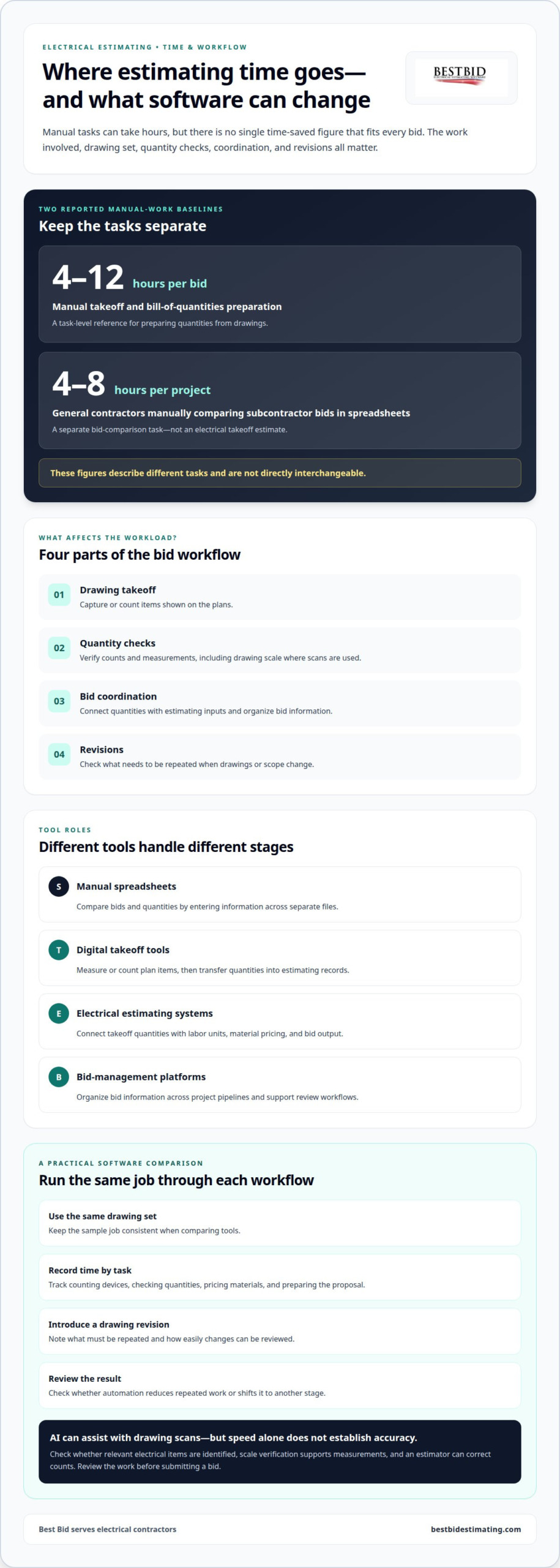
AI can speed electrical estimating, but there isn’t one hours-saved figure that fits every bid. Manual takeoff and bill-of-quantities preparation can take 4-12 hours per bid. The practical time savings depend on the drawings, quantity checks, bid coordination, and revisions. Best Bid Next Generation with AI is part of a closer look at how those tasks can fit into a more connected estimating workflow.
If you’ve spent hours counting devices, checking quantities, or revising a bid after plans change, you know how quickly estimating work can pile up. Best Bid Next Generation with AI can assist with repetitive tasks, but accurate results still depend on careful review and estimator judgment.
This article explains how AI assistance, takeoff, quantity checks, and change handling fit into electrical estimating. You’ll learn what to assess in a workflow, where automation can help, and how to decide whether Best Bid Next Generation with AI suits the way your team builds bids.
Key Takeaways
- Compare electrical bidding tools by how they handle takeoff, bid coordination, and changes, not by feature labels alone.
- See how AI drawing scans can count outlets, switches, and fixtures and verify blueprint scales for quantity checks.
- Learn how conversational AI can help query estimating data and support bid management.
- Understand how labor units and material pricing shape estimate totals, and why markup and gross margin produce different bid prices.
- Use system requirements and integration criteria to assess whether an estimating workflow fits your electrical contracting operation.
How Much Time Does Electrical Bidding Software Save?
Electrical bidding software saves time by reducing repeated counting, quantity entry, and bid comparison. Takeoff and bill-of-quantities preparation can take 4-12 hours per bid. General contractors can spend 4-8 hours per project comparing subcontractor bids manually in spreadsheets. Those figures describe different tasks, so they aren’t directly interchangeable.
For an electrical contractor, compare the full bid workflow rather than a single automated feature. Takeoff tools capture drawing quantities, estimating software connects those quantities with labor and material inputs, and bid-management tools organize project documents and proposals. A spreadsheet-based process may work for simple jobs, but repeated manual transfers can add work and make revisions harder to track.
- Manual spreadsheets: Compare bids and quantities by entering information across separate files.
- Digital takeoff tools: Measure or count items on plans, then transfer quantities into estimating records.
- Electrical estimating systems: Connect takeoff quantities with labor units, material pricing, and bid output.
- Bid-management platforms: Organize bid information across project pipelines and support review workflows.
To compare electrical bidding tools, run the same sample job through each workflow. Start with the same drawing set and record the time spent counting devices, checking quantities, pricing materials, and preparing the proposal. Then introduce a drawing revision and note what must be repeated. This practical test shows whether automation reduces the total workload or simply shifts it to another stage.
AI can assist with drawing scans, but speed alone doesn’t establish that an estimate is accurate. Check whether the scan identifies relevant electrical items, whether scale verification supports reliable measurements, and how easily the estimator can correct a count. A missed symbol or revised sheet can affect later quantities, so review the work before submitting a bid.
When evaluating AI tools, focus on whether drawing scans, quantity checks, and revisions fit an actual electrical estimating workflow. The useful test is whether they reduce repeated work while keeping quantities and bid records easy to review.
Construction bidding software pricing varies with the tool’s scope, licensing model, and included capabilities. Compare the cost structure alongside takeoff, estimating, and bid-management functions, rather than judging software by a feature list alone. For a closer look at an AI-assisted electrical estimating workflow, consider how drawing takeoff and quantity review fit together in one process.
AI-assisted construction bid management
AI-assisted bid management can help organize project information and make estimating data easier to query. For example, an estimator might ask which bids include a particular scope or material category. The response can guide a review, but it should be checked against the estimate and project documents.
That distinction matters. AI can retrieve or summarize records, but it shouldn’t replace decisions about scope, quantities, labor, exclusions, or bid strategy. Keep the estimator in control:
- Organize: Keep drawings, addenda, scope notes, and bid records tied to the correct project.
- Query: Ask a focused question about stored estimating data, such as which line items need review.
- Validate: Compare the response with the underlying records before changing a proposal.
- Document: Record approved revisions so the team can trace what changed and why.
For example, an estimator reviewing several commercial bids could use a conversational query to locate estimates containing a specific equipment category. They can then inspect the relevant line items, confirm the drawing revision, and decide whether the proposal needs an update. This approach makes searching more direct without treating an AI-generated response as an approved scope decision.
Bid-management software also needs to fit the size and complexity of the project pipeline. Dedicated bid-management tools usually pay for themselves for commercial general contractors running project pipelines of $50M or more. For electrical contractors, the relevant question is whether coordination features address their actual estimating workload, including bid records, scope review, and change tracking.
Prequalification also shapes commercial bid workflows. For commercial general contractors working on projects valued at $5M or more, prequalification is described as essentially mandatory. That requirement makes organized records and clear project information especially important to the bidding process. It doesn’t mean every electrical contractor needs a separate platform; the right tools depend on project volume and the role played in each bid.
To assess AI-assisted management, test a real workflow instead of relying on a feature list. Use a completed estimate, ask a specific question about its data, trace the response to its source, and review how a change is recorded. Include an addendum or scope adjustment. This shows whether AI supports the team’s process or adds work reconciling the results.
Choose tools that keep estimate details reviewable and decisions under estimator control. An electrical estimating workflow can connect bid preparation with the records estimators need to manage projects clearly.
The webinar describes using conversational AI to query estimating data. This focused use can support information retrieval while leaving review and decisions with the estimator.
Labor units, material pricing, and bid output
Electrical estimating software combines takeoff quantities with labor units, material pricing, and project costs to prepare a bid. Estimators select or enter these inputs, then review calculated totals and bid settings. The results depend on the information entered and how the estimator applies it.
Labor units connect a measured quantity to the labor hours used in an estimate. Electrical estimating programs can use units published in the NECA Manual of Labor Units to apply labor hours to takeoff quantities. For example, an estimator can pair a measured conduit quantity with a labor unit so the estimate reflects material requirements and installation effort.
Material pricing provides the cost basis for takeoff items. A useful estimate needs line items that match the specified equipment, devices, wiring, and other materials. Project costs account for costs assigned to the job beyond direct labor and materials. Keeping these categories visible helps the estimator understand what drives the bid total.
Consider an illustrative construction quote with $10,000 in direct cost and $1,000 in project cost. Together, those inputs produce $11,000 in costs before markup or margin. The distinction matters: applying a 20% markup to $11,000 produces a $13,200 price, while a 20% gross margin on $11,000 in costs requires a $13,750 price. Markup is calculated from cost; gross margin is calculated from the final price.
- Quantities: Use takeoff counts and measurements as the estimate’s scope foundation.
- Labor: Apply selected labor units to quantities to calculate labor hours.
- Materials: Assign applicable material pricing to each estimate line.
- Project costs: Include job costs before applying the chosen pricing method.
- Bid output: Review totals, scope, and pricing settings before producing the proposal.
To assess the output, trace one line item from drawing quantity through labor and material costs to the proposal. Then confirm project costs and the pricing method. In the $11,000 example, changing from markup to gross margin changes the quoted total, even though the underlying costs remain the same.
A clear bid lets the estimator trace each total back to its inputs. That review helps catch a missing quantity, outdated material price, or incorrect labor assignment before the proposal is sent. It also gives the team a consistent way to explain how the bid was built.
The U.S. Bureau of Labor Statistics counts about 221,400 cost estimators in the United States. For estimating teams, a dependable process helps keep the relationship between measured scope, labor assumptions, material prices, and the final bid understandable. Recording the basis for each input makes later review more useful, particularly when an estimate is revised or handed to another team member.
A practical review distinguishes a scope change from a change in pricing assumptions. When quantities, labor units, or material costs are updated, check which totals are affected and whether project costs or the pricing method need attention too. Keeping those choices visible makes the proposal traceable to its inputs. The estimator’s judgment remains essential, supported by a clear basis for preparing and reviewing the bid.
What AI features does Best Bid Next Generation offer?
AI-assisted drawing scans can count outlets, switches, and fixtures, and verify blueprint scales. These functions help with specific takeoff tasks by identifying symbols and supporting drawing measurements. They don’t cover every decision involved in preparing an electrical estimate.
Scale verification matters because measurements depend on the drawing’s scale. If a plan is interpreted at the wrong scale, calculated lengths can be misleading. Check the scale before using measurements to develop quantities. This doesn’t replace reviewing the drawing set, confirming the relevant sheet, or interpreting unclear symbols.
Automated counts can give an estimator a starting quantity for visible devices. A practical review keeps the scan connected to the source drawing:
- Check the sheet: Confirm the scan uses the relevant electrical plan, not an unrelated drawing.
- Review the count: Compare detected outlets, switches, and fixtures with the symbols shown.
- Inspect scale: Confirm the blueprint scale before relying on measured distances.
- Resolve differences: Correct missed or misidentified symbols before quantities feed the estimate.
For example, a floor plan may show outlets across several rooms. A scan can identify and count the symbols, while the estimator checks the rooms, legend, and drawing notes. A fixture symbol that resembles another mark still needs to be interpreted in context. The count is most useful when it can be traced to the drawing.
AI functions can complement electrical takeoff tools such as on-screen takeoff and automatic conduit and wire length calculations. Device counts, measured lengths, and estimator review each contribute different information: counts identify items, measurements establish lengths, and the estimator checks scope and decides how quantities belong in the bid.
Drawing revisions need another review. If an updated sheet moves a switch or adds fixtures, the estimator must identify the changed plan and reconcile its quantities. A scan can support this work, but a reliable bid still depends on using the correct drawing revision and accounting for relevant changes.
AI drawing scans are useful for repeatable identification and measurement checks, but they don’t determine the complete electrical scope, select labor assumptions, or set bid pricing. Treat scan results as estimating inputs: review detected symbols, confirm the scale, correct discrepancies, and carry approved quantities into the estimate.
What are the system requirements and integrations?
System requirements determine whether estimating software fits the computers, drawings, and file-handling process an electrical contractor already uses. Integration requirements determine how project information moves between takeoff, estimating, and bid preparation. Start by mapping those tasks before comparing platforms. A requirements list is more useful than assuming every tool supports the same devices, file types, or connections.
Start with the drawing workflow. Identify whether estimators work from PDF plans, printed sheets, or both. Note where project drawings are stored and how revised sheets reach the team.
On-screen takeoff works with digital plans, while printed drawings follow a different process. This inventory helps show which capabilities matter.
Next, document the equipment each estimator uses and how the team shares work. Include the computer used for takeoff, where project files are kept, and whether bids move between offices. These are evaluation criteria, not universal specifications. Operating system, hardware, and network needs depend on the software and the contractor’s workflow, so don’t treat generic recommendations as product requirements.
Review integrations just as practically. List the information that must move between each step:
- Drawings to takeoff: Identify the plan files and revisions used for measurements.
- Takeoff to estimate: Track how quantities reach labor and material line items.
- Estimate to proposal: Note how totals and scope details enter bid documents.
- Revision to record: Define how changed quantities and updated documents are retained.
For example, if an estimator measures conduit on a PDF and then enters quantities elsewhere, that transfer is an integration point even without an automatic connection. Spreadsheet exports, manual entry, and shared project records each create a different process. Comparing the steps reveals duplicate entry and shows where a direct connection could help.
Test compatibility with a representative electrical project. Open a drawing, complete a takeoff, transfer sample quantities, and prepare a draft bid. Then introduce a revised sheet and see how the workflow handles the changes. This tests file handling, quantity transfer, and revision control together, rather than treating each feature as a separate promise.
Before adopting a system, write down the operating environment, drawing formats, transfer points, and revision process. Use that checklist to ask focused questions during product evaluation, then compare the answers with the actual estimating workflow. For an overview of electrical estimating software, explore how digital takeoff and bid preparation can fit into the process.
Best Bid: Best Bid Next Generation
Best Bid Next Generation provides electrical contractors with on-screen takeoff, automatic conduit and wire length calculations, and tools for preparing detailed project bids. Its AI assistance can count outlets, switches, and fixtures and verify blueprint scales. Consider it when your workflow needs support from plan review through quantity development and bid preparation.
To assess the fit, consider how your team handles drawings, takeoff quantities, and bid output. Best Bid Next Generation is sold with a one-time purchase, no per-seat license fees, lifetime updates, and technical support. It’s designed for electrical estimating, where drawings, quantities, and bid details need to work together.
If you’d like to discuss whether it fits your estimating workflow, contact Best Bid.
Put Your Estimating Workflow to Work
For electrical contractors evaluating Best Bid Next Generation with AI, start by matching the estimating tools to your team’s day-to-day work. Identify where your process needs support, from drawing takeoff to bid preparation, then consider which tools fit. Best Bid offers Best Bid Next Generation, Best Bid Hybrid Pro, and Accura CADD PDF Draw for electrical estimating work.
A focused conversation can help you connect those products with your estimating priorities. Bring questions about how your team turns drawings into quantities and estimates into bid documents. Clear priorities make it easier to choose a practical next step while keeping the estimator’s review central.
Discuss your estimating needs with Best Bid, and take the next step toward a workflow that better supports your electrical contracting work.
Frequently Asked Questions
What is Best Bid Next Generation?
Best Bid Next Generation with AI combines AI assistance with estimator-led electrical estimating. It includes on-screen takeoff, unlimited custom assemblies, real-time pricing integration, and a database backup feature. For example, an estimator can develop quantities from drawings and review the estimate before preparing a bid. AI supports the work, while the estimator evaluates project details and makes the decisions.
Who makes it, and who is it designed for?
Best Bid makes Best Bid Next Generation with AI for electrical contractors and estimating teams. The software is designed for electrical estimating, not general construction estimating. An estimator preparing a bid with changing device counts can use its electrical estimating tools to build and review the estimate, then decide how to represent the project scope and details in the final bid.
How much does the software cost?
The license allows unlimited installations, and updates and technical support are included for the life of the license. That optional service doesn’t change the one-time purchase model for the core estimating software.
How does the software compare with competing AI bidding software?
Compare how each system fits your estimating process, including electrical takeoff tools, custom assemblies, database controls, and backup workflow. Best Bid Next Generation provides AI assistance in an offline desktop application. Test it with a representative electrical project to assess drawing review, estimate preparation, and how the workflow supports your team’s bid decisions.
How do you set up and use Best Bid Next Generation with AI?
Use drawing scans to count outlets, switches, and fixtures and verify blueprint scales. The tools can route measurements through hallways, bypass open architectural spaces, create schedule designations linked to an audit trail, and let you query estimating data conversationally.