Electrical Fixture Count Software: A Contractor’s Buying Guide

A missed or duplicated fixture can throw an electrical bid off course. The challenge is not only how long counting takes, but how easy it is to review the result. Electrical fixture count software gives you a digital way to record quantities against the plans, revisit the count, and carry reviewed quantities into the estimate.
Fast counting alone is not enough. A useful tool should fit how your team reviews plans, organizes assemblies, checks quantities, and builds a complete bid. When takeoff and estimating work together, you can spend less time transferring information and more time verifying scope.
This guide covers practical criteria for comparing fixture-count tools, a repeatable count-and-check workflow, and how plan quantities connect to labor and material estimates. You’ll also learn what to look for in on-screen takeoff, how to keep counts auditable, and why the right fit depends on your entire estimating process, not just the counting step.
Key Takeaways
- A fixture count is one input to an electrical estimate, not a complete bid. Keep quantities connected to the wider estimating process.
- Use electrical fixture count software to record fixture categories against the plans, then review the totals before they reach the estimate.
- Compare manual tallying, standalone counting, and built-in takeoff by how clearly each shows quantities and supports review.
- Make counts easier to check by separating fixture types and recording assumptions another estimator can follow.
- Best Bid’s built-in on-screen takeoff and direct screen-based counting can keep plan review and estimating in one workflow.
What Electrical Fixture Count Software Does for an Electrical Bid
A fixture count can become difficult to verify when drawings are busy or symbols look alike. A symbol might be missed, counted twice, or assigned to the wrong category, leaving reviewers to untangle the quantities before they can trust the estimate. Electrical fixture count software gives estimators a digital way to identify and record quantities from electrical plans, making the count easier to review and use.
Fixture-count software records quantities shown on plans. Electrical estimating software uses those quantities, along with labor, materials, and other project requirements, to build a bid. A count is a starting input, not a complete price or scope. The estimator still interprets the documents and determines how counted items translate into estimate line items or assemblies.
For a visual example of a digital fixture-counting workflow, watch this software demo:
What counts as an electrical fixture in a plan takeoff?
Lighting fixtures are familiar examples, but the project drawings determine which symbols belong in each count. Start with the plan legend, then use the specifications and drawing notes to understand how the project identifies each fixture type. Similar-looking marks may represent different equipment, so classify symbols by their documented meaning, not appearance alone.
Keep fixture quantities distinct from associated materials and labor. A count might record the number of a particular fixture, while the estimate accounts separately for items such as wiring, supports, controls, and installation labor, as required by the project scope. The Role of an Electrical Estimator includes evaluating project information to develop a bid, not simply tallying symbols.
How fixture counts feed into an electrical estimate
After reviewing quantities, assign them to relevant estimate line items or assemblies. Consistent categories show what each total represents and make it easier to compare the count with the plans. If one reviewer records all lighting together while another separates fixture types, the totals become harder to reconcile and scope differences can get lost in the handoff.
Use category names that match the project documents, and record assumptions that affect interpretation. This gives another reviewer a clear path from plan symbol to counted quantity to estimate entry. Best Bid’s electrical estimating software with built-in on-screen takeoff supports direct screen-based counting and measuring, keeping plan review within the estimating workflow. The count remains one part of the bid, but a visible, organized quantity record makes it easier to follow.
How Electrical Fixture Count Software Works with Digital Plans
A dependable digital count starts before the first symbol is recorded. The estimator needs to know which drawing set is current, what each symbol means on that project, and how each fixture category will be organized. Screen-based counting ties the quantity review to the plan in view, but the estimator remains responsible for interpreting the documents and checking the result.
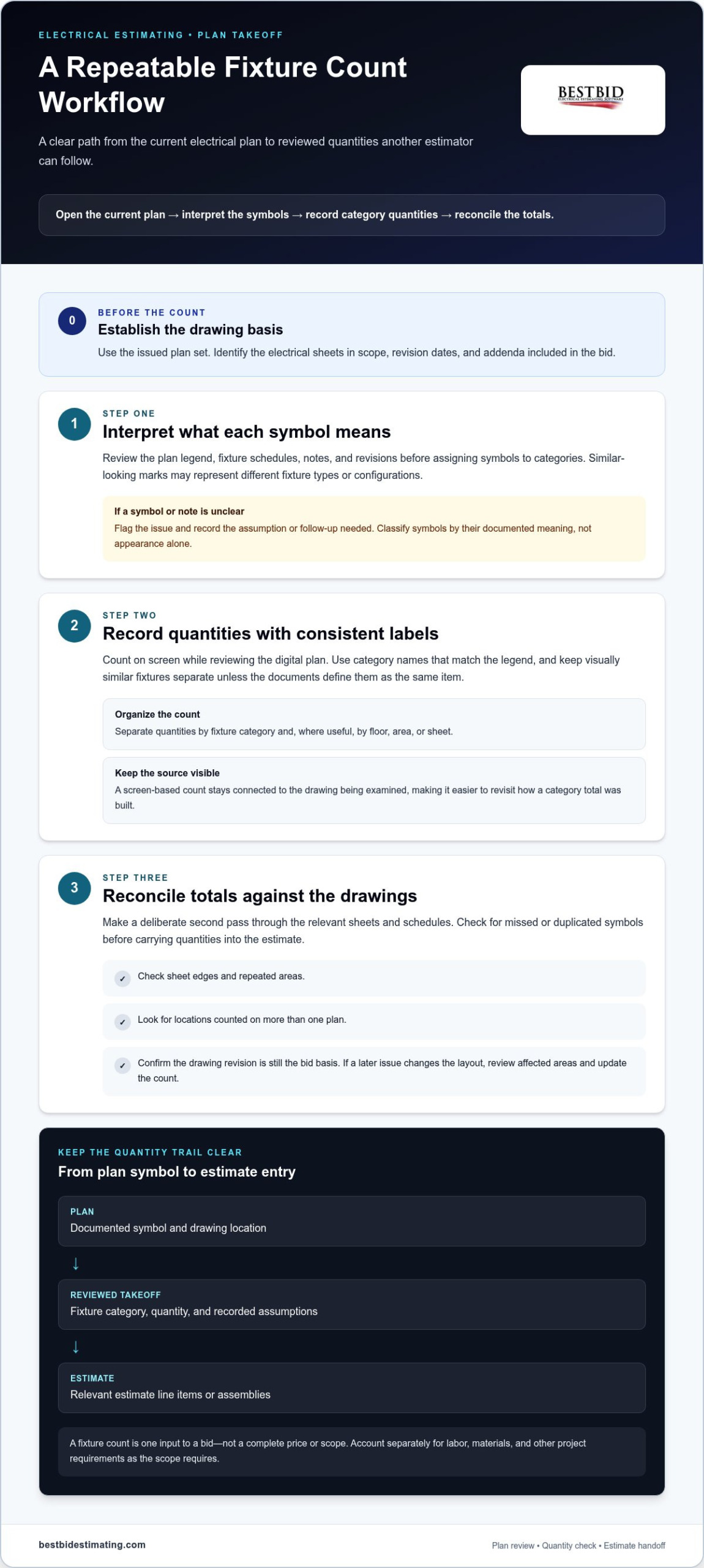
Open the current plan, confirm the legend and schedules, record each fixture category, then reconcile the totals against the drawings and revisions. This sequence gives reviewers a trail to follow instead of a number with no clear source.
Prepare the electrical drawing before counting
Start with the issued plan set and identify the electrical sheets, revision dates, and addenda included in the bid. Review the legend and fixture schedules before tallying. A symbol’s meaning is project-specific, and similar marks may refer to different types or configurations. If notes conflict or a symbol is unclear, flag the issue and record the assumption or follow-up needed.
Once the drawing basis is clear, organize the count by fixture category and, where useful, by floor, area, or sheet. This structure helps you locate a total later and spot a gap. Training in digital estimating processes and quantity estimation also reflects how takeoff depends on working systematically with project information, not just entering quantities.
Record and review fixture quantities on screen
With direct screen-based counting, the estimator records quantities while reviewing the digital plan. The count stays connected to the drawing being examined, making it easier to revisit a location and see how a category total was built. Use labels that match the legend, and keep visually similar fixtures separate unless the documents define them as the same item.
Make a deliberate second pass. Compare category totals against the relevant sheets and schedules, checking for symbols missed at sheet edges, repeated areas, or locations counted on more than one plan. Confirm the drawing revision is still the bid basis. If a later issue changes the layout, review the affected areas and update the count rather than carrying forward an unchecked total.
- Open: Select the current electrical plan set and identify the sheets in scope.
- Interpret: Read the legend, schedules, notes, and revisions before assigning symbols to categories.
- Record: Count on screen using consistent labels and a clear breakdown by area or sheet.
- Reconcile: Cross-check totals, resolve discrepancies, and document assumptions or unresolved drawing questions.
Keep a short record of what was reviewed, including the drawing revision and any assumptions that affect quantities. This makes handoff clearer when another estimator checks the takeoff or the team receives updated plans. Best Bid’s electrical estimating software with built-in on-screen takeoff supports direct screen-based counting and measuring within the estimating workflow. To see how Best Bid approaches electrical estimating, explore its estimating resources.
Compare Fixture-Counting Approaches Before Choosing Software
The right approach depends on how your team handles bids. A manual tally may suit a small, straightforward plan set, while repeated or multi-sheet takeoffs can benefit from a digital process that keeps categories organized. Compare how each method makes quantities visible, supports checking, and moves counts into the estimate.
| Approach | Count visibility and review | Handoff and details to assess |
|---|---|---|
| Manual tallying | Marks and totals can be reviewed if the estimator keeps a clear, organized record. | Quantities may need to be re-entered into estimating tools. Consistent category labels and a documented second check matter. |
| Standalone counting workflow | A digital record can help organize categories and review quantities against plan sheets. | Account for how counts enter the estimate and whether the team must transfer or reformat them. |
| Built-in on-screen takeoff | For Best Bid, built-in on-screen takeoff supports direct screen-based counting and measuring. | Best Bid includes a user-controlled database and assembly-structure workflow. Consider how those features fit your takeoff and estimating steps. |
The table distinguishes Best Bid capabilities from functions that vary by product. A digital tool does not automatically recognize every fixture symbol or transfer every quantity without input. Treat automatic recognition and transfer as specific features, not standard functions of electrical fixture count software.
Standalone counter or built-in on-screen takeoff?
A standalone counter separates plan review from estimate building, which can suit teams that already have a dedicated counting process. Built-in takeoff keeps counting within the estimating workflow and can reduce tool handoffs. For a closer look at the process, use this guide to on-screen takeoff for electrical plans.
Consider where errors are most likely to enter your workflow. If quantities are copied between tools, include a review of the transferred figures. If takeoff sits within the estimating process, make sure reviewers can trace each quantity back to its plan and category. Best Bid’s electrical estimating software features include built-in on-screen takeoff alongside estimating capabilities.
Which buying criteria matter most to an estimator?
Start with count visibility and reviewability: can another estimator understand how the totals were recorded? Next, assess how the tool handles drawings and how quantities fit into your bid steps. Finally, consider whether the database and assembly workflow support how your team builds estimates, not just how it tallies fixtures.
Match the tool to your bid volume, review habits, and estimating process. To learn more about Best Bid’s approach to electrical estimating, visit the Best Bid website.
Download as HTML
Build a Repeatable Fixture Count Workflow for Each Bid
A count is easier to trust when someone else can follow how it was produced. Use the same review sequence on every bid, record the plan set that informed the quantities, and leave a clear trail from drawing to estimate. A consistent workflow does not replace estimator judgment, but it makes omissions, duplicate counts, and classification differences easier to catch.
Create a consistent category and counting method
Build fixture categories from the project legend, schedules, and specifications rather than starting with a generic list. Apply the same naming and counting convention across all relevant sheets. For example, if the documents distinguish fixture types, keep those categories separate instead of merging them under a broad lighting label. Add a sheet, area, or location reference to count notes where your electrical fixture count software supports it.
Before counting, record the drawing set and revision used as the bid basis. Then follow a repeatable sequence:
- Establish the scope: Identify the relevant plan sheets, schedules, and current revisions.
- Set categories: Match fixture labels to the project documents and note any interpretation assumptions.
- Count consistently: Work through the sheets using the same category definitions and counting method.
- Reconcile: Compare totals with schedules and other relevant drawing information, then investigate differences.
- Document the handoff: Record the plan set reviewed, resolved questions, and any items that still need attention.
Reconcile counts before they reach the bid
Use the schedule as a cross-check, not as a substitute for reviewing plan symbols. If a schedule and plan count disagree, trace the difference to its source. A fixture may be represented differently across documents, or a drawing revision may have changed the layout or designation. Record what you found and how the estimate will treat the quantity so another reviewer can understand the decision.
Revision control matters. Before handoff, confirm the count still reflects the drawings included in the bid. Check revised sheets for additions, removals, relocated fixtures, and changed designations. If an update affects only part of the plan, revisit that area and refresh the affected category totals rather than assuming the earlier count still applies.
Before estimate handoff, verify:
- The drawing set and revisions used are recorded.
- Categories follow the project legend and are applied consistently.
- Totals have been checked against schedules and relevant plan information.
- Revisions, assumptions, and unresolved discrepancies are documented.
This creates a practical bridge from takeoff to estimate: quantities arrive with enough context to be reviewed and assigned to the right estimate items. For a workflow that brings plan takeoff into electrical estimating, explore Best Bid electrical estimating software.
Choose Electrical Fixture Count Software That Fits Your Estimating Workflow
The right electrical fixture count software should do more than leave you with a total. Look for quantities you can review against the plan, consistent categories, and a practical path from takeoff into estimate line items or assemblies. The best fit depends on how your team builds and checks bids, so weigh the counting process alongside the estimating tools you’ll use after takeoff.
How Best Bid supports fixture takeoff and estimating
Best Bid includes built-in on-screen takeoff for direct screen-based counting and measuring. This puts plan review and estimating in one workflow, while keeping the estimator responsible for interpreting drawings and checking quantities. Its user-controlled database and assembly-structure workflow support the broader work of organizing estimate information, so fixture quantities can contribute to a developed electrical bid rather than sit apart as an isolated tally.
Review the Best Bid Next Generation workflow to understand how those capabilities fit together. Consider whether your estimators can follow their normal process from drawing review through quantity checks and into the estimate. A connected workflow can simplify handoffs, but clear category definitions and review steps remain essential.
What ownership and support mean for the buying decision
Software fit is only part of the decision. Best Bid uses a one-time purchase model with no recurring subscription payments. Updates and technical support are free for the life of the license. Weigh this ownership structure alongside the workflow and the tools your team will use.
Before choosing, map the software to your estimating routine. Can your team review quantities against drawings? Does the takeoff connect sensibly to the database and assemblies used to build bids?
Will the ownership model work for the business over time? Answering these questions helps you compare practical value, not just a feature list.
Use this final fit check:
- Counts are visible and can be reviewed against the plan.
- Fixture categories and estimate entries align with your bid process.
- Takeoff works naturally with your database and assembly workflow.
- Purchase, updates, and support terms are clear for the life of the license.
Best Bid brings electrical estimating software and built-in on-screen takeoff together, backed by more than 50 years of hands-on electrical trade experience. If that approach matches how you want to review plans and build bids, explore Best Bid estimating software.
Make Your Next Fixture Takeoff Easier to Own
Choose a workflow your team can use consistently, from the first plan review to the final estimate check. The right electrical fixture count software makes quantities practical to review and helps them move into your bid without a confusing handoff.
Best Bid brings built-in on-screen takeoff together with direct screen-based counting and measuring, so plan review and estimating can sit in one workflow. Its ownership model is straightforward: a one-time purchase with no recurring subscription payments, plus updates and technical support free for the life of the license.
Ready to explore a tool built around electrical estimating? Explore Best Bid electrical estimating software for your next takeoff.
Frequently Asked Questions
Can electrical fixture count software count symbols automatically from a PDF plan?
Some tools offer automatic symbol recognition, but capabilities vary by product and plan quality. Best Bid supports direct screen-based counting and measuring; that does not mean symbols are recognized and counted automatically. The estimator still interprets the drawings and checks quantities. Distinguish manual on-screen counting from automated recognition so you know what work the software performs and what remains part of your takeoff process.
Is fixture-count software different from electrical estimating software?
Yes. Fixture-count software focuses on recording quantities from plans, while electrical estimating software supports the wider process of developing a bid. That can include organizing items and assemblies and applying project-specific estimate information.
A count tool can suit a team that already has a separate estimating process; an integrated estimating program can bring takeoff and bid development together. In either case, fixture quantities need estimator review before they inform a bid.
What should an electrical fixture count report include?
A useful report makes each total understandable without relying on the estimator’s memory. Include the fixture category, quantity, drawing sheet or area reference, plan-set revision, and any assumptions or unresolved questions that affect interpretation. If a schedule total differs from the takeoff, note the discrepancy and how it was handled. This context helps a reviewer trace a number to its source and understand what the estimate includes.
Can fixture-count software work with revised electrical drawings?
It depends on the software’s drawing and revision workflow. Treat a revised plan as a new review input: identify the changed sheets, compare the affected fixture locations and designations, and update quantities changed by the revision. Keep a record of which drawing issue informed the bid. Do not rely on an earlier count simply because the sheet title is unchanged; revisions can alter details within a sheet.
How can estimators check fixture counts before submitting a bid?
Have a second reviewer trace selected category totals back to the drawing, then investigate any mismatch instead of adjusting a number without a clear reason. Compare plan quantities with schedules and check that repeated areas or sheets have not led to duplicate entries. Confirm that bid assumptions address unclear symbols or conflicting information. A concise review record gives the estimator a clear basis for resolving questions before submission.
Does built-in on-screen takeoff eliminate the need to review fixture counts?
No. Built-in on-screen takeoff gives an estimator a way to count and measure against the plan, but it does not replace drawing interpretation or quantity verification. The reviewer still needs to confirm that fixture symbols match the project documents, categories are consistent, and the count reflects the drawings used for the bid. Software supports a visible workflow; estimating judgment remains essential.
Can a contractor use fixture-count software without a monthly subscription?
Yes. Best Bid electrical estimating software is sold as a one-time purchase with no recurring subscription payments. Updates and technical support are free for the life of the license.
This gives contractors a way to plan software ownership without recurring subscription charges. Compare ownership terms alongside the takeoff and estimating workflow so the buying decision fits both your team’s daily process and longer-term software needs.