Managing Electrical Project Budgets Effectively: A Contractor’s Guide

What if the number that wins the job is the least useful number for keeping it profitable? A bid total can’t show what’s been committed, what’s changed, or where actual costs are starting to drift. Managing electrical project budgets effectively means turning the accepted estimate into a traceable baseline, then keeping purchasing and field updates connected to it.
You already know how quickly a late scope change or material order can put pressure on expected margin. The challenge is spotting the impact while there’s still time to respond, especially when estimates, spreadsheets, drawings, and job updates don’t line up.
This guide lays out a practical process for carrying budget figures from bid handoff through project completion. You’ll learn how to organize the baseline, track commitments and variances, document changes, and choose controls that fit your team’s workflow. Electrical estimating tools such as Best Bid help build an accurate, organized estimate. Ongoing project cost tracking still depends on clear processes and timely updates from the team.
Key Takeaways
- Build a budget baseline from the accepted estimate, with scope, labor assumptions, material quantities, pricing, and exclusions clearly documented.
- Managing electrical project budgets effectively means tracking commitments and actual costs against cost codes, then forecasting the cost to finish.
- Record purchase orders and subcontract commitments before invoices arrive to see how much of the budget is already spoken for.
- Review variances regularly and investigate changes in productivity, material costs, and remaining scope before deciding how to respond.
- Use Best Bid for electrical estimating and takeoff, then connect its organized estimate data to the project tools your team uses for cost tracking.
Managing electrical project budgets effectively starts with a reliable baseline
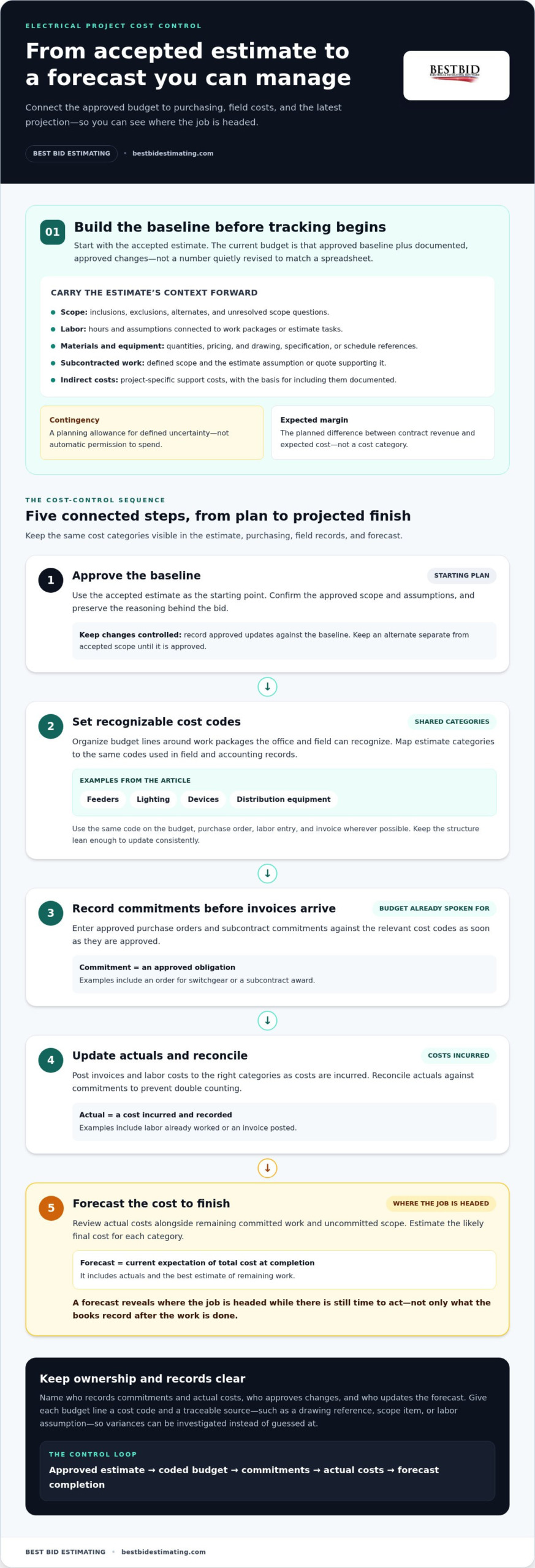
A bid total wins or loses work. A project budget has a different job: give the team a traceable cost baseline to manage from award through closeout. Start with the accepted estimate, confirm its scope and assumptions, then document approved changes against it. The current budget is the approved baseline plus those documented updates, not a number quietly revised to match the latest spreadsheet.
Scope, labor assumptions, material quantities, pricing, and exclusions all shape that starting point. If an estimate assumes a particular installation method or excludes work by others, carry that context into the budget. Project management principles reinforce the value of clear planning and controlled changes, both essential when drawings and field conditions evolve.
For a broader overview of project finances and resources, watch this video:
What belongs in an electrical project budget?
Group costs so the team can see what the money is meant to cover. Direct costs are tied to delivering the electrical scope. Indirect project costs support that work but may not map to a single installed item.
Contingency is a planning allowance for defined uncertainty, not automatic permission to spend. Expected margin is the planned difference between contract revenue and expected cost, not another cost category.
- Labor: Hours and labor assumptions connected to work packages or estimate tasks.
- Materials and equipment: Quantities, pricing, and references to the relevant drawing, specification, or schedule.
- Subcontracted work: Defined scope and the estimate assumption or quote supporting it.
- Indirect costs: Project-specific support costs, documented with the basis for including them.
Give each budget line a cost code and a traceable source, such as a drawing reference, scope item, or labor assumption. That connection makes it easier to explain a variance later instead of guessing what an allowance covered.
How to hand off the estimate without losing context
A clean handoff preserves the reasoning behind the number. Record inclusions, exclusions, labor assumptions, alternates, and unresolved scope questions alongside the estimate. For example, identify an alternate separately from the accepted scope so it doesn’t become part of the working budget unless it’s approved.
Assign clear ownership: name who records commitments and actual costs, who approves changes, and who updates the forecast. A strong electrical estimating workflow helps preserve quantities and assumptions. Best Bid’s electrical estimating software supports estimate development, while project cost control requires a process for maintaining post-award records. For deeper guidance on building estimates, consult Electrical Estimating: 2026 Contractor Training Guide.
An estimate predicts the cost of the work; a controlled project budget tracks that approved plan as commitments, actuals, and authorized changes unfold. That distinction is the foundation for managing electrical project budgets effectively.
Build a dependable electrical budget with cost codes, commitments, and forecasts
A budget becomes useful when the team can follow each cost from the estimate into purchasing, field work, and the latest projection. Keep the process simple enough to update consistently. A practical sequence is:
- Approve the baseline. Use the accepted estimate and record the approved scope and assumptions as the starting point.
- Set cost codes. Organize budget lines around recognizable work packages, then use those same categories in field and accounting records.
- Record commitments. Enter approved purchase orders and subcontract commitments against the relevant codes before invoices arrive.
- Update actuals. Post invoices and labor costs to the right categories as costs are incurred, and reconcile them against commitments to prevent double counting.
- Forecast completion. Review actual costs alongside remaining committed work and uncommitted scope, then estimate the likely final cost for each category.
Committed, actual, and forecast costs answer different questions. A commitment is an approved obligation, such as an order for switchgear or a subcontract award. An actual is a cost incurred and recorded, such as labor already worked or an invoice posted. A forecast is the current expectation of total cost at completion, including actuals and the best estimate of remaining work.
Forecast cost matters because it shows where the job is headed while there’s still time to act, not just what the books record after the work is done.
Set up cost codes that match the work
Choose categories the office and field can recognize, such as feeders, lighting, devices, and distribution equipment. Map estimate categories to the same cost codes so you can compare planned labor and material with current spending without manually translating between systems. Keep the structure lean: a small team is more likely to update a manageable set of useful codes consistently than a long list of narrow categories.
Use the same code on the budget, purchase order, labor entry, and invoice wherever possible. If an order covers more than one category, split the commitment consistently rather than assigning the entire amount to a convenient catchall. Panel schedules serve a different purpose: they document panel and circuit information, while cost codes organize spending. Keep those records coordinated, but don’t mistake one for the other.
Track commitments and forecast final cost
For each code, compare the approved budget with actual costs, open commitments, and the cost still expected for uncommitted work. If an equipment order is committed but not invoiced, it still affects the remaining budget. When part of that order is invoiced, update the records so the same cost isn’t counted once as a commitment and again as an actual.
Review the forecast with the people closest to the work. Ask whether remaining quantities, labor hours, delivery status, and subcontract scope still support the current projection. Record the reason for material changes, such as a revised quantity or an approved scope adjustment, so the forecast has a clear trail instead of becoming a new, unexplained number.
For electrical contractors building an estimating workflow that supports clear cost breakdowns, explore Best Bid’s electrical estimating resources.
Choose budget tools by the job they need to do
No single tool has to manage every stage of an electrical project. The right setup depends on what your team needs to produce and track: takeoff quantities, prepare a bid, approve commitments, report field costs, or close the books. Connected tools can work well when cost categories and handoff procedures stay consistent. The goal is a reliable flow of information, not a crowded software stack.
| Tool | Workflow fit and strengths | Limitations |
|---|---|---|
| Spreadsheets | Simple, low-volume budget tracking and custom summaries. | Manual updates can create version conflicts, entry errors, and limited change history. |
| Electrical estimating software | Takeoff, quantity development, assemblies, labor adjustments, material pricing, and bid preparation. | Builds the estimate and supports the baseline, but doesn’t replace post-award job-cost accounting or field reporting. |
| Project-management or accounting systems | Depending on the system, can organize purchase orders, commitments, field updates, invoices, and job costs. | May not provide electrical takeoff or the estimating structure needed to prepare a detailed bid. |
When spreadsheets are enough, and when they become a risk
A spreadsheet can be a sensible choice for straightforward work when one person owns updates and the team has a clear routine. Risk grows as projects, contributors, and handoffs multiply: copies diverge, formulas get overwritten, and approvals or revisions become hard to trace. Move to more structured tools when staff can’t reliably tell which version is current or when purchase and field records need to connect.
What electrical estimating software contributes
Electrical estimating software supports bid development by turning drawing takeoffs and scope into organized quantities and costs. Assemblies help group related items, labor adjustments let estimators reflect job assumptions, and material pricing supports a more informed estimate. These capabilities strengthen the starting point, but committed orders, invoices, field labor, and final job costs still need to be managed through the team’s post-award workflow.
To compare functions and selection considerations in more detail, explore electrical estimating software tools built for electrical contractors.
Before choosing or changing tools, map the handoffs. Decide where the approved estimate lives, how cost codes carry forward, who enters commitments, and how field updates reach the people responsible for forecasting. If the estimating and accounting systems use different categories, create a clear mapping between them and assign someone to maintain it. That small control prevents useful detail from getting lost in translation.
Managing electrical project budgets effectively means matching each tool to its job, then making the connections between them dependable. A focused setup often beats a single system expected to handle every task, especially when the team understands where each figure comes from and who keeps it current.
Download as HTML
Control electrical project budget variances before they consume margin
A variance is the difference between the budgeted cost and the current expected cost. It’s a signal to investigate, not a verdict that someone has overspent. A category can look over budget because an invoice arrived earlier than expected, a commitment was entered twice, or the scope changed. Check the underlying records before choosing a corrective action.
Set a regular review cadence that fits the project’s pace, and involve the people who can explain what’s happening in the field and office. Compare costs by major category, not just by the job’s total. A favorable overall number can hide a labor overrun in one area and unused allowance in another.
Run a useful budget variance review
For each major category, compare the approved budget, actual cost to date, open commitments, and forecast cost at completion. Then record the cause of any meaningful difference, who owns the follow-up, the corrective action, and the next review date. This creates a decision trail and keeps the review focused on resolving the cause rather than debating a single figure.
Check labor productivity against completed work, review material commitments and invoices for quantity or pricing differences, and verify that remaining scope is still represented in the forecast. If the same labor or material deviation recurs, escalate it before it becomes a closeout surprise. Early escalation gives the team more choices; late escalation leaves fewer ways to protect margin.
- Is the cost assigned to the right budget category?
- Does the invoice match the purchase order, quantity, and received work?
- Do labor hours and completed quantities support the productivity assumption?
- Are remaining materials, subcontract work, and scope included in the forecast?
- Who will act on the variance, and when will the result be reviewed?
Keep change orders visible in the budget
Drawing revisions and field requests can affect quantities, labor, equipment, and schedule. Log each potential change with a clear description, drawing reference, status, approval record, and budget effect. Price the added or revised work using its scope and cost assumptions, then update the forecast in a way that preserves whether the change is submitted, approved, or still unapproved.
Keep those statuses separate. An unapproved request may create exposure, but it shouldn’t quietly become approved contract value or disappear from the cost outlook. Show its expected cost distinctly, identify who is pursuing the decision, and revise the approved budget when authorization is documented. Controlled project records, including current drawings and submittals, help the team trace which scope and revision a cost decision relates to.
Use the review to assign specific next steps, not just report numbers. For practical electrical estimating resources that support a clear cost foundation, explore Best Bid’s electrical estimating tools.
Make Best Bid part of a practical electrical budget workflow
Electrical estimating software is most useful at the front end of budget control. It helps develop a clear, organized estimate from drawings and scope; after award, the contractor’s project-management or accounting process must carry that baseline into commitments, field costs, invoices, and forecasts. Treat the handoff as a defined step, not an assumption that estimating software will manage the entire job lifecycle.
Best Bid’s electrical-specific workflow includes built-in on-screen takeoff, NetPricer pricing integration, a user-controlled database, assembly-based estimating, and estimate backup and transfer tools. These features support estimate preparation and organized cost information. They don’t replace the team’s post-award process for tracking actual project costs.
Where Best Bid fits between takeoff and budget handoff
Takeoff quantities provide a traceable connection between the drawings and the estimate. Organized estimate items help carry that detail into bid categories, where labor and material assumptions can be reviewed before the budget baseline is handed off. Assemblies group related estimate items and can be adapted to the project’s needs, helping estimators build a consistent structure without losing sight of what the work includes.
For electrical contractors assessing how estimating and takeoff fit their workflow, Best Bid electrical estimating software provides the estimating-stage tools. At handoff, preserve the estimate backup and transfer the relevant scope, categories, and assumptions into the system the team uses for job-cost control. That connection makes later comparisons more meaningful: the budget owner can trace a cost back to the estimate rather than trying to reconstruct how the bid was built.
Best Bid uses a one-time purchase model with lifetime software updates and technical support. Contractors get the software without recurring subscription costs, with updates and support included for the life of the license. The estimating tools support the front end of the workflow, while the team’s process carries cost tracking forward after award.
Choose a next step that matches your budget challenge
Start with the friction point. If takeoff and estimate organization are slowing bid preparation, review Best Bid Next Generation and its estimating workflow. If you’re comparing ownership models, Best Bid’s one-time purchase approach gives you a way to own the software without ongoing subscription fees.
Managing electrical project budgets effectively takes both a dependable estimate and a consistent process for maintaining the budget after award. Best Bid supports the estimating and takeoff stage; your team’s cost-code, approval, and forecasting routines carry the controls forward. Explore an electrical-specific estimating workflow built to help organize the project budget from the start. Explore Best Bid’s electrical estimating resources.
Put one budget control into practice on your next project
The strongest budget process is one your team can keep using when schedules tighten and scope shifts. Choose a practical next step: assign a clear owner to the forecast, set a consistent review point, or make sure every approved change reaches the budget record. Small, repeatable controls give the team a better chance to respond before a cost issue reaches closeout.
For the estimating stage, experience matters. Best Bid founder Steve Griffin brings more than 50 years of electrical trade and estimating experience to tools built for electrical contractors. That trade perspective informs a workflow that starts with a clear estimate and hands off useful information to the people managing the project.
Managing electrical project budgets effectively isn’t about forcing every task into one system. It’s about giving your team a dependable starting point and a straightforward way to keep decisions visible as the work moves forward. Pick the control that would remove the most uncertainty on your next job, then build from there.
Explore Best Bid electrical estimating software to organize takeoff and estimate development for your next project. A clearer process starts with one deliberate improvement, and your next project is a good place to make it.
Frequently Asked Questions
How do you create a budget for an electrical project?
Create the budget by checking that the accepted estimate reflects the drawings, specifications, and agreed scope, then carry its assumptions into a project cost plan. For example, confirm that the labor plan accounts for installation conditions and that material quantities match the latest drawing set. Managing electrical project budgets effectively also means identifying uncertain items early, so the team can track them separately instead of treating an assumption as a confirmed cost.
What costs should an electrical project budget include?
Include the costs required to deliver the agreed electrical scope: labor and related labor burden, materials, equipment, subcontracted work, and project-specific support such as supervision or mobilization. Add a documented contingency for identified uncertainty, but keep it distinct from expected margin. For instance, an anticipated access constraint belongs in planning assumptions, while expected margin is the planned return after accounting for projected project costs.
How often should a contractor review a project budget?
Review the budget often enough to catch changes before they become difficult to correct. A weekly check can suit an active job with frequent purchasing or changing field conditions, while a slower-moving project may need a different cadence. Also review promptly after a major drawing revision, purchase decision, or scope change. The key is consistency: set a recurring review point and bring current field and purchasing information to it.
What is the difference between actual cost, committed cost, and forecast cost?
Actual cost is recorded spending or labor already incurred. Committed cost is an approved obligation that may not yet appear as an invoice, such as an order for equipment. Forecast cost is the current projection of the final amount, including costs already incurred and work still to come. For example, delivered equipment may have an actual invoice, while equipment ordered but not delivered remains a commitment.
How can electrical contractors control material cost overruns?
Check that purchase quantities and specifications match the current drawings before releasing an order, and compare supplier confirmations with the estimate assumptions. Track partial deliveries and backorders so the team can see what’s still needed, not just what’s been purchased. If a substitution or revised quantity is proposed, record the scope and cost effect before treating it as the new plan. Keep documentation with the relevant purchase record.
How should a change order affect an electrical project budget?
Assess the change’s cost and scope impact, then keep it separate from the approved budget until authorization is documented. For example, a revised device layout may affect quantities, labor, and related materials. Track the request’s status and include its potential cost transparently in internal projections, but don’t treat pending revenue or approval as settled. Once approved, update the project records and preserve the original budget for comparison.
Can electrical estimating software track a project budget after the bid is awarded?
Electrical estimating software helps develop the bid and organize its cost assumptions, but it shouldn’t be assumed to handle the full post-award job-cost process. After award, the contractor still needs a reliable way to record invoices, labor, purchase commitments, and field changes, then compare them with the estimate. Use estimating tools for estimate development and connect that information to the project’s accounting or cost-tracking workflow.




 Electrical contractor reviewing project costs after winning a construction bid