2026 Buyer’s Guide: Electrical Proposal Software

What if a stronger electrical proposal starts with the estimate, not the template? When takeoffs and calculations are manual, bid preparation can drag. Unclear assumptions about scope, labor, or materials can also leave important details open to interpretation. The right software for professional electrical proposals should support the electrical estimating work behind the bid, not just make a document look polished.
Generic contractor software may not match the way electrical estimators count, measure, price, and build assemblies. You also need to weigh the learning curve, ongoing costs, and how much control you retain over your estimating data. This guide shows you how to compare electrical estimating software, prepare clearer bid packages, and choose a tool that fits your team and workflow.
We’ll look at how takeoff connects to estimating, what to check in databases and pricing workflows, and how to assess usability, ownership, and long-term value. The goal is a more dependable process, from the first measurement to the final bid details.
Key Takeaways
- Evaluate software for professional electrical proposals by how well it supports takeoff, pricing, labor calculations, and clear bid preparation.
- Check whether drawing counts and measurements transfer smoothly into estimates, and whether assemblies, labor adjustments, and database edits fit your workflow.
- Compare electrical estimating tools with general contractor and field-service platforms based on electrical depth, pricing data, handoffs, and data ownership.
- Test your shortlist with a representative drawing set and real estimating scenario before changing your team’s process.
- See whether Best Bid’s electrical estimating workflow, built-in on-screen takeoff, user-controlled database, and one-time purchase model suit your needs.
What should software for professional electrical proposals actually do?
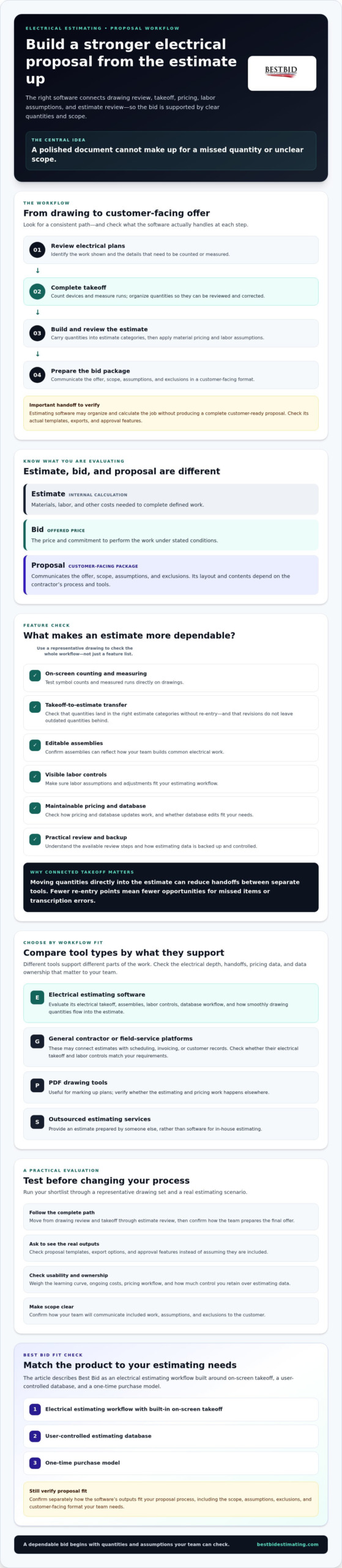
Software for professional electrical proposals should support the work behind a dependable bid: reviewing electrical plans, counting and measuring materials, applying labor and pricing assumptions, and preparing the estimate for submission. A polished document can’t make up for a missed quantity or unclear scope. Look for a consistent path from drawing review to a well-supported price.
A professional proposal pairs that estimate with clear scope, assumptions, exclusions, and customer-facing presentation. Estimating software may support some of these steps, but proposal content and format depend on the contractor’s process and the software’s capabilities. The broader construction bidding process provides useful context for how a contractor develops and submits an offer.
For a quick overview of tools in this category, watch this video:
Estimate, bid, and proposal: how the terms differ
An estimate is the contractor’s internal calculation of the materials, labor, and other costs needed to complete defined work. A bid is the offered price and commitment to perform that work under stated conditions. The proposal is the customer-facing package that communicates the offer, scope, assumptions, and exclusions. Its layout and contents depend on the contractor’s workflow and chosen tools.
That distinction matters: estimating software organizes and calculates the job, but it may not create a complete customer-ready proposal. Before relying on a product for that final step, check its actual outputs. Best Bid’s electrical estimating software is built around electrical estimating and on-screen takeoff. Confirm separately how its outputs fit your proposal process.
Which parts of the proposal workflow can software support?
Electrical estimating tools can help move work through plan review, takeoff, cost calculation, and estimate review. An estimator might measure runs or count devices from drawings, organize quantities, apply labor assumptions, and check the estimate before preparing the bid. Built-in takeoff and direct transfer into the estimate can reduce handoffs between separate tools.
Software doesn’t replace decisions about what work to include, how to explain exclusions, or how to communicate with a customer. General field-service platforms may handle estimates alongside scheduling, invoicing, and customer records, but check their electrical takeoff and labor controls. PDF drawing tools help mark up plans. Outsourced estimating services provide an estimate prepared by someone else, rather than software for in-house estimating.
During a demonstration, ask to see proposal templates, export options, and approval features rather than assuming they’re included. Test the full path from drawing to reviewed estimate, then confirm how your team will turn that estimate into a clear offer.
Which electrical estimating features make proposals more dependable?
Dependable bids start with quantities and assumptions an estimator can check. Prioritize software that lets you count symbols and measure runs on drawings, organize items clearly, and carry takeoff quantities into the estimate without re-entering them. Every handoff creates another opportunity for a missed item or transcription error.
Demo checklist: Verify on-screen counting and measuring, takeoff-to-estimate transfer, editable assemblies, visible labor controls, maintainable pricing and database updates, and practical review and backup processes.
Takeoff, assemblies, and material data
Use a representative drawing to test direct counting and measuring, then check whether quantities are easy to review and correct. Confirm that each takeoff item lands in the right estimate category and that revisions don’t leave outdated quantities behind. A built-in workflow can reduce switching between tools, but judge the review steps, not just the feature list.
Assemblies should reflect how your team builds common electrical work. Ask to modify an assembly and adjust its components without searching through long item lists or losing track of what changed. Then check how material costs are maintained. If real-time pricing through NetPricer matters to your workflow, confirm the integration’s availability and details for the specific software version you’re considering.
Labor, database control, and estimate review
Test labor adjustments on a sample estimate. Can you apply a global adjustment where appropriate while still seeing the underlying labor assumptions for individual items or assemblies? Clear assumptions help estimators review the result and explain how the estimate was built.
Ask whether the database can grow with your material, labor, and assembly requirements, and who controls that data. Confirm how edits are saved, backed up, and shared between estimators. A useful review process should make it straightforward to spot missing items, unusual quantities, or inconsistent costs before a bid goes out. Software can support those checks, but your team still needs to decide who reviews estimates and how changes are approved.
During a demonstration, don’t settle for a polished sample estimate. Bring a drawing your team knows and follow quantities through to the estimate. That reveals whether the workflow fits your actual work and whether another estimator can review it. If you’re assessing tools built around electrical estimating, explore Best Bid’s estimating resources as one point of reference.
How do electrical proposal tools compare with general contractor software?
The right tool depends on the work you estimate, your bid volume, and who prepares the bids. An all-in-one contractor platform may connect estimates with scheduling, invoicing, and customer records. Specialized electrical estimating software may offer deeper controls for takeoff, assemblies, and labor assumptions. Outsourcing can add estimating capacity, but your team won’t have the same direct control over each estimate as it would with an in-house workflow.
Use this comparison to identify what to verify, not to assume every product in a category works the same way.
| Evaluation area | Electrical estimating software | General field-service platform | Outsourced estimating |
|---|---|---|---|
| Electrical depth | Check support for electrical items, assemblies, and estimating logic. | Verify it can handle the detail in your electrical work. | Depends on the estimator’s experience and agreed scope. |
| Drawing takeoff | Test counting, measuring, and quantity review. | Confirm whether takeoff is included or requires another tool. | The estimator performs takeoff as part of the service, if agreed. |
| Labor controls | Review labor units, adjustments, and visible assumptions. | Ask how labor is calculated for electrical work. | Clarify how labor assumptions are set and presented. |
| Pricing data | Check update methods and pricing integrations. | Confirm support for your estimating data and process. | Agree on pricing sources and who verifies them. |
| Proposal handoff | Verify how estimate details move into your proposal process. | Assess how estimates connect to customer and job records. | Set expectations for deliverables and review. |
| Ownership | Check access to and control of estimate data. | Review data access and retention terms. | Your team reviews the completed work and retains agreed files. |
Specialized estimating software versus all-in-one contractor platforms
A connected platform can reduce duplicate entry between office tasks. But administrative convenience isn’t a substitute for electrical estimating depth. Ask the vendor to demonstrate a representative electrical project, including drawing takeoff, assembly changes, labor adjustments, and estimate review. A generic sample may not show whether the software fits your bid workflow. For more context on dedicated options, see this overview of electrical estimating software.
In-house software versus outsourced estimating
In-house software suits teams that want to build internal estimating capacity and maintain direct control of their workflow, provided they have the time and expertise to prepare bids. Outsourced estimating may help during a workload spike or when internal capacity is tight. It can complement an in-house system rather than replace it.
Consider bid volume, schedule, review responsibility, and how estimates fit your process before choosing. No category is automatically best; the right fit depends on your projects and team.
Download as HTML
How can you test software before committing your estimating workflow?
Feature lists describe what a platform claims to do. They can’t show whether your estimators can use it to build and review a real electrical bid. Test software for professional electrical proposals with a familiar drawing set and representative job, then follow the work from takeoff through your customer-facing proposal process.
Run a realistic electrical bid test
Use the same project and assumptions to evaluate each shortlisted tool. Keep notes so you can compare accuracy, clarity, and effort instead of relying on a smooth product demonstration.
- Choose a representative drawing set. Pick a project your team understands, with typical devices, circuits, and assemblies. Agree on the scope and estimating assumptions before testing.
- Complete the takeoff. Count and measure quantities, then review how the software organizes them. Check that corrections are straightforward and quantities transfer into the estimate without avoidable re-entry.
- Inspect labor and database controls. Apply your usual labor assumptions and make a sample database edit. Confirm that estimators can see what changed and understand how those choices affect the estimate.
- Run a second-person review. Have another estimator check quantities, assemblies, labor assumptions, and item organization. Note whether they can follow the estimate and identify omissions without relying on the original estimator to explain every decision.
- Follow the proposal handoff. See how estimate information fits your current proposal process. Ask the vendor to demonstrate any templates, exports, or approval features you need, and verify that those functions are included in the product version you’re evaluating.
Check ownership, adoption, and support
A good workflow must also work for the people who’ll use it. Ask who needs training, what onboarding involves, and what support and update terms apply. Confirm licensing, data access and ownership, backup procedures, and how your team can retain or retrieve historical estimates. Get the details directly from the vendor.
Compare the full commitment, not just the initial purchase. A one-time purchase with updates and support may suit a contractor who values control without recurring software payments. A recurring model may fit another team’s requirements.
Check the actual terms, including what updates and support cover. There’s no universal winner.
Hands-on testing also puts the learning curve in perspective. Let the estimators who will prepare and review bids try the workflow themselves. Their feedback can reveal confusing steps a feature checklist won’t catch. Best Bid also offers training through the Online School for Electrical Estimating. To explore its estimating workflow, review Best Bid’s software information.
Is Best Bid a fit for your electrical proposal workflow?
Best Bid may suit contractors who want electrical estimating tools that connect drawing takeoff with estimate work. Its software includes built-in on-screen takeoff for direct counting and measuring, an assembly-based approach, and an estimating database under the user’s control. Takeoff quantities can transfer into the estimate, helping reduce handoffs between separate tools.
That makes it worth evaluating if you prepare estimates in-house and want electrical-focused functions rather than a general contractor platform. The right fit still depends on how your estimators work and what you need in the customer-facing proposal. Software for professional electrical proposals doesn’t always create the final document, so confirm exactly what each version outputs before buying.
Best Bid capabilities to evaluate against your checklist
During an evaluation, test a familiar drawing and follow quantities through to the estimate. Review how assemblies are organized and adapted, how your team manages its database, and whether the workflow matches your labor assumptions. NetPricer integration is a relevant pricing capability, but confirm its availability and details for the specific version you’re considering.
Compare your findings with the details for Best Bid electrical estimating software and Best Bid Next Generation. Ask which takeoff, transfer, database, and pricing features apply to each product. Also verify proposal templates, file outputs, branding, and approval features directly. Don’t assume they’re included just because estimating functions are available.
Choose a next step that matches your buying criteria
If your estimators will use the software, ask for a demonstration built around familiar electrical estimating tasks. Have the people who prepare and review bids test the workflow, then discuss any gaps between the estimate and your existing proposal process. Best Bid’s software is sold through a one-time purchase model that includes lifetime updates and support without recurring software payments. Review the current terms with the company, including what updates and support cover.
Founder Steve Griffin entered the electrical trade in 1973 and has more than 50 years of industry experience, grounding Best Bid’s work in practical trade knowledge. Still, your team’s own test is the best measure of fit. Consider whether you value control of your estimating database and an ownership model, then weigh those priorities against the features and workflow you need.
Ready to compare your requirements with Best Bid’s tools? Explore Best Bid and raise the workflow questions that matter to your estimating team.
Choose a workflow that makes every bid clearer
The right software for professional electrical proposals should fit the way your team estimates, from plan takeoff and labor assumptions to a clear, reviewable bid. Compare tools with a real project, check how estimate details move into your customer-facing proposal, and confirm which outputs the software supports before you commit.
Best Bid is an option for contractors looking for built-in on-screen takeoff and transfer from takeoff to estimate. Its one-time purchase model includes lifetime updates and support without recurring software payments. Founder Steve Griffin entered the electrical trade in 1973 and brings more than 50 years of industry experience to the work behind the software.
Every estimating team has its own priorities. Match those needs against the workflow, data control, and ownership terms a tool provides. Explore Best Bid’s electrical estimating software and see whether it fits your approach. With a clear process and suitable tools, you can prepare bids with greater clarity and confidence.
Frequently Asked Questions
What is the difference between electrical estimating software and proposal software?
Electrical estimating software helps calculate a job’s materials, labor, and other costs from drawings and estimating assumptions. Proposal software focuses on presenting an offer to a customer, often with scope, exclusions, and other bid details. Some tools support both parts of the workflow, but don’t assume they do. Check whether the product handles electrical takeoff and estimating, then confirm what it can produce for customer-facing proposals.
What features should professional electrical proposal software include?
Look for features that support accurate electrical takeoff and a traceable estimate: on-screen counting and measuring, clear item organization, takeoff-to-estimate transfer, editable assemblies, visible labor controls, and maintainable material pricing and databases. Review processes, backups, and data access matter too. These functions help estimators prepare and check bid information consistently. Confirm which capabilities are included in the specific product version, especially if you need proposal templates or customer approval tools.
Can electrical estimating software create customer-ready proposals?
Some products may support proposal preparation, but customer-ready documents aren’t guaranteed by estimating features alone. An estimate organizes quantities, labor, and costs; a proposal communicates the offer, scope, assumptions, and exclusions to the customer. Ask the vendor to demonstrate the exact handoff you need, including templates, output formats, branding, and approval features. Verify these details for the version you’re considering before relying on the software to produce the final proposal.
Is electrical estimating software better than a general contractor platform?
Not automatically. Electrical estimating software may offer more specific tools for electrical takeoff, assemblies, and labor assumptions, while a general contractor platform may connect estimates with scheduling, invoicing, or customer records. The best fit depends on the complexity of your bids and which tasks your team needs to manage in one system. Test both with a representative electrical project, not just a generic sample, and compare the estimating detail and administrative workflow.
How do I evaluate electrical estimating software before buying?
Test it with a drawing set and estimating scenario your team knows. Complete a takeoff, apply labor assumptions, edit a database item or assembly, and have another estimator review the result. Then check how estimate data moves into your proposal process.
Ask the vendor about training, support, updates, backups, data control, licensing, and any recurring payment obligations. A hands-on team test will reveal workflow and learning-curve issues a feature list may miss.
Does Best Bid charge recurring subscription fees?
No. Best Bid uses a one-time purchase model for its software, with lifetime updates and support rather than recurring software subscription fees. Before purchasing, confirm the current license terms and what updates and support cover. This model may suit contractors who prefer an upfront purchase and control over their estimating workflow, but compare it with your team’s needs, ownership preferences, and the specific product version you plan to use.
Does Best Bid include built-in on-screen takeoff?
Yes. Best Bid software includes built-in on-screen takeoff, allowing estimators to count and measure directly from drawings. Takeoff can transfer into the estimate, supporting a more connected workflow between quantity review and cost calculation.
Confirm the specific features and terminology for the Best Bid version you’re considering, then test the process with a familiar drawing. That’s the practical way to see whether the takeoff tools fit your estimating work.