How to Calculate Conduit Runs Automatically: A Practical Guide

What does it take to learn how to calculate conduit runs automatically without losing control of route decisions? Start by calibrating the plan, tracing each route on-screen, and checking the result. Manual takeoff and re-entry take time, while drawing scale, route changes, and vertical segments can make totals harder to trust. The right tool measures the route you define and calculates its length; it does not make every estimating decision for you.
That distinction is central to a dependable conduit takeoff. Electrical estimating software such as Best Bid supports direct on-screen measuring and conduit length calculations, while leaving route interpretation and review in the estimator’s hands. You decide what to measure, how to group the quantities, and which plan conditions need further consideration.
This guide walks through a practical workflow, from checking the drawing revision and calibrating its scale to measuring conduit paths, organizing quantities, and reviewing results before bid day. You’ll also learn what takeoff software can automate, where your judgment still matters, and how to assess whether an electrical-specific estimating workflow fits your bids.
Key Takeaways
- Learn how to calculate conduit runs automatically by measuring plan routes digitally and organizing the resulting lengths for estimating.
- Calibrate the drawing to its sheet scale before measuring, then account for route changes and vertical segments in your takeoff.
- Compare manual, general-purpose digital, and electrical estimating workflows for repeatability, quantity organization, and revision tracking.
- Before carrying totals into a bid, check the drawing revision, scale, route continuity, exceptions, and quantity reconciliation.
- Electrical-specific takeoff can calculate conduit and wire lengths from screen-based measurements, while estimator review keeps route assumptions visible.
Why calculate conduit runs automatically instead of measuring every route by hand?
The time drain on bid day isn’t just tracing a route once. It’s measuring similar paths across sheets, entering lengths into a separate estimate, then repeating the work when a drawing changes. Each handoff creates another chance to miss a segment or carry forward a quantity from an outdated revision. A digital workflow can reduce repeated arithmetic and keep measurements organized, but it still depends on the estimator defining what belongs in the takeoff.
An automatically calculated conduit run is a route measured on a drawing whose length the takeoff workflow totals and carries into the estimate. When learning how to calculate conduit runs automatically, keep the scope clear: the result is a conduit-route quantity, not a complete installation decision. It does not, by itself, determine conduit material or size, select fittings, calculate wire length, or decide how an installer will route around field conditions.
These quantities are related, but they aren’t interchangeable. Wire length depends on the conductors in the raceway and the path they follow; conduit selection depends on project requirements and specifications. A measured plan route is an estimating input. The estimator still interprets the drawings, identifies scope, and documents assumptions where the plans leave questions unanswered. For background on conduit types and common uses, see Electrical conduit.
What information does a conduit takeoff need?
Start with the electrical plan that shows the route. Confirm the sheet revision and make sure its scale can be calibrated. Identify the route’s intended endpoints, then follow the drawn path rather than measuring a straight line between them.
Project specifications and scope details help establish which runs belong in the estimate. If a route disappears behind a wall, crosses an unclear detail, or depends on information the drawing doesn’t provide, record an explicit estimating assumption instead of presenting a guess as a verified measurement.
Which parts of conduit takeoff can software automate?
Software can support screen-based route measurement, total measured lengths, organize quantities, and transfer takeoff information into an estimate. These are distinct steps: a tool that adds lengths you entered isn’t necessarily measuring the plan route. And a measured line can’t reliably reveal every concealed segment, vertical transition, or field-adjusted path. Flag unusual conditions for review and keep the related assumptions visible.
Automation handles the measurement and arithmetic; the estimator interprets the route. The result is a more repeatable workflow without implying that software can read every design intent or predict installation conditions. It reduces duplicated work while leaving professional judgment in place where the plans need interpretation.
How to calculate conduit runs automatically from an electrical plan
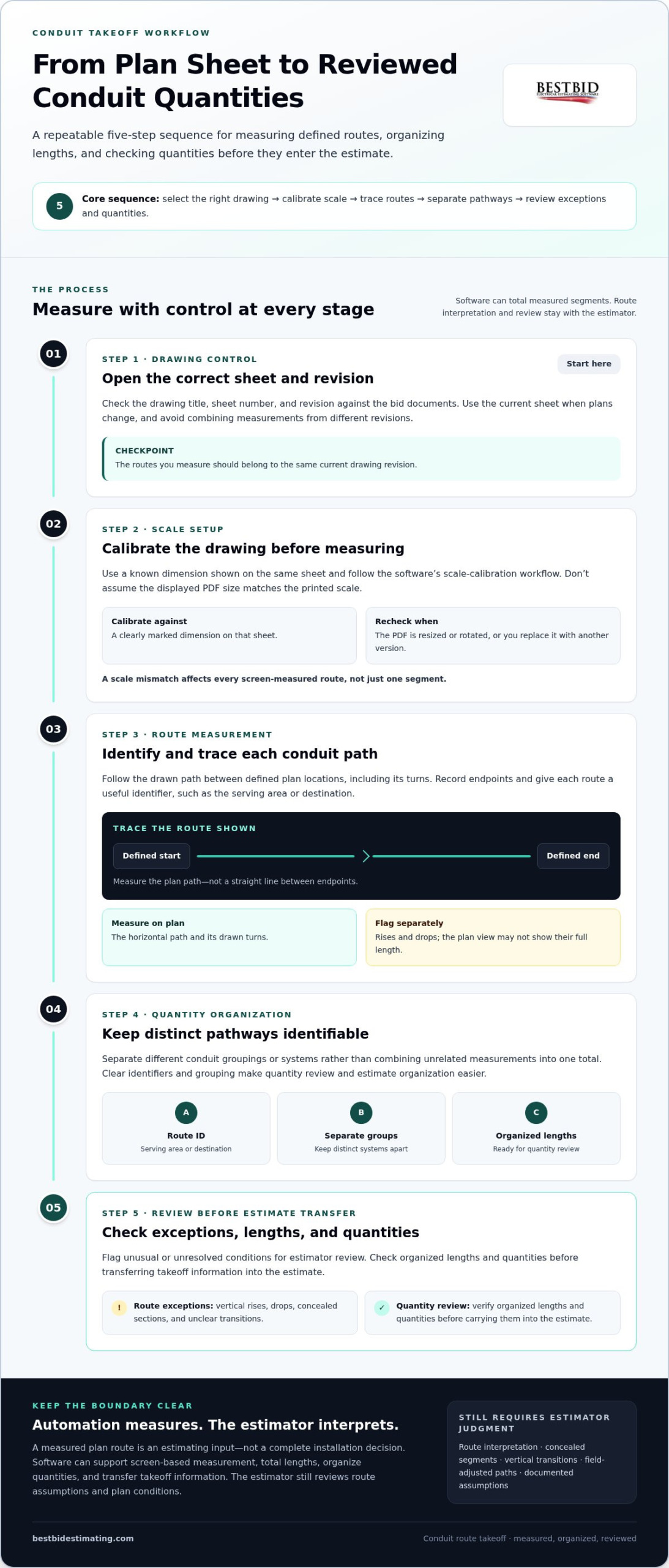
A dependable digital takeoff follows a repeatable sequence: select the right drawing, set its scale, measure defined paths, organize the results, and review the quantities transferred to the estimate. Software can total measured segments, but you decide which route to trace and how to handle details the plan doesn’t resolve. Use the same sequence for each sheet so the takeoff is easier to review and update.
- Open the correct sheet and revision. Check the drawing title, sheet number, and revision against the bid documents. When plans change, use the current sheet and avoid combining measurements from different revisions.
- Calibrate the drawing. Use a known dimension shown on the same sheet and follow the software’s scale-calibration workflow. Don’t assume the displayed PDF size matches the printed scale.
- Identify and trace each route. Follow the conduit path between defined plan locations, including its drawn turns. Give each route a useful identifier, such as the serving area or destination, so you can distinguish pathways later.
- Separate distinct pathways. Keep different conduit groupings or systems identifiable rather than combining unrelated measurements into one total. This makes quantity review and estimate organization clearer.
- Review exceptions and carry quantities forward. Flag vertical rises, drops, concealed sections, and unclear transitions for estimator review. Check organized lengths and quantities before transferring the takeoff into the estimate.
Set up and calibrate the drawing before measuring
Confirm the sheet and revision first. Calibrate against a clearly marked dimension on that sheet, using the software’s scale-calibration workflow rather than relying on assumed menu names. Recheck the calibration if the source PDF has been resized or rotated, or if you replace it with another version. A scale mismatch affects every screen-measured route, not just one segment.
Measure routes and generate conduit length totals
Trace each defined pathway consistently, recording its endpoints and identifier. Measure the horizontal path shown on the plan, and flag rises or drops for separate treatment instead of assuming the plan view captures their full length. The takeoff workflow can total measured segments and group quantities for estimating, but route interpretation remains your responsibility.
Calibrated scale is the foundation of every digital length total: if the drawing scale is wrong, precise tracing still produces the wrong quantity. Before carrying measurements into an estimate, check that route identifiers, segment totals, and flagged exceptions make sense together. Project requirements also guide the estimate’s scope. Consult the applicable documents, including relevant OSHA electrical wiring regulations, rather than treating a takeoff total as a substitute for interpreting requirements.
This is the practical value of learning how to calculate conduit runs automatically: measured paths can flow into organized estimating quantities without repeated manual entry, while you retain control of assumptions and review. Electrical-specific takeoff tools such as Best Bid electrical estimating software support on-screen measurement and conduit length calculations within an estimating workflow.
Automatic conduit takeoff vs. manual measurement: what should you compare?
Comparing takeoff methods isn’t just a question of which one produces a number fastest. Consider how each method captures a route, organizes quantities, handles drawing revisions, and keeps assumptions visible. A manually measured length, a digital line measurement, and an electrical estimating takeoff can all produce totals, but the amount of repeat work needed to turn those totals into a usable bid may differ.
Use these criteria to assess the workflow:
- Manual measurement: You control every measurement and can make an independent check, but must record, total, and re-enter lengths yourself. Revisions can mean repeating several steps.
- General-purpose digital measurement: Screen-based tools can measure plan distances. Assess how easily you can label and group quantities and carry them into an electrical estimate.
- Electrical estimating takeoff: Look for a workflow that connects on-screen measurement with organized electrical quantities and estimate transfer, while letting you review what was measured.
With any method, ask whether another estimator can understand the route identifier, endpoints, and exceptions behind a total. An automated total doesn’t guarantee a correct interpretation of an incomplete or ambiguous plan. For design requirements, consult the applicable project documents and the National Electrical Code (NEC). A takeoff quantity alone doesn’t establish a material choice or installation decision.
When is manual measurement still useful?
Manual measurement remains useful for a small number of unusual routes or as an independent spot check on digital quantities. Record the method, endpoints, and assumptions so someone reviewing the estimate can follow the comparison. The challenge is repetition: as plan scope changes, keeping handwritten notes and re-entered totals aligned with the current drawing takes more effort and can lead to inconsistent updates.
What makes electrical takeoff software a better fit?
Assess whether on-screen measurements flow into electrical estimate quantities without hiding how each route was measured. Keep conduit and wire measurements distinguishable and reviewable, rather than combining them into an unexplained total. A useful on-screen takeoff workflow for electrical plans connects measurement and estimating while leaving route assumptions available for review.
For a fair comparison, test the same drawing area and note what happens when a route changes: what must be measured again, which quantities need updating, and whether the assumptions remain clear. Independently check selected routes, especially where plan intent is unclear. This practical review shows whether automation is reducing repeat work or simply moving manual entry to another step.
To connect on-screen takeoff with estimating, explore the Best Bid electrical estimating workflow.
How to check automated conduit-run quantities before bid day
A calculated total is ready for estimating only after you’ve checked what it represents. Use a consistent review before carrying conduit quantities into the bid. This makes it easier to catch an outdated drawing, a missed transition, or an assumption that was never recorded.
- Confirm the drawing revision. Make sure the takeoff matches the current electrical plan and route notes refer to the same sheet.
- Verify the scale. Check calibration against a known dimension on the drawing. If the source sheet changed, recheck the measurement setup.
- Follow route continuity. Compare the takeoff path with the plan from its starting point to its endpoint, including turns and transitions.
- Review exceptions. Look for vertical segments, offsets, concealed paths, or other project-specific assumptions that need separate consideration.
- Reconcile totals. Compare organized conduit lengths with the related estimate quantities and scope before transferring them forward.
Catch drawing and route errors systematically
Independently remeasure selected routes, paying particular attention to long paths, unusual transitions, and routes affected by revisions. Start and finish at the same clearly identified plan locations as the takeoff, then compare the lengths. If a difference matters to the estimate, investigate it rather than averaging the figures or choosing one without explanation. Check the scale, route turns, and any omitted segment.
Then inspect the path itself. Do the endpoints match the intended locations? Does the measured line follow the drawn route, or has it skipped a transition or included a branch that belongs to another pathway?
Keep unresolved routes marked as assumptions, not confirmed quantities. That distinction helps the next estimator understand what the drawing establishes and what still depends on interpretation.
Reconcile conduit lengths with estimate scope
Compare each organized conduit total with the estimate line items it supports. Confirm that route groupings and descriptions align with project scope. Investigate quantities with no clear estimate line and estimate items with no corresponding takeoff.
Keep conduit length distinct from wire length, fittings, labor, and material allowances. Related costs may depend on the route, but they aren’t the same measurement.
Leave a review trail: record the drawing sheet and revision, route identifiers, scale check, exceptions, and any manual adjustments. If a revised plan arrives, those notes show which quantities may need remeasurement and which assumptions need another look. Reviewable assumptions make automated takeoffs auditable: another estimator can trace how a route became a bid quantity.
Learning how to calculate conduit runs automatically is only part of a reliable bid process; review makes the totals usable. For an electrical estimating workflow that connects screen-based takeoff with organized quantities, explore Best Bid electrical estimating software.
How Best Bid supports automatic conduit-run takeoff
Best Bid’s electrical estimating software connects screen-based measurement with estimating quantities. For conduit runs, you can measure paths on the plan, use software tools to calculate conduit and wire lengths, and carry takeoff information into an estimate. The software supports measurement and calculation; it doesn’t interpret every symbol or identify every route automatically. You decide which path the drawing intends and review conditions that need an estimator’s judgment.
This division of work reduces repeated measuring, totaling, and data entry while keeping the drawing revision, route assumptions, and quantity review in the estimator’s hands. Best Bid’s founder, Steve Griffin, entered the electrical trade in 1973 and brings more than 50 years of electrical trade and estimating experience to the practical orientation behind the software.
Where Best Bid fits into a digital conduit takeoff
Best Bid Hybrid Pro supports estimators who want on-screen takeoff within an electrical estimating workflow. Best Bid’s electrical estimating software includes direct screen-based measuring and built-in takeoff, connecting measured plan routes with organized estimate quantities. You still set route assumptions and check results; the software supports the process rather than replacing plan interpretation.
For example, distinguish measured conduit paths from wire-length quantities as you organize the takeoff, then review how those quantities relate to estimate scope. Clear categories help prevent a conduit-run total from being mistaken for wire quantity, fittings, or another allowance. A readable takeoff gives you and another reviewer a clearer basis for checking what was measured and what needs further consideration.
Move from measured routes to a reviewed electrical estimate
Once routes are measured and grouped, estimate-transfer workflows can carry takeoff quantities forward and reduce repeated entry. Transfer isn’t the final quality check. Review the drawing revision, route identifiers, scale, exceptions, and estimate line items before relying on the quantities in a bid. Pay particular attention to vertical segments or unclear transitions, where the plan may not show the full route.
Use the software to organize measured quantities and carry them forward, not to hide assumptions inside a total. If your current process requires entering the same lengths more than once, an electrical-specific takeoff workflow connects measurement and estimating with fewer handoffs. Learning how to calculate conduit runs automatically means combining digital measurement and calculated totals with a review process you can explain.
Explore Best Bid’s electrical estimating software to see how on-screen takeoff fits into your bid workflow.
Build a stronger process for your next bid
Use your next project to make estimating more consistent, not just faster. Agree on how your team will name routes, record unresolved conditions, and note drawing changes. After submission, capture takeoff questions that caused rework. Those notes can refine your approach on future projects and make handoffs clearer when estimates pass between people.
If you’re deciding how to calculate conduit runs automatically, choose a workflow that supports your team’s measuring and review habits without hiding route assumptions. The goal is a process estimators can use consistently, understand later, and improve as bid requirements change.
Explore Best Bid’s electrical estimating software to connect on-screen takeoff with your estimating workflow. Build a process your team can stand behind, then carry it into the next bid.
Frequently Asked Questions
Can software automatically calculate conduit runs from electrical plans?
Yes. Takeoff software can total lengths measured from an electrical plan, but the estimator needs to identify the route being measured. Treat it as a digital measuring and calculation workflow, not a guarantee that software can interpret every symbol or design condition. For example, measure separate paths to different equipment locations and keep their quantities distinct for review rather than combining them into one unexplained figure.
How do you calculate conduit length from a scaled drawing?
Use a known dimension on the same drawing sheet to set or confirm the measurement scale, then measure along the route rather than across a straight line between endpoints. For a manual check, compare the measured drawing distance with the printed scale and convert it to the represented length. If the PDF has been resized, its displayed size may no longer match the printed scale, so calibrate from a known dimension.
Does conduit takeoff software recognize routes automatically?
Not necessarily. On-screen takeoff lets an estimator trace a route on a plan, and the software can calculate the resulting measured length. That differs from automatic route recognition, where software identifies and follows conduit paths without the estimator defining them. Check what “automatic” means in the workflow: measuring routes you select, totaling measurements you enter, or detecting routes without manual tracing.
How do you check whether an automatic conduit takeoff is accurate?
Check a route against a known dimension or an independent measurement, then compare its endpoints and turns with the plan. If the software total differs, look for scale issues, missed branches, duplicate segments, or inconsistent start and end points. Also compare a route affected by a drawing revision. Record what you checked and any correction so the reason for an adjusted quantity remains clear during estimate review.
Are conduit run length and wire length the same quantity?
No. Conduit length describes the measured raceway path, while wire length refers to the conductor quantity required for the circuit. Their totals can differ because the wire takeoff may account for multiple conductors or portions of a circuit that the conduit measurement doesn’t represent as additional raceway. Keep the quantities separately identified in your estimate and apply project-specific assumptions when determining how each should be counted.
Can Best Bid help calculate conduit runs automatically?
Yes. Best Bid electrical estimating software includes on-screen takeoff and direct screen-based measuring, with tools for calculating conduit and wire lengths. The estimator interprets the plan, defines the routes, and reviews the results. Best Bid Hybrid Pro supports digital takeoff, and estimate-transfer workflows carry takeoff information into an electrical estimate, helping reduce duplicate entry while keeping route decisions under estimator control.
What should I do when a conduit route is unclear on the plan?
Don’t record an uncertain path as though the drawing clearly defines it. Mark the affected location, note what information is missing, and document the estimating assumption used for the takeoff. For instance, if a route disappears between a wall penetration and a piece of equipment, flag that segment for review rather than silently drawing a direct path. Revisit the note if a clearer detail or drawing revision becomes available.