
Oct 29 – ‘Bid process software’ is too vague. Change to: ‘electrical bid process software’

Electrical bid process software helps contractors manage invitations, project files, deadlines, leads, estimates, and submissions in one organized workflow. Rather than tracking opportunities across scattered emails and spreadsheets, teams can keep bid details together and move each project from invitation to submission.
This matters when plans, addenda, estimator notes, and due dates compete for attention. A centralized process makes it easier to identify bids needing follow-up, keep estimate information organized, and prepare submissions using current project documents. This guide explains how electrical bid management tools organize invitations, track deadlines and leads, support estimating, and help assemble bids, so you can assess what suits your workflow.
Key Takeaways
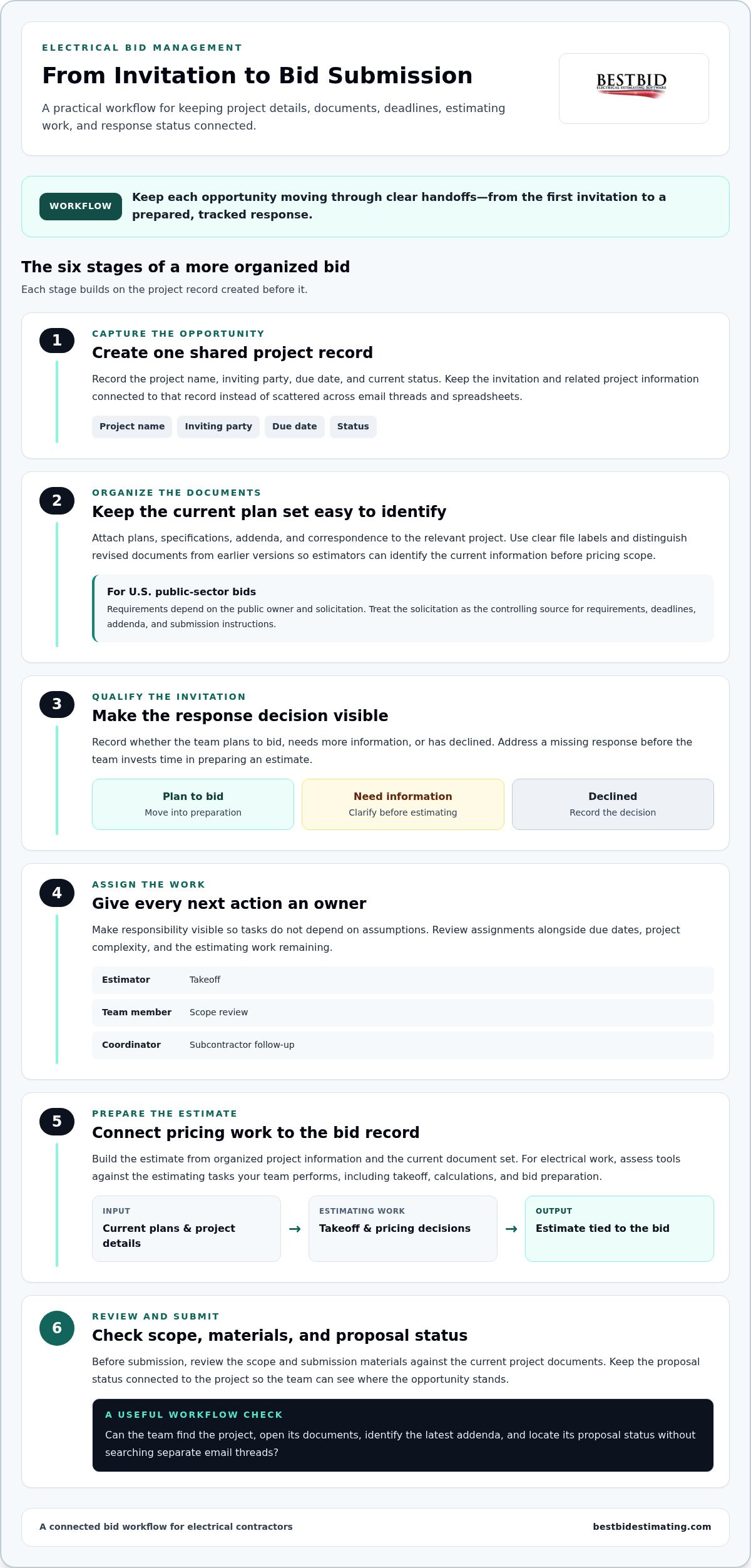
- Track each invitation and response in a consistent workflow so promising projects don’t get lost in scattered follow-up.
- Prioritize bids by due date, project status, and estimator workload to keep deadlines visible and assignments manageable.
- Record lead activity alongside bid details to make follow-up more deliberate and help teams assess each opportunity.
- Build estimates from organized project information, then review the scope and submission materials before sending the bid.
- Choose electrical estimating tools that match how your team handles takeoff, calculations, and bid preparation.
How can software & tools help improve bid management in construction?
Construction bid management software brings project details, invitations, documents, and proposal status into one workflow. For electrical contractors, that creates a clearer path from receiving an invitation to preparing a bid.
Construction Bid Software Basics
These platforms help teams create, track, and manage bids in one place. An effective workflow connects each opportunity to its invitation, project files, due date, estimate, and response status. Before choosing software, map your process from lead review to submission. Then assess whether a platform supports those steps without making estimators maintain duplicate records.
Plan Rooms and Document Versioning
A construction plan room groups plans, specifications, addenda, and related project documents. Version control is essential when a revised drawing or specification changes the scope being priced. Keep the current document set connected to the project and make updated files easy to identify. For example, an estimator reviewing an electrical schedule should be able to tell the latest issue from an earlier file.
Begin invitation tracking by recording the project name, inviting party, due date, and status. Then note whether your team plans to bid, needs more information, or has declined. This gives estimators and managers a shared view of open opportunities and makes follow-up more purposeful. Address a missing response before the team spends time preparing an estimate.
Construction bidding platforms vary in focus. Some emphasize invitation distribution and subcontractor responses, while others support a contractor’s internal bid workflow. Compare how each handles your actual process, not just its feature list.
Can your team find a project, open its documents, see the latest addenda, and locate its proposal status without searching separate email threads? These tasks show whether a platform suits daily bidding work.
Public-sector procurement rules in the United States depend on the public owner and solicitation. Use software to organize published requirements, deadlines, addenda, and submission instructions, while treating the solicitation as the controlling source.
Bid software can organize contract information, but it doesn’t replace negotiation or review. Terms may cover payment schedules, change orders, party responsibilities, and liabilities; keep proposed revisions and decisions tied to the relevant project record.
During a demo, ask the vendor to show how an invitation moves through document review, estimate preparation, and proposal submission. Ask how the platform displays addenda, tracks responses, and records status changes, then compare the workflow with your team’s actual process.
For electrical work, evaluate tools against the estimating tasks your team performs alongside bid tracking. A focused electrical estimating software workflow can connect takeoff and project pricing decisions to the bid being prepared.
Managing bid invitations, projects, workload, and due dates
Once opportunities are logged, contractors need to assign ownership and balance estimating work. A clear project workflow helps general contractors coordinate invitations, subcontractor responses, and internal deadlines.
Bid Documents and Plan Rooms
Keep plans, specifications, addenda, and correspondence attached to the relevant project record. For example, an estimator pricing a school renovation should be able to find the electrical drawings and current addenda without searching email threads. Look for clear file labels, accessible project folders, and a way to distinguish revised documents from earlier versions.
Bid Management and Project Discovery
Project discovery helps contractors find and qualify opportunities before an invitation arrives. Bid management takes over when a project is under consideration, organizing its invitation, workload, deadlines, and submission progress. A general contractor may use discovery to identify a suitable project, then bid management to coordinate subcontractors and track responses. Choose tools based on where your team needs better visibility.
For each opportunity, record who owns the next action. A project manager might assign takeoff to an estimator, scope review to another team member, and subcontractor follow-up to a coordinator. This makes responsibility visible instead of leaving several people to assume someone else is handling a task. Review assignments alongside due dates so workload decisions reflect project complexity and the estimating work remaining.
User permissions help separate responsibilities within a project record. Set access so estimators can work with bid information while managers oversee assignments and project status. Before adopting software, map who needs to view, edit, or share each document.
Then check whether the user controls suit that workflow and whether changes can be traced to a user and time. These controls support orderly collaboration and a useful audit trail.
Bid management, construction bidding, and e-sourcing overlap, but cover different stages. Bid management organizes active opportunities and bid tasks; construction bidding is the broader process of preparing and submitting offers; e-sourcing handles digital purchasing and supplier selection. When comparing platforms, identify which stage needs support rather than assuming one tool covers every procurement activity.
Security, compliance, and audit-trail needs depend on the project owner and solicitation. Look for role-based access, a record of document and status changes, and a way to retain the bid files your team needs for review.
For electrical contractors working with PDF plans, electrical estimating software can be considered alongside the team’s project and document workflow, including Accura Cadd PDF Draw.
Bid deadlines, lead tracking, and reminders
A bid pipeline turns incoming opportunities into visible next steps. For electrical contractors, tracking deadlines, lead activity, and responses helps estimators focus on viable work before bid day.
Start with an online bid board that records each project’s invitation date, due date, estimator, and status. Use consistent stages such as received, reviewing, bidding, submitted, and closed. For example, a project marked “reviewing” needs a go-or-no-go decision, while “submitted” needs its proposal and submission details recorded. This makes the pipeline useful for daily decisions, not just project storage.
Deadlines require more than a calendar entry. Record the submission time, delivery method, and internal review date from the solicitation. Then work backward, setting estimate and scope review milestones before the owner’s deadline. A construction bidding process can take from a few weeks to a couple of months, so distinguish the project timeline from the final submission date.
Use reminders to prompt specific actions, not merely announce an approaching due date. An estimator may need a reminder to finish takeoff, while a project manager may need to confirm scope coverage. Assign each action to a person and link it to the project record. Clear task ownership helps streamline follow-up without relying on one person’s inbox.
Bidder response tracking shows whether invited subcontractors have acknowledged a request, asked questions, or returned pricing. Log each response against the relevant trade package. If an electrical estimate depends on information from another trade, flag the missing response early and assign follow-up. Construction bid management software can centralize invitation details and response status, helping general contractors see where attention is needed.
Coverage tracking answers a different question: does the bid include enough trade participation and pricing for a complete submission? Compare the required scope with responses received, then identify gaps while there is time to address them. Construction bid management software can give general contractors a day or two of lead time to work on coverage gaps before bid day.
Using Best Bid, a typical organization’s previous process for getting a bid out took about three days; that entire bid process was reduced to about one hour, according to infrastructure data coordinators. The example shows why tracking distribution and status together matters. Compare platforms by testing how quickly a user can locate an open project, identify its next deadline, and see outstanding responses. Electrical bid process software should support your actual preconstruction workflow, not create another parallel tracker.
Bid preparation, cost estimates, and submission
A reliable estimate starts with a defined scope and ends with a complete submission. For each construction project, connect takeoff quantities, cost assumptions, review steps, and bid documents.
Bid Preparation and Submission
Begin with the invitation, plans, specifications, and addenda, then confirm the work included in the estimate. Construction bid preparation commonly includes estimated costs, early schedules, project management plans, and intended materials. Organize these elements with the proposal so reviewers can see what the price covers. Before submission, compare the final package with the solicitation’s requested forms and delivery instructions.
Digital takeoff turns plan measurements into quantities for an electrical estimate. For example, an estimator can measure conduit runs and wire lengths from a drawing, then connect those quantities to labor and material assumptions. Keep the source drawing and takeoff notes together. If an addendum changes a route or equipment schedule, revisit affected quantities before using the earlier estimate.
Bid Leveling and Estimate Accuracy
Bid leveling compares estimates against a consistent scope, not just their totals. Align labor, materials, exclusions, allowances, and assumptions before comparing subcontractor pricing. If a proposal omits a defined portion of work, record the gap rather than treating the lower total as equivalent. A structured comparison helps teams identify scope differences and make informed pricing decisions.
Accuracy depends on input quality and the review process. Check that takeoff quantities match current plans, addenda have been incorporated, and labor and material assumptions reflect the estimate’s scope. A second estimator can review unusual quantities or incomplete notes before the proposal is assembled. Documenting revisions also gives the team a clear reason for each changed amount.
Takeoff integrations can reduce duplicate entry when quantities move into pricing or bid management software. A sound workflow is straightforward: create takeoff quantities, review them against the drawing, transfer them into the estimate, and retain the source documents. Compare tools using a real construction project, including how they handle revised quantities and estimate updates. Do not assume every platform connects directly to your other systems.
Integration with ERP, CRM, accounting, and e-procurement systems depends on the platform’s data exchange methods. Map what needs to move, such as project details, customer records, estimate totals, or purchase data, and determine whether it transfers through supported connections, file imports, or manual entry.
Before final submission, assign a reviewer to confirm the scope, arithmetic, attachments, and requested forms. Save the submitted version with its project record so the team can distinguish the issued proposal from working drafts and respond accurately if the owner requests clarification.
Invitation-to-bid distribution and tracking
A well-run invitation process connects project details, the right recipients, and follow-up in one workflow. For electrical contractors, consistent distribution helps prevent missed invitations and makes responses easier to track.
Organize project information before sending an invitation. Attach relevant plans, specifications, scope description, response deadline, and submission instructions. Then identify subcontractors or suppliers suited to the work.
For example, send an electrical package to contacts who handle electrical scopes, not every address in a general contact list. Clear information gives recipients a practical basis for deciding whether to respond.
A connected contact network makes distribution more orderly. Keep company names, contact details, and trade categories current, and link each invitation to its project record. When a general contractor sends an invitation, record who received it and when. This creates a traceable starting point for follow-up and helps distinguish invitations sent to trade partners from those still waiting to go out.
Automation can handle repeatable steps, such as preparing a recipient list by trade category or prompting an estimator to follow up. It should support, not replace, sound judgment. Before sending, review the selected contacts, scope, documents, and deadline.
If an invitation includes revised plans, make sure the files match the intended project version. A brief human review can prevent a distribution error from reaching the whole network.
Track each recipient’s status separately: invitation sent, acknowledged, declined, question received, or proposal received. A subcontractor who acknowledged an invitation but has not returned pricing may need different follow-up from one who declined. Keep questions and responses attached to the project so estimators can find relevant details without searching separate email chains.
Follow-ups work best when they have an owner and a clear purpose. Assign a coordinator to check unanswered invitations while the estimator handles scope questions. Tie each reminder to the response deadline or a missing item, rather than sending the same generic message to every contact. This makes bid management more useful and keeps communication relevant to the project and recipient.
Review the distribution record before bid day. Confirm that each required trade received the correct invitation, note outstanding responses, and flag scope gaps for the estimating team. A consistent tracking routine helps contractors understand where bid coverage stands and which conversations still need attention. To connect electrical estimating work with a more organized bid workflow, explore electrical estimating tools.
Best Bid: Best Bid Next Generation
Best Bid Next Generation gives electrical contractors tools for organizing takeoff, calculations, and detailed project bids. Use it when your team needs electrical estimating software to support the work behind each submission, rather than a general construction workflow.
On-screen takeoff helps estimators work from project documents, while automatic conduit and wire length calculations support quantity development. The software also includes tools for creating detailed bids. Best Bid uses a one-time purchase model with lifetime updates and support, without recurring subscription fees. Accura Cadd PDF Draw offers drawing-based PDF tools, and the Online School for Electrical Estimating supports estimating education.
To explore whether Best Bid Next Generation fits your estimating workflow, visit Best Bid’s website.
Build a bid workflow that fits your team
Decide where a better workflow would make the biggest difference for your electrical team. Is the pinch point sorting new opportunities, coordinating estimator workload, building estimates, or keeping bid information together? Choose a recurring task, map how it moves between people, and identify what information needs to stay accessible at each handoff.
This practical starting point helps you assess whether bid process software supports your team’s actual work. A tool should fit your estimating approach and give staff a clear path through their responsibilities, not add another layer of administration. Bring a real workflow and project example to the conversation so you can focus on the needs that matter to your operation.
Contact Best Bid to discuss your needs and take the next step toward a more workable electrical bidding process.
Frequently Asked Questions
What is a construction bidding platform?
A construction bidding platform is a digital tool for coordinating bid-related work among project owners, general contractors, and trade contractors. Some platforms support opportunity discovery or proposal collection, while electrical bid process software can focus on the estimating behind a trade bid. For example, an electrical contractor might track an opportunity in one system and prepare its detailed estimate in another. Identify the users and workflow before comparing tools.
Can I get expert help selecting the right bid software?
Yes, an experienced electrical estimating professional can help match software capabilities to your actual process. Bring a representative project and explain how your team handles takeoff, labor assumptions, material pricing, and bid review. Ask the expert to walk through those tasks rather than give a generic feature tour. Best Bid’s Online School for Electrical Estimating can strengthen estimating knowledge and help you make more informed software decisions.
Does bid management software work with the subcontractors I already use?
A platform can support existing subcontractor relationships if your workflow lets you keep familiar communication methods and record responses consistently. Before adopting a platform, list your subcontractors and how each receives plans, asks questions, and returns pricing. Then test a real invitation with a current trade partner. Check whether the process accommodates their response method rather than assuming every subcontractor will adopt a new account or portal.
How can I stay updated on bid software news and trends?
Follow product release notes, software training updates, and trade education relevant to your estimating work. Keep a brief review routine: note changes that might affect takeoff, data handling, or proposal preparation, then test relevant updates on a sample project before changing the team’s standard workflow. Estimating education can also help electrical contractors judge whether a new feature addresses a real bottleneck or merely adds another tool to manage.
What is bid process software and who uses it?
These tools organize activities related to evaluating opportunities and preparing or managing bids. General contractors may use them to coordinate procurement, while subcontractors and electrical contractors use them to support estimating and proposal work. The right fit depends on the user’s role: an electrical estimator needs accurate trade-specific quantities, while a project owner may focus on receiving and comparing submissions. Clarify the job before selecting software.
What are the best bid management software platforms in 2026?
No single platform fits every construction bidding role. Electrical contractors comparing estimating tools can evaluate Best Bid Next Generation and Best Bid Hybrid Pro using a representative takeoff and estimate. General contractors managing procurement may need a different workflow from trade estimators. Compare platforms by role, estimating method, document needs, and fit with the team’s existing process.
What features should buyers compare in bid process software?
Compare capabilities with the work your team performs, not a long feature checklist. Electrical estimators can assess on-screen takeoff, conduit and wire length calculations, estimate organization, and tools for detailed project bids. Also consider how staff handle revisions, maintain estimating information, and review work before submission. Use the same sample drawing and scope across options to make workflow and output differences easier to see.
What steps are involved in managing an RFP or bid using software?
First, enter the opportunity and identify its owner, scope, and submission requirements. Assign the necessary review and estimating tasks, and keep relevant correspondence with the project record. Build the estimate from the applicable scope, review exclusions and assumptions, then assemble the requested proposal materials.
Before submission, compare the package with the RFP instructions. Record the issued version and any follow-up so the team can respond from a clear project history.






 Electrical contractor reviewing project costs after winning a construction bid