Automating Electrical Material Lists from Takeoff: The 2026 Contractor’s Guide

What if the fastest way to build an electrical material list wasn’t counting symbols faster, but connecting each takeoff to the materials and pricing behind it? If you’ve ever rechecked conduit and wire lengths or copied quantities into a separate pricing sheet as bid day approaches, you know how easily manual steps create stress and costly gaps. Automating electrical material lists from takeoff means linking digital plan quantities to electrical assemblies and material costs, while keeping an estimator in control of the result.
This guide explains how to move from blueprint takeoff to a priced material list with less repetitive data entry and quantities that are easier to review. You’ll learn how to calculate conduit and wire lengths, connect takeoff symbols to materials, and keep pricing aligned. You’ll also see how electrical-specific software, including Best Bid, can bring takeoff and estimating together without a recurring software subscription.
We’ll walk through the workflow, explain where automation helps and where an experienced estimator still matters, and cover practical checks to make before a bid goes out. Faster bids, clearer counts, and more control over your work start with a connected process.
Key Takeaways
- See how digital takeoff can turn plan counts into a structured Bill of Materials.
- Learn how assembly-based takeoff connects a selected symbol to a component list you can adapt to the project.
- Compare AI symbol recognition with estimator-led automation, and understand why you should review automated results.
- Follow practical steps for automating electrical material lists from takeoff, from choosing electrical-specific software to checking the finished list.
- Explore how Best Bid Next Generation combines built-in OST with estimating tools informed by founder Steve Griffin’s more than 50 years in the electrical trade.
The Evolution of Electrical Takeoff: From Highlighters to Automation
Electrical takeoff has moved from paper plans, highlighters, and handwritten counts to digital workflows that can turn plan quantities into a structured Bill of Materials (BOM). A BOM is a detailed list of the materials required for a project, similar in purpose to a bill of quantities. But a faster symbol count alone does not make a reliable estimate. The key is connecting each takeoff to the components, assemblies, and pricing needed to build a bid.
Rushed entries, missed symbols, and outdated material costs can all affect a bid. Generic PDF markup tools can help you measure and mark plans, but they may leave you to transfer counts, define assemblies, and price materials elsewhere. Each handoff adds work and another opportunity for an error. Electrical estimating software can connect takeoff and estimating, helping you move from counting symbols to building material assemblies that reflect the installation.
For a look at how integrated construction software connects estimating and back-office workflows, watch this demo:
Why Manual Spreadsheets Fail the Modern Contractor
Spreadsheets are flexible, but they rely on careful data entry and intact formulas. A value pasted into the wrong cell or a broken formula can change a total without being obvious. Even when the takeoff is correct, quantities may take time to transfer, check, and match with material prices.
Static pricing can also fall out of date. The result may be a bid built from information that is not current or consistent.
The Role of On-Screen Takeoff in Automation
With on-screen takeoff (OST), you count or measure directly on a digital plan. In an integrated electrical estimating workflow, a takeoff item can be tied to a database entry or assembly, reducing the need to enter the same quantity again during bid preparation. Built-in OST keeps takeoff and estimating together; using separate tools can create another handoff to manage. Best Bid software includes built-in OST, bringing plan takeoff and electrical estimating into one workflow.
Automating electrical material lists from takeoff still leaves the estimator in charge. Review the plan, confirm that the selected assembly fits the installation, and adjust it for project requirements. Automation can organize the work, while trade judgment keeps the list grounded in the job.
A count is only a starting point. A useful material list connects what’s shown on the drawings to what the crew will need to install.
How Automation Transforms Takeoff into Accurate Material Lists
A symbol count tells you how many devices appear on the plan. An assembly-based takeoff goes further: select a receptacle symbol, and its linked assembly can populate the estimate with defined components, such as a box, device, cover, and installation materials. The estimator can review the package against the drawings and project scope instead of rebuilding the list item by item.
An assembly should be adaptable, not a black box. If the job calls for a different box type or wiring method, a flexible workflow lets you adjust the assembly and update the resulting quantities. This approach keeps the takeoff tied to the project rather than applying the same package to every plan. It also gives the estimator control over what gets counted.
Automatic Conduit and Wire Length Calculations
Automatic conduit scaling uses the drawing scale and defined parameters to calculate linear footage. Depending on the software and setup, measured runs can include configured allowances for vertical drops or waste, reducing repetitive hand calculations. Check the drawing scale, trace the intended route, and verify assumptions such as risers, offsets, and routing changes. A screen measurement is only as dependable as the drawing and parameters behind it.
The Power of Electrical Assemblies
Assemblies turn takeoff clicks into coordinated material quantities. Instead of counting a receptacle box and separately adding every related item, select a defined receptacle assembly and review its components in the estimate. Pre-built assemblies can reduce repetitive clicks, but only when they are set up accurately.
Confirm that fittings, fasteners, connectors, and wire nuts match the installation. Do not assume a template covers every field condition.
After you review quantities and assemblies, connected pricing can bring material costs into the estimate. Best Bid software integrates with NetPricer for real-time material pricing. Check that the feed covers the items you need, then review substitutions and project-specific requirements. Connected pricing can narrow the gap between takeoff and bid, but the estimator still needs to verify the costs and assumptions.
Database flexibility matters as much as speed. Choose a system that lets your team maintain relevant items and assemblies, and understand how project data is stored, backed up, and exported. The ELECTRI International research program examines technology and business practices affecting electrical contractors. When assessing new tools, compare their features with your actual estimating workflow, not just a checklist.
For a connected workflow, explore electrical estimating software that brings on-screen takeoff and estimating together. The goal is not to surrender judgment to automation. It is to spend less time re-entering quantities and more time validating a material list that reflects the job.
AI-Driven vs. Assembly-Based Automation: Which Is Right for You?
AI can recognize symbols quickly, but a recognized symbol is not automatically a complete, bid-ready material list. A receptacle on a plan still needs the right box, wiring method, fittings, and project-specific adjustments. Treat AI recognition as a possible starting point, not a substitute for an estimator’s review. Assembly-based automation takes a different approach: the estimator selects or verifies a defined material assembly, then adapts it to the job.
A plan may not show every routing condition, and a standard assembly may not fit every specification. Steve Griffin brings more than 50 years of experience as an electrician, estimator, project manager, and contractor to Best Bid’s software design. That practical background supports an approach to automation that reduces repetitive work while keeping the estimator responsible for scope, assumptions, and final quantities. Consistent, reviewable methods matter in estimating, a principle also reflected in the government cost estimating system requirements.
Evaluating Workflow Speed and Accuracy
For a small or mid-sized shop, estimating time competes with other work. Best Bid Next Generation is rated five stars for workflow speed, but speed only helps if the takeoff can be checked and corrected. When evaluating a tool, ask how it handles uncertain symbols, unusual conditions, and exceptions. If a process includes review by another person or provider, check the expected turnaround rather than assuming results will be immediate.
Keep an override in the workflow. If a field condition calls for a different conduit route or assembly, the estimator should be able to revise quantities and document the assumption. Automation should support trade judgment, not lock it out.
The “Buy It and Own It” Advantage
Subscription pricing makes software access an ongoing expense. A one-time purchase separates the software license from recurring charges for other services or data feeds. To assess long-term value, compare the purchase terms with any recurring software fees, support costs, required add-ons, and the time your team spends maintaining estimates. Check what the license includes, including user access, updates, support, and connected services.
Best Bid uses a one-time purchase model for its estimating software, with lifetime updates and support and no recurring software subscription fees. That can suit contractors who want to avoid ongoing software payments while keeping control of their estimating process and database. Review the details on the Best Bid pricing page and compare them with your workflow. The right fit saves estimating time without taking final decisions out of your hands.
When automating electrical material lists from takeoff, weigh more than recognition speed. Check review controls, assembly flexibility, pricing connections, data access, and the full cost of ownership. The right automation works with your estimator, not around them.
Download as HTML
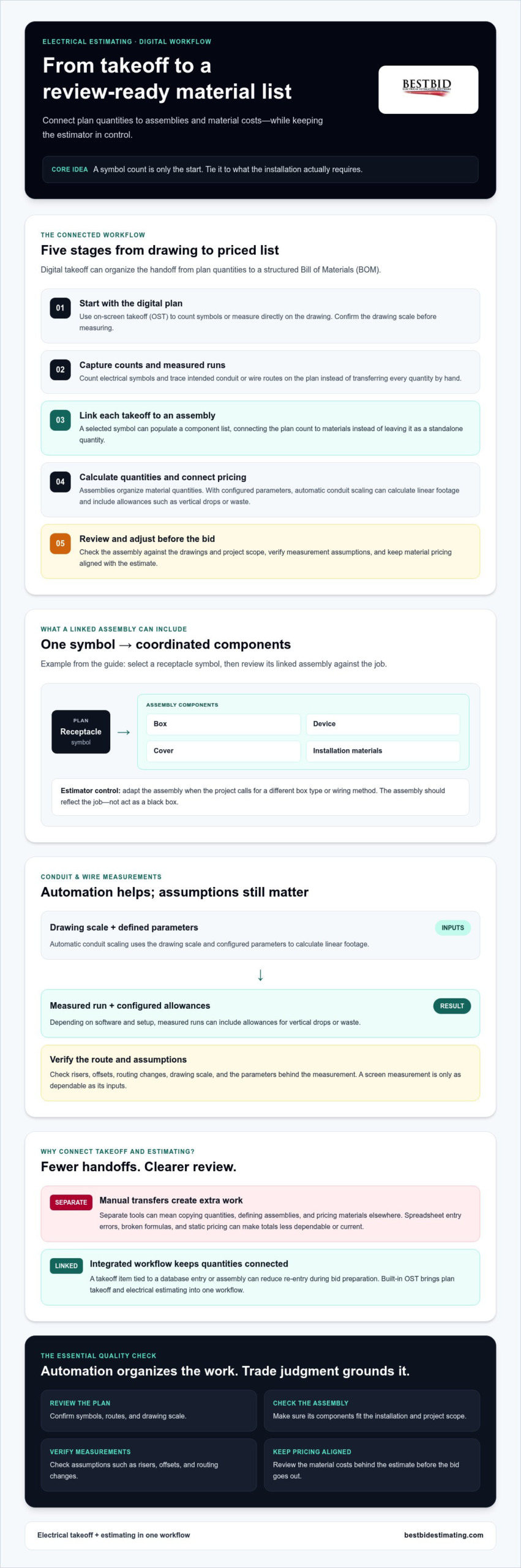
5 Steps for Automating Electrical Material Lists from Takeoff
A reliable automated workflow connects plan quantities to electrical assemblies, checked lengths, and material pricing. The estimator still reviews the result. Use these steps to reduce repetitive entry without giving up control of the bid.
- Set up your assembly database. Start with electrical estimating software that includes on-screen takeoff (OST) and an electrical material database. Review standard assemblies and adapt them to your company’s installation practices. Check that labor units reflect your own historical performance rather than assuming a default fits every crew. Before choosing a system, find out how to add or edit items and whether database size or customization has limits or added charges.
- Perform the digital takeoff. Calibrate the drawing scale, then count devices and trace runs directly on the plan. Use assembly-based counting so a receptacle takeoff connects to its defined material package instead of requiring each component to be entered separately. Review symbols and assemblies as you go, especially where plans leave room for interpretation.
- Verify lengths and quantities. Let the software handle measured runs and linked quantity calculations, but check the assumptions behind them. Confirm the drawing scale, conduit routes, vertical drops, and any waste allowances used in the estimate. Compare unusual totals with the plans and project specifications. Automation handles the arithmetic; your review catches a missed riser or an assembly that does not match the installation.
- Connect material pricing. Best Bid integrates with NetPricer for real-time material pricing. Check which items and suppliers are covered, how often pricing is updated, and whether prices reflect your purchasing arrangements. Do not rely on old average costs for materials such as copper without checking current pricing. A connected feed can inform the estimate, but verify exceptions and substitutions before bid day.
- Export and review the Bill of Materials. Generate the material list from the checked takeoff, then review quantities, descriptions, units, and costs before using it in the bid. Look for duplicate items, missing components, and unexpected totals. Save or export the final list in a format your workflow supports, and retain the project assumptions so the estimate can be reviewed later. Once your Bill of Materials is approved and ready for procurement, check out South Control Electrical Accessories LLC to source commercial electrical and electronic products.
This is the practical value of automating electrical material lists from takeoff: fewer repeated entries, a clearer path from plan to priced materials, and an estimator who stays responsible for the final call. Best Bid also offers training through Best Bid Academy for contractors who want to build estimating skills and improve their bidding workflow.
Winning More Bids with Best Bid Next Generation
For an electrical shop, estimating software needs to fit the way the team bids: move from digital plans to a reviewed estimate, adjust materials to the project, and keep the estimator in charge. Best Bid Next Generation combines built-in on-screen takeoff (OST) with electrical estimating tools, so the workflow does not depend on separate takeoff and estimating programs.
That practical focus reflects founder Steve Griffin’s more than 50 years of experience as an electrician and contractor. Software shaped by trade experience can support the decisions a symbol count alone cannot make, such as whether an assembly suits the installation or a plan detail needs closer review. Automation should shorten repetitive steps, not replace the judgment that protects a bid.
From the Trenches: Why Field Experience Matters
A direct path from OST quantities into an estimate helps reduce re-entry and makes it easier to review how takeoff decisions affect material totals. Backup practices matter, too: understand how project files are saved and restored before relying on any estimating system. Best Bid Next Generation offers one-click backup and fast transfer of OST data into an estimate. Learn more about Best Bid Next Generation and its estimating workflow.
Teams adopting a new system should set aside time to configure familiar assemblies and learn the steps they use most. Best Bid’s Online School for Electrical Estimating offers training to help contractors strengthen estimating skills. Once the database and process are configured, users can follow a repeatable workflow rather than starting each bid with disconnected counts and manual entries. Review a sample project before making any new system part of your bid-day routine.
The Best Value for Small-to-Medium Contractors
Best Bid uses a one-time purchase model for its estimating software, giving contractors an alternative to recurring software subscription fees. Compare the full terms, including what the purchase includes and how updates and support are handled. NetPricer integration provides real-time material pricing. Check the current capabilities and terms for connected pricing as part of your budgeting.
Real value comes from matching the tool to your shop. If built-in OST, electrical-specific estimating, and control over your workflow are priorities, explore Best Bid estimating software and assess how it fits the way your team prepares bids. The goal of automating electrical material lists from takeoff is to give estimators a faster, more connected process while leaving them the final say on the work.
Build Your Next Bid with More Confidence
Accurate estimates rely on more than fast symbol counts. They depend on connected takeoff, well-built electrical assemblies, current material pricing, and an estimator who checks the details. Automating electrical material lists from takeoff can cut repetitive work while keeping those decisions in your hands.
Best Bid Next Generation brings built-in on-screen takeoff and electrical estimating into one workflow. Its design draws on founder Steve Griffin’s more than 50 years of electrical trade experience. Best Bid’s software is sold with a one-time purchase, lifetime updates, and support, without recurring software subscription fees.
Ready to move beyond disconnected counts and spreadsheets? Explore Best Bid Next Generation and take ownership of your estimating workflow. Pair a connected takeoff process with your trade judgment to approach the next bid with greater clarity and confidence.
Frequently Asked Questions
Can I automate material lists without a monthly subscription?
Yes. Best Bid electrical estimating software uses a one-time purchase model, with no recurring software subscription fees. It includes built-in on-screen takeoff and estimating features, so you can connect plan quantities to material lists without a separate OST tool.
Check the terms for any connected third-party services, such as material pricing, separately. This helps distinguish the software license from other services in your estimating workflow.
Does Best Bid Next Generation include built-in on-screen takeoff?
Yes. Best Bid Next Generation includes built-in on-screen takeoff, allowing you to count symbols and measure directly from digital plans within the estimating workflow. This helps reduce re-entering quantities between separate takeoff and estimating tools.
You’ll still need to set the drawing scale correctly, choose or confirm assemblies, and review the resulting quantities. Built-in OST makes the workflow more connected, but the estimator remains responsible for checking the takeoff against the plans.
How does the software handle conduit and wire length calculations?
Best Bid includes tools for automatic conduit and wire length calculations. Measure runs from the digital drawing using its scale, then review the calculated footage and the assumptions used. Account for routing, vertical drops, and project-specific allowances as appropriate. Do not treat an automated measurement as a field-verified route: confirm the drawing scale and check unusual runs or plan details before relying on the quantities in a bid.
Is it possible to integrate real-time material pricing into my takeoff?
Yes. Best Bid’s estimating software integrates with NetPricer for real-time material pricing. Connecting material costs to the estimating workflow can help keep the priced list aligned with current data rather than static spreadsheet values.
Check supplier coverage, update timing, and any separate service terms before depending on the feed. Review substitutions and project-specific purchasing conditions as well, since connected pricing does not replace estimator verification.
What is the learning curve for automating electrical estimates?
Best Bid describes its software’s learning curve as low to medium. Your team will still need to learn the takeoff workflow, set up assemblies, and understand how quantities transfer into the estimate. Start with a familiar project and check the output against a completed bid. That hands-on practice helps estimators build confidence without treating automation as a substitute for reviewing scope, labor assumptions, and material quantities.
Can I customize the material database in Best Bid?
Yes. Best Bid provides an unlimited database with user control, allowing contractors to manage material items and assemblies for their estimating workflow. Add relevant items and adjust assemblies to better reflect project requirements and company practices.
Before adopting a database structure, agree on naming and update practices within your team. Consistent entries make it easier to find the right item and keep estimates clear from project to project.
How does assembly-based takeoff differ from symbol counting?
Symbol counting records how many devices appear on a plan. Assembly-based takeoff links a counted symbol to a defined group of related materials, so selecting a receptacle can populate its associated components rather than requiring each item to be added separately. Review the assembly to confirm it fits the installation and project specifications. Best Bid’s workflow also allows assemblies to be adapted, keeping the estimator in control rather than relying on an unreviewed symbol-recognition result.
What happens to my data if I stop using a subscription-based tool?
Data access after cancellation depends on the provider’s contract and system. Before subscribing, ask how long you can access projects after cancellation, whether you can export estimates and databases, and which file formats are available. Keep approved backups and test an export before you need to leave.
Best Bid’s one-time purchase model avoids recurring software subscription fees. Review the license terms and backup practices to understand how your files are managed.