Electrical Project Documentation Tools: 2026 Guide

Why are you paying a “rent” on the software you use to document your own hard work? Your project records are the only thing standing between a profitable closeout and a legal nightmare, so why is the software used to create them priced like a utility bill you can never pay off? Most electricians agree that documentation is the least favorite part of the job, yet it’s the most critical for protecting your profit. Between fighting with inaccurate as-builts and wasting hours on manual panel schedules, it’s easy to see why many feel overwhelmed by the digital side of the trade.
Finding the right electrical project documentation tools shouldn’t mean adding another heavy layer of monthly overhead to your business. This 2026 guide will show you how to take back control. You’ll learn how to streamline your workflow with tools that offer professional PDF markups and precise records without the burden of a subscription. We’re diving into how you can secure faster project closeouts and maintain permanent records that you actually own, ensuring your digital toolbox is as reliable as the physical one in your truck.
Key Takeaways
- Learn how to stop manual documentation from eating your profits by transitioning to a streamlined, digital record-keeping system.
- Identify the essential electrical project documentation tools needed for professional PDF markups, layering, and precise as-built drawings.
- Master the art of professional panel scheduling to eliminate circuit identification errors and ensure faster project closeouts.
- Discover the massive long-term ROI of the “buy it and own it” model compared to the high cost of recurring software subscriptions.
- Explore how field-tested tools designed by industry veterans can standardize your workflow and provide accurate, permanent records you actually own.
The Role of Documentation in Modern Electrical Projects
Most contractors think of documentation as a chore they tackle after the “real” work is finished. That’s a fundamental mistake. In reality, your electrical drawing sets and submittals are the backbone of your project’s financial health. Documentation isn’t just about showing where a wire goes; it’s about proving what you did and why you should be paid for it. It’s the difference between a profitable closeout and a project that drags on with unpaid extras.
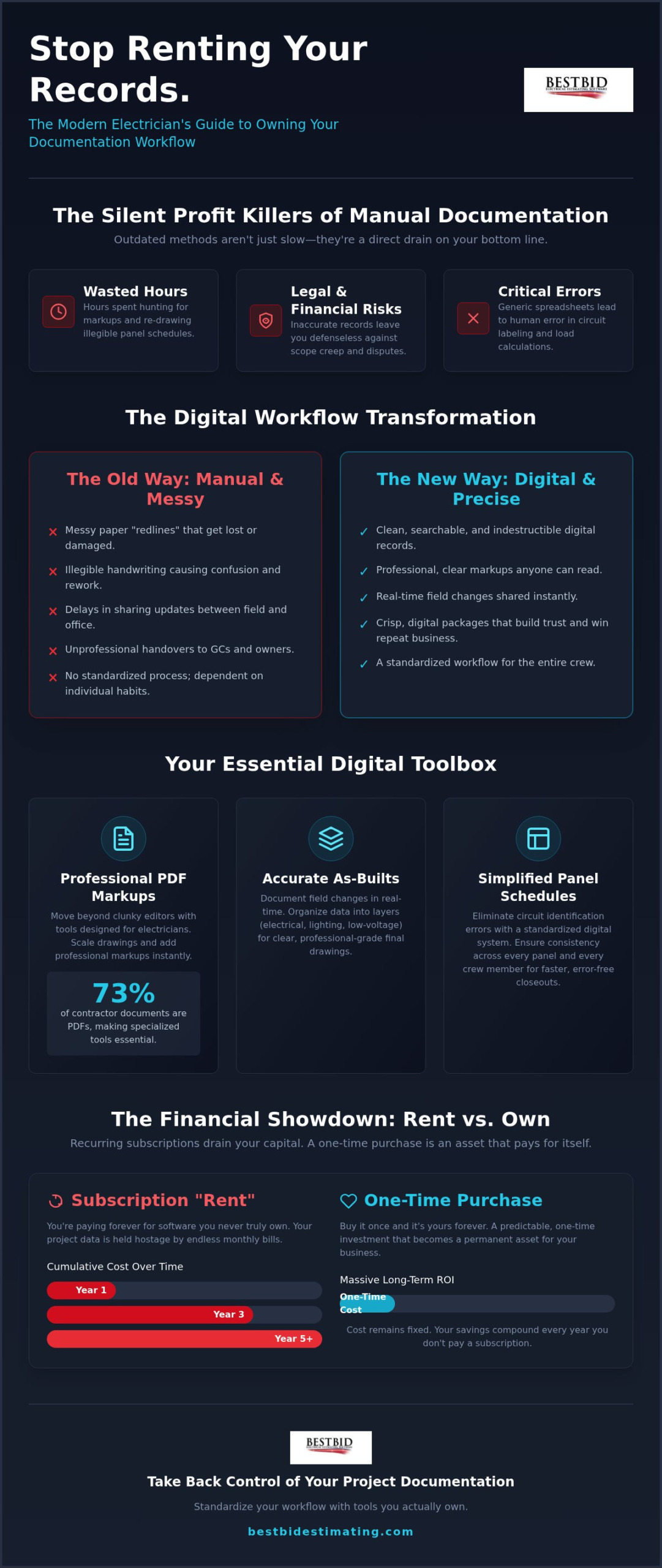
Documentation covers the entire lifecycle of a job, starting with initial submittals and ending with final as-built drawings. When you handle this manually, you’re bleeding money. Think about the hours spent hunting for a specific markup or re-drawing a panel schedule because the original handwriting was illegible. These are the silent profit killers. Modern electrical project documentation tools turn these hours of administrative headache into minutes of productive work. They allow you to transition from messy paper “redlines” to clean, digital project assets that you can share instantly.
Professional documentation also changes how you’re perceived by General Contractors (GCs) and owners. When you hand over a crisp, digital package, you build immediate trust. It shows you’re an expert who values precision. It makes their job easier, which means you’re the first person they call for the next project.
The Legal and Financial Importance of Accuracy
Accuracy is your best defense against scope creep. When a GC asks for “one small change,” an updated as-built is your evidence for a change order. Following IAEI standards and local codes requires precise records that prove compliance during inspections.
Project documentation serves as a permanent record of liability and labor, protecting your business long after the crew leaves the site. Without these records, you’re essentially working on a handshake that can’t be defended in a dispute.
Moving Beyond the Spreadsheet
Using generic office tools or spreadsheets for specialized electrical data is a recipe for disaster. Spreadsheets don’t understand circuit loads or wire types, which leads to human error in labeling that can haunt a project for years. Dedicated electrical project documentation tools provide a standardized framework. This ensures every crew member, from the apprentice to the foreman, follows the same process. Standardization means that if a foreman is out sick, the rest of the crew can pick up exactly where he left off without guessing which circuits have been identified. You need a system that ensures consistency across every floor and every panel.
Essential Tools for Accurate As-Builts and PDF Markups
Why is the PDF the king of the jobsite? It’s simple. Everyone has a reader, and the format doesn’t break when you send it across different devices. Research shows that PDF remains the most common file format for contractor documents, accounting for 73% of all project files. However, just having a PDF reader isn’t enough for a professional shop. You need specialized electrical project documentation tools that allow you to interact with those plans in a meaningful way. Physical blueprints are a relic that leads to lost data and damaged records. Digital redlining gives you a clean, searchable, and indestructible record of exactly what was installed.
Most general-purpose PDF editors are too clunky for the field. They lack the specific features an electrician needs, like measurement scaling or specialized symbol libraries. Using Accura Cadd PDF Draw simplifies the entire plan review process. It allows you to scale drawings quickly and add markups that look professional rather than hand-drawn. This level of detail is critical for meeting the OSHA General Requirements for Electrical Systems, which mandate clear identification and safe installation practices. If your documentation is sloppy, your compliance is always in question. If you want to see how these tools fit your workflow, you can explore our full suite of contractor solutions.
Mastering Digital Redlines
Documenting field changes in real-time is the only way to ensure 100% accuracy. If you’re waiting until Friday to mark up your changes, you’re guessing. Digital tools allow you to organize data into layers.
You can isolate electrical, lighting, and low-voltage data on separate planes within the same file. This organization is vital for exporting professional-grade as-builts that GCs actually want to read. It makes the final project closeout seamless and protects your bottom line by providing an undisputed record of work performed.
Symbol Libraries and Standardization
Drafting from scratch is a waste of your time. You’re an electrician, not a graphic designer. Using pre-built electrical symbols allows you to drop standardized icons onto your plans in seconds. This ensures consistency across every phase of the project, even if different crew members are handling the markups. For a reliable, field-tested way to manage these drawings, Accura Cadd PDF Draw serves as the core solution. It’s about working smarter to produce a permanent record you can be proud of without the headache of manual drafting.
Simplifying Panel Schedules and Circuit Identification
Why do so many contractors treat panel schedules like an afterthought? It’s usually the last task on a long Friday. You end up with chicken-scratch handwriting on a flimsy piece of cardstock that nobody can read. This “lost art” of professional scheduling is actually a critical part of your electrical project documentation tools. When a circuit is misidentified, it leads to expensive service calls and safety hazards. Legible, professional labels reflect your brand’s quality. They tell the customer you care about the details they can see. If the panel looks like a mess, they’ll assume the wiring behind the walls is a mess too.
Using an automated Panel Scheduler prevents the data entry errors that ruin manual methods. The software tracks your assignments so you don’t double-book a circuit by mistake. This produces a clean, printed record that fits perfectly in the panel door. It’s a professional touch that separates you from the competition. You aren’t just labeling wires; you’re signing your name to the quality of the installation.
Automating the Scheduling Process
Digital schedules replace those crumpled field notes with a clean interface. You can manage load balancing and circuit descriptions in one place without flipping through a legal pad. This ensures the panel is efficient and organized from day one. For a deeper look at how to master this workflow, check out our Electrical Panel Schedule Software Guide. It walks you through the transition from field notes to final submittals. Digital tools stop the “human error” cycle before it starts, saving you from embarrassing mistakes on the final walkthrough.
Long-term Maintenance and Troubleshooting
Accurate schedules are more than just a convenience. They are essential electrical project documentation tools for long-term maintenance. When a technician comes back for service years later, a precise schedule cuts troubleshooting time in half. You’re providing a real asset to the building owner. Integrating this data into your final submittal package makes your closeout look like it came from a much larger shop. It builds a reputation for precision that keeps your phone ringing. It’s about building a legacy of quality that lasts as long as the building itself.
Subscription vs. One-Time Purchase: The Long-Term ROI
Why are software companies acting like landlords? For most shops, software is one of the biggest overhead costs after labor and materials. The “Subscription Trap” is real. You sign up for a low monthly fee, but over five years, you’ve paid for the software ten times over. When it comes to electrical project documentation tools, the industry is shifting toward recurring revenue models that favor the developer, not the contractor. For a single-location shop, this is a drain on profits that could be reinvested in better equipment or more crew members. It feels like you’re renting your own productivity, and that isn’t right.
Let’s look at the numbers. A typical 5-user license with high-end competitors can run you anywhere from $15,000 to $60,000 every single year. In contrast, you can secure a 5-user license for approximately $2,500 as a one-time investment.
That is a massive difference in your bottom line. “Buy it and Own it” isn’t just a catchy phrase; it’s a profit-protection strategy. You get lifetime updates and technical support without a monthly bill hanging over your head.
It’s about building a modern system that doesn’t punish you for growing. We believe you should own the tools you use to build your business, just like you own the tools in your pouch.
Calculating the True Cost of Software
Many tools look affordable until you factor in mandatory upgrade fees and training costs. Cloud-only platforms often hold your data hostage. If you stop paying, you lose access to your project history. When you compare Accubid vs Best Bid pricing, it becomes clear that owning your tools is the only way to ensure long-term value. You shouldn’t have to pay a toll every time you want to open an old project file. True ROI is measured over years, not months, by keeping your overhead low and your efficiency high.
Data Ownership and Security
Owning your database is critical for long-term project history. If a dispute arises three years after a job is finished, you need 1-click access to your records. Local backups give you peace of mind that a server outage or a missed payment won’t lock you out of your own business. It’s about security and permanence. You can view our transparent pricing model to see how we help you keep your money in your pocket. This approach ensures that your hard-earned data remains your property forever, providing a solid foundation for your company’s future.
Standardizing Your Workflow with Best Bid Tools
Why struggle with software built by people who’ve never stepped foot on a jobsite? Most generalist platforms are designed by developers who don’t understand the difference between a subpanel and a splitter. Steve Griffin built Best Bid with 50 years of field experience as a Master Electrician. He knows the pain of messy paperwork and the stress of a looming deadline. By using electrical project documentation tools designed by a peer, you’re getting a system that mirrors the practical realities of the trade. This expertise bridges the gap between the field and the office, ensuring that every markup and measurement serves a specific purpose in your business growth.
The transition from manual paperwork to professional automation doesn’t have to be a nightmare. It’s about creating a unified workflow where your documentation isn’t a separate task, but a natural part of your process. When your field markups flow directly into your office records, you eliminate the double-entry that leads to errors.
You’re building a “before and after” narrative for your company. Before, you were buried in legal pads and red pens. After, you have a streamlined, digital asset that proves your value to every GC and building owner you work with.
The Best Bid Ecosystem
The real power comes from how our tools talk to each other. Connecting your Accura Cadd markups to your final bid ensures that your estimates are based on the actual conditions of the job. This integration is at the heart of the Best Bid Next Generation Guide, which shows you how to manage the entire project lifecycle without a subscription. We also know that new tools require a bit of a learning curve. That’s why we provide the Online School for Electrical Estimating for team training. It’s a resource designed to get your crew up to speed quickly so you can start seeing the benefits of professional documentation on your very next project.
Implementation for Small-to-Mid-Sized Shops
We designed these electrical project documentation tools with a low-to-medium learning curve specifically for small-to-mid-sized shops. You don’t need a dedicated IT department to roll out these standards to your crews. Start by standardizing your panel schedules, then move to digital redlining for your as-builts. By taking it one step at a time, you build a culture of precision without overwhelming your team. You’re investing in a permanent system that you actually own. If you’re ready to stop renting your productivity and start building a more profitable future, you can get started with a one-time purchase today.
Take Total Ownership of Your Digital Toolbox
You’ve seen how the right system transforms field markups from a liability into a profit-protecting asset. Shifting away from the “subscription trap” isn’t just a way to save money; it’s about taking total control of your business data. By using specialized electrical project documentation tools, you ensure that every as-built drawing and panel schedule is accurate, professional, and permanent. You’re building a foundation of precision that protects your reputation and your bottom line on every job you close out.
Best Bid tools are built by a Master Electrician with over 50 years of field experience, so we understand the daily grind of the trade. We don’t believe in monthly fees or holding your data hostage. When you invest in our system, you get lifetime updates included and the security of a one-time purchase. It’s time to stop renting your productivity and start using tools that work as hard as you do. View Pricing and Own Your Electrical Tools Today. We’re ready to help you build a more efficient, profitable future.
Frequently Asked Questions
What are the most essential electrical project documentation tools for small contractors?
Essential tools include Accura Cadd PDF Draw for as-builts and Panel Scheduler for circuit labeling. These electrical project documentation tools help you move away from messy paper redlines. A good system ensures that your field changes are recorded in real-time, preventing expensive errors during the closeout phase. For small contractors, owning these tools upfront instead of renting them monthly keeps overhead low while maintaining professional standards on every project site.
Can I create as-built drawings without expensive CAD software?
You don’t need to master complex CAD programs to produce professional as-builts. Accura Cadd PDF Draw allows you to markup existing PDF plans with specialized electrical symbols and measurement tools. It’s designed for contractors who need to document field changes quickly without the steep learning curve of engineering software. This approach saves you thousands in licensing fees while providing the high-quality digital records that general contractors and building owners expect today.
Is there electrical documentation software that does not have monthly fees?
Best Bid offers a full suite of software that operates on a one-time purchase model. You buy the software once and own it forever, with no monthly subscription fees to drain your profits. This includes lifetime updates and technical support at no additional cost. It’s a transparent approach that stands in direct contrast to the industry trend of recurring rent for digital tools, allowing you to keep more of your hard-earned money.
How do I manage electrical panel schedules digitally?
Managing schedules is easiest with a dedicated tool like Panel Scheduler. This software replaces handwritten notes with a clean, digital interface that prevents data entry errors and double-booked circuits. You can print professional labels that fit perfectly in the panel door, giving your work a polished finish. It ensures that future troubleshooting is faster and safer, which provides significant long-term value to the building owner and reflects well on your brand.
What is the difference between electrical estimating and project documentation tools?
Estimating tools are used to calculate material and labor costs to win a bid, while documentation tools record the actual installation. Best Bid Next Generation integrates both functions into a single workflow. This means your initial takeoff data can flow directly into your as-built records. Using integrated electrical project documentation tools ensures that your final submittals match your original bid, protecting you from scope creep and providing a clear trail of all field changes.
Do I need a Master Electrician license to use these documentation tools?
You don’t need a specific license to use the software, but it helps that the tools were built by someone who has one. Steve Griffin, a Master Electrician with 50 years of experience, designed these systems to handle real-world jobsite challenges. Whether you’re an apprentice marking up field changes or a project manager finalizing a submittal, the software is intuitive and easy to learn. It’s built for the trade, by the trade.
Does Best Bid software include built-in on-screen takeoff for documentation?
Best Bid Next Generation is unique because it includes built-in on-screen takeoff (OST) as a core feature. You don’t have to buy a separate third-party OST tool to measure lengths or count fixtures on your digital plans. This built-in capability streamlines your workflow, allowing for a seamless transfer from the drawing markup to the final estimate. It’s one of the reasons our system is rated five stars for speed and efficiency.
How much does it cost to get a professional documentation suite for 5 users?
You can secure a professional 5-user license for approximately $2,500. This is a one-time investment that covers your entire team without any hidden monthly costs. When you compare this to competitors who charge between $15,000 and $60,000 annually for similar access, the long-term ROI is obvious. Our model is designed to support single-location shops that need powerful, professional tools without the burden of high recurring overhead that eats into project margins.