How to Make a Cost-Value Case for Estimating Software

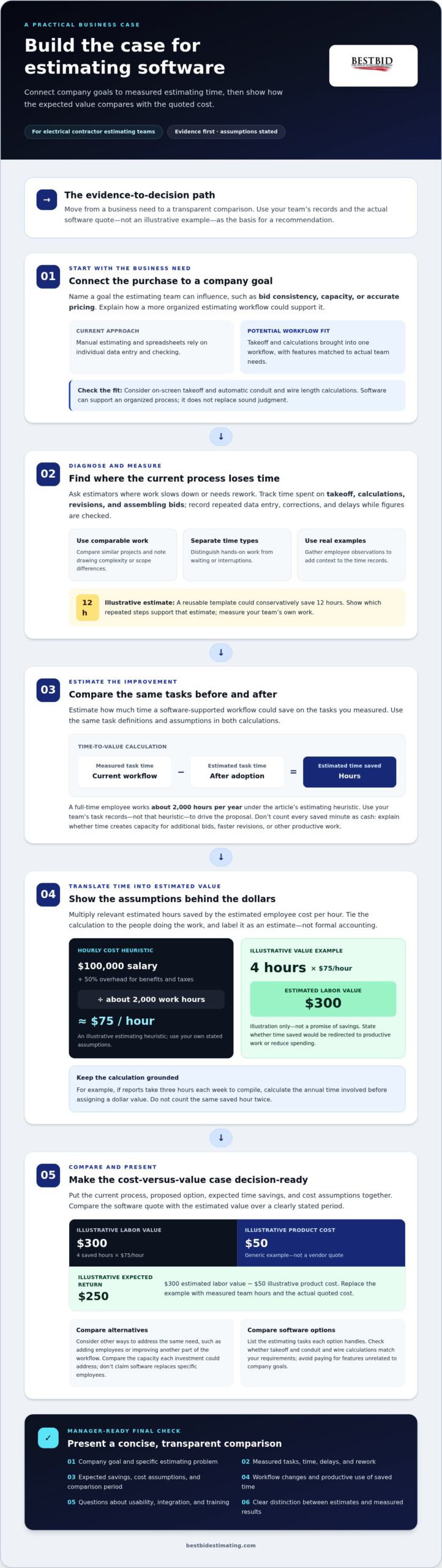
Make the case with evidence: connect estimating software to company goals, measure the time and rework your current process creates, and compare the tool’s cost with the value of the improvement. If you’re working out how to convince my boss to buy estimating software, use a clear example: four hours saved at an estimated employee cost of $75 per hour represents $300 in estimated value. That’s an illustration, not a promise of savings.
It’s reasonable to expect management to ask what problem the software solves and how the investment could pay off. A stronger proposal answers with your team’s estimating workload, where delays or errors occur, and how saved time could be put to productive use.
This guide explains how to connect your proposal to company priorities, quantify current problems and potential savings, and present the cost-versus-value case clearly. You’ll also learn how to prepare for questions about workflow changes, usability, integration, and training, so your recommendation is practical as well as persuasive.
Key Takeaways
- Link the software proposal to company priorities, such as improving bid consistency and making better use of estimating time.
- Track where the current estimating process loses time or creates rework, then use those pain points to shape your case.
- Show management how expected time savings translate into business value, and make clear how you arrived at the estimate.
- Present a concise cost-versus-value case that explains workflow changes, likely implementation barriers, and how the team can address them.
- Prepare focused questions about usability, integration, and training so decision-makers can assess how the software would fit the team’s work.
What About Company Goals?
Manual estimating and spreadsheets rely on individual data entry and checking. Estimating software can bring takeoff and calculations into one workflow. Look for features such as on-screen takeoff and automatic conduit and wire length calculations, then compare each option with your team’s actual estimating needs.
To frame the investment clearly, watch this business case overview from ProjectManager:
Connect the Purchase to Company Goals
Start by naming a goal your estimating team can influence, such as bid consistency, capacity, or accurate pricing. Then explain how the software could support it. The U.S.
Government Accountability Office says sound contractor cost-estimating systems use complete, accurate, and current data. Show how a more organized estimating process could support that standard, without presenting software as a substitute for sound judgment.
Compare Software With Other Investments
Compare the proposal with other ways the company could address the same problem, such as adding employees or improving another part of the workflow. Use the comparison to discuss capacity, not to claim software replaces specific employees. The strongest case shows which business need each investment addresses.
Weigh Costs Against Expected Savings
Build a transparent calculation using a generic purchase example, not a vendor quote. A $50 product that saves four hours has an estimated value of $300 when time is valued at $75 per hour, leaving an expected return of $250. Label every input, then replace the example with your team’s measured hours and the software’s actual quoted cost.
Compare Software Options
List the estimating tasks each option handles, then compare them against your requirements. For electrical estimating, assess whether on-screen takeoff and automatic conduit and wire length calculations match your workflow. A page about electrical estimating software capabilities can help frame those criteria. Avoid paying for features unrelated to the company’s goals.
Make the Comparison Decision-Ready
Put the current process, proposed option, expected time savings, and cost assumptions into one concise comparison. When assessing whether a quote is reasonable, include prices for similar tools, but distinguish estimates from measured results. Explain how you calculated the figures behind your recommendation.
Estimating time savings and dollar value
Make estimating work measurable: record how long tasks take now, then estimate how much time a software-supported workflow could save. Use the same tasks and assumptions in both calculations.
Estimate Time Savings
Track the hours employees spend on takeoff, calculations, revisions, and assembling bids. Use a representative set of completed estimates, and separate hands-on work from waiting or interruptions. A full-time employee works about 2,000 hours per year under this estimating heuristic, but your team’s own task records should drive the proposal.
Compare similar projects and note differences in drawing complexity or scope. If a reusable template could conservatively save 12 hours, show which repeated steps account for that estimate. Don’t count every saved minute as cash: identify whether it creates capacity for additional bids, faster revisions, or other productive work.
Translate Time Savings Into Dollar Value
Convert the hours you expect to save into an estimated labor value. One estimating heuristic adds 50% overhead for benefits and taxes, then divides annual compensation and overhead by about 2,000 work hours. For example, a $100,000 annual salary with that overhead produces an estimated employee cost of $75 per hour.
Multiply the relevant hourly cost by the estimated hours saved, and label the result as an estimate, not formal accounting. Tie the calculation to the employees doing the work. For example, if three hours each week go toward compiling reports, calculate the annual time involved before assigning a dollar value. State your assumptions, including whether the time saved would be redirected or reduce spending.
Demonstrate Potential Cost Savings
Present the calculation beside the software’s quoted cost, then show the period used for comparison. Include direct savings only when they follow from your records; describe extra bid capacity separately. For instance, report automation might save an employee over 150 hours a year, but that time becomes a financial saving only when the company can use it productively.
Show a conservative case alongside your expected case. Explain which tasks account for the difference, and don’t count the same saved hour twice. A concise table can compare current hours, estimated hours after adoption, hourly cost assumptions, and projected value. Electrical estimating resources can help you refine task assumptions before presenting your case.
For electrical estimating practice, explore electrical estimating resources as you refine your time-saving assumptions.
Presenting a cost-versus-value case to a manager
Keep your proposal concise, specific, and easy to assess. Show the problem, the operational change, and the evidence management needs to make a decision.
Build Support From Colleagues
Ask employees who estimate projects where the current process slows them down. Gather concrete examples, such as repeated data entry, corrections after takeoff, or bids delayed while figures are checked. Their firsthand accounts add context to your calculations without turning the proposal into a complaint about the existing system.
Compare notes and look for recurring issues. If three estimators identify the same handoff as a source of rework, explain how improving that step could help the team. Don’t treat agreement as proof of savings; pair colleagues’ experience with recorded task times and specific workflow examples.
Keep the request focused. Ask a colleague to review the problem statement or validate the workflow description, rather than seeking a blanket endorsement. A proposal grounded in practical estimating work is easier for management to assess than a list of general software benefits.
Involve Management in the Change
Bring a manager into the discussion before presenting a finished recommendation. Ask which company goals matter most, what evidence would support a purchase, and what concerns could block adoption. Use the answers to shape your proposal instead of assuming time savings alone will settle the decision.
Gartner describes a typical buying group for a complex B2B solution as involving six to ten decision makers. Each decision maker brings four or five pieces of independently gathered information. Use that insight to prepare a concise case that different stakeholders can assess, including operational impact, cost assumptions, and workflow changes.
Offer a clear decision path: review the current estimating process, evaluate the proposed change, then agree on how to assess the results. Involve the manager in choosing relevant measures, such as time spent revising bids or handling repetitive calculations. This makes the evaluation easier to connect to real work.
Address Reasons for Resisting Change
Identify the manager’s likely concerns before the meeting. A purchase may raise questions about budget, disruption, data quality, or whether employees will use the new workflow. Address each concern directly with a specific example, a cost assumption, or a practical response plan.
For example, if management worries that a new process could interrupt active bids, explain how the team could plan the transition around its workload. If the concern is value, show the calculation behind your expected benefit and identify the assumptions that matter most. Don’t dismiss risks or promise a perfect result.
Close by asking which unresolved issue matters most to the decision. If a manager needs clearer evidence, refine the relevant estimate. If workflow disruption is the concern, clarify the proposed change. A direct next step keeps the discussion productive and gives management a basis for deciding.
Download as HTML
Preparing questions about usability, integration, and training
Prepare practical questions before evaluating estimating software. Free trials, demonstrations, and pilot programs are possible evaluation formats, each with different access, duration, and scope.
- Test usability against real estimating tasks. Choose a familiar electrical project and list the steps an estimator completes, from takeoff through bid preparation. Ask how the software handles each step, where users enter information, and how they review quantities. During a demonstration, follow an example estimate instead of relying on a general feature tour. Note confusing screens and repeated actions.
Include employees with different levels of software experience. Ask each person how they would complete the same task, then compare the steps. This reveals whether the workflow is clear across the team, not just to the person presenting it.
- Ask specific integration questions. List the files, systems, and handoffs your estimating process uses today. Ask which formats the software supports and how information moves between estimating and the next stage of your workflow. Use a sample drawing or bid file to make the discussion concrete. Don’t assume that two systems integrate simply because they serve related purposes.
Document any manual transfers that remain. If employees must re-enter quantities or project details, include that task in the workflow assessment. A clear map of inputs and outputs helps management understand how the proposed tool could fit existing work.
- Clarify training and support needs. Ask what learning resources are available, who can use them, and how employees can practice common estimating tasks. Build a short training plan around actual work, such as reviewing takeoff steps and checking a sample bid. Identify who will guide adoption and how questions will be handled during the transition.
Estimate the staff time needed for learning separately from expected long-term savings. This gives management a fuller picture of adoption instead of suggesting there is no learning curve. Ask how users can find instructions when they need help with a specific task.
- Plan for implementation barriers. Identify possible disruptions before the decision, including busy bid periods, file preparation, and employee training. Ask how the transition could fit the team’s schedule and which work should remain in the current process temporarily. A practical plan addresses downtime without promising a frictionless change.
Assign responsibility for each transition task. For example, identify who will prepare sample project files, review the first completed estimate, and gather employee feedback. Clear ownership makes the rollout easier to assess.
- Use a demo, trial, or pilot to answer defined questions. Set evaluation criteria before testing, such as whether users can complete a takeoff, review calculations, and prepare bid details. Record observations against those criteria instead of relying on a general impression. A focused evaluation gives management useful evidence about usability, workflow fit, and training needs.
Quantifying problems with existing software
Build your case around specific estimating problems, not broad claims that current tools are outdated. A bid, revision, or missed handoff can show where the process costs time or affects accuracy.
- Keep a log of estimating problems. For each affected bid, record the task, the issue, and its consequence. Note whether employees re-entered quantities, corrected a calculation, or rebuilt a takeoff after a drawing change. Include the project stage and people involved so management can see whether the problem recurs across estimates.
Use a shared spreadsheet or issue log, and update it as problems occur. For example, record each time a quantity had to be checked against the source drawings. Separate verified rework from estimates of possible risk. That distinction makes your evidence more credible.
- Measure rework and delays. Track time spent correcting errors, finding missing information, and recreating bid details. In one reported example, technical debt left a project without progress for three months while a team tried to fix bugs. For estimating, document the actual delay and affected work rather than implying that every software problem causes a prolonged stoppage.
Compare planned work with what happened. If a revision required reopening a takeoff and checking quantities again, record each task separately. A short timeline can show how a small issue creates a larger delay during bid preparation.
- Show the cost of inaccurate estimates. Record where labor assumptions, quantities, or pricing inputs failed, then explain the effect on the bid. One shop-manager example involved selling a 20-hour job for a 10-hour price. Use it to illustrate how estimating errors can affect project returns, not as a typical result for every contractor.
For your own work, connect each error to its source: a missed scope item, incorrect quantity, or outdated entry. Don’t assign a dollar loss unless your records support the calculation.
- Separate tool limitations from process gaps. Review whether the issue came from software, data, training, or a handoff. One developer described a feature taking three to five days to write well, despite being asked to complete it in one day. In an estimating team, compare the requested task with actual workflow needs before blaming the tool alone.
That distinction helps management choose a useful fix. If inconsistent data is the problem, address the data process. If repeated manual calculations are the bottleneck, compare tools that handle those tasks.
- Summarize the evidence for a decision. Group issues by type, such as rework, delay, or bid accuracy, then attach a real example to each category. Close by reviewing electrical estimating software options against the problems your records reveal.
Best Bid: Best Bid Next Generation
Best Bid Next Generation gives electrical contractors a specialized estimating software option to assess against the workflow and cost-value case you’ve built. Best Bid software includes on-screen takeoff, automatic conduit and wire length calculations, and tools for creating detailed project bids. Use those capabilities as a practical comparison: identify which current estimating tasks they address and how they fit your team’s process.
Best Bid also offers Best Bid Hybrid Pro, Accura Cadd PDF Draw, and the Online School for Electrical Estimating. Consider the school if your next step is building estimating skills rather than adopting software alone. Match the option to the need your proposal identified, and make that fit clear to management.
Visit bestbidestimating.com to explore the estimating options.
Turn Your Case Into a Clear Next Step
Your proposal doesn’t need to settle every question at once. Aim to start a focused discussion about whether a better estimating workflow fits the company’s priorities. If you’re considering how to convince your boss to buy estimating software, make the next decision easy: bring a concise recommendation and invite management to assess its fit with your team’s real work.
For electrical contractors evaluating their options, Best Bid offers Best Bid Next Generation, Best Bid Hybrid Pro, and Accura Cadd PDF Draw. Consider which one aligns with the estimating tasks your team wants to improve, then use that match to guide the conversation. A practical proposal opens the door to a thoughtful decision, not a hard sell.
Contact Best Bid about estimating software to discuss the available options. Take the next step with a clear case and confidence in the work behind it.
Frequently Asked Questions
How Can You Convince Management to Buy New Software?
Build a practical case around a specific business need, then show how the proposed tool could address it. If you’re asking, “how to convince my boss to buy estimating software,” start with a real example from your team’s estimating work. Explain what happened, what the proposed change could improve, and what evidence supports your recommendation. Finish by asking management to consider a clear next step.
What Will It Change?
Estimating software can change how employees organize project information and complete bid tasks. Before recommending a tool, map one project’s current workflow from drawing review to bid preparation. Note who handles each handoff and where information is re-entered. This practical view helps identify which tasks would change and what the team would need to learn, without assuming every part of the process must be replaced.
Will It Save Time?
Software may reduce time spent on repetitive estimating tasks, but the useful measure is your team’s own workflow. Compare similar projects and track time spent on takeoff, calculations, revisions, and bid preparation. Include review and correction time. This gives management a fuller comparison than timing only the first step and shows where employees could redirect time if the process becomes more efficient.
What Benefits Does Estimating Software Provide to a Business?
Estimating software can help organize project details, make bid preparation more consistent, and give reviewers a clearer view of estimate inputs. For example, a manager reviewing a bid can follow how quantities and assumptions were assembled. The business benefit depends on whether the software supports your team’s actual estimating tasks, so assess its fit against project types and existing work practices.
How Much Does Construction Estimating Software Cost?
There isn’t one price for every estimating software option. Cost depends on the case and is provided after a quote request; factors include the estimating work, licensing model, users, capabilities, training, and support. Compare those factors when reviewing options. Electrical contractors should assess software suited to electrical estimating rather than assuming a general construction tool will meet their specific workflow needs.
What Is the ROI of Estimating Software for a Small Business?
ROI compares the value gained with the total cost of adopting software. Consider supported benefits, such as reduced rework or time employees can put toward other business tasks, and include transition and training effort. A small business can also assess whether improved estimating capacity helps it prepare bids more effectively. Keep assumptions visible so management can judge the calculation rather than treating it as a guaranteed return.
How Can I Calculate Time and Cost Savings From Estimating Software?
Record the time employees spend on defined tasks, then estimate how long those same tasks would take with the proposed workflow. The difference is the estimated time saved. Multiply it by the relevant labor cost to estimate its dollar value. Separate potential cash savings from time employees would use elsewhere, and state your assumptions clearly.
How Can I Prepare a Business Case to Get My Boss to Approve Software?
If you’re still asking, “how to convince my boss to buy estimating software,” organize your proposal around a decision, not a feature list. State the business problem, show a relevant work example, and explain how the proposed workflow addresses it. Include the costs management should assess, the assumptions behind your expected value, and a practical response to adoption concerns. End with a specific decision request.