Accubid Alternative: Compare Electrical Estimating Software

The best accubid alternative is not necessarily the one with the longest feature list. It is the one that fits how your team measures, prices, and builds bids without adding a workflow or long-term commitment that creates new headaches. If you are weighing a switch, account for retraining, active bids, and recurring fees from the start.
Compare the work behind the estimate, not just the software checklist. Takeoff tools, database control, material pricing updates, licensing, and support all affect how an estimating system performs in your day-to-day workflow.
This guide provides a practical framework for comparing Accubid with other electrical estimating options. You will see what to assess in takeoff workflows, database control, pricing integration, and software ownership, while keeping the effect of a transition in view. We will also look at Best Bid Next Generation, which includes built-in on-screen takeoff, real-time NetPricer integration, a user-controlled unlimited database, and a one-time purchase model with lifetime updates and support. Use the comparison to identify what matters most to your bids, then assess whether Best Bid fits the way your team estimates.
Key Takeaways
- Pinpoint whether your search for an accubid alternative is driven by a capability gap, a frustrating workflow, or the software ownership model.
- Use a practical checklist to assess estimating needs, then test sample drawings and estimate types that reflect your actual work.
- Compare complete estimating workflows, including how takeoff quantities move into the estimate, rather than judging software by feature counts alone.
- Reduce switching risk by documenting your current process, protecting active bids, and moving through testing and training in stages.
- Assess whether Best Bid Next Generation’s approach aligns with the way your team estimates before deciding if it belongs on your shortlist.
Why electrical contractors search for an Accubid alternative
Which part of estimating is prompting your software search: the takeoff, the estimate itself, or the terms of ownership? A capability gap means your current tools cannot support a task your bids depend on. Workflow dissatisfaction is different. You may have the features you need but still spend too much time counting, measuring, re-entering quantities, or working around a process that does not match how your team builds estimates.
That distinction matters. Changing software will not automatically fix a process problem, and a smoother workflow will not fill a capability gap if the tools lack something your estimates require. Start by identifying the specific friction you want to remove. For example, note whether the issue is repeated data entry, limited control over estimating records, or the way your team handles alternate pricing.
For a closer look at one Accubid workflow, watch this video on working with advance alternates:
What should prompt a search for electrical estimating software?
Look at the handoffs in a typical bid. Do estimators repeatedly count devices, measure runs, and transfer quantities from drawings into estimate lines? Each manual step adds effort and another place where quantities may need review. Electrical-specific takeoff should support the work you actually measure, while labor adjustments and material data should reflect how your team prices and assembles that work.
Data control matters, too. If your estimating practices rely on your own item records, costs, or assemblies, limited ability to manage that information can lead to workarounds. Ownership is another useful comparison point: recurring software commitments suit some contractors, while others prefer a one-time licensing model. The goal is to weigh the long-term terms alongside the everyday workflow.
Separate workflow needs from feature-list pressure
Before comparing products, write down the estimating tasks that take the most time or cause the most rework. Sort possible capabilities into two groups: must-haves that directly affect your bids, and extras that would rarely change how you estimate. A neutral overview of construction estimating software describes core functions such as takeoff, cost databases, and estimating worksheets, useful categories to keep in view as you make that list.
An Accubid alternative is estimating software chosen to fit a contractor’s real workflow, data needs, and ownership preferences. While discovery platforms like Alternative Radar can help teams find and compare software alternatives across different business needs, your evaluation should focus on practical workflow fit rather than broad promises that one tool works for everyone. Next, test your shortlist against representative drawings and estimate types, including the electrical work your team bids most often.
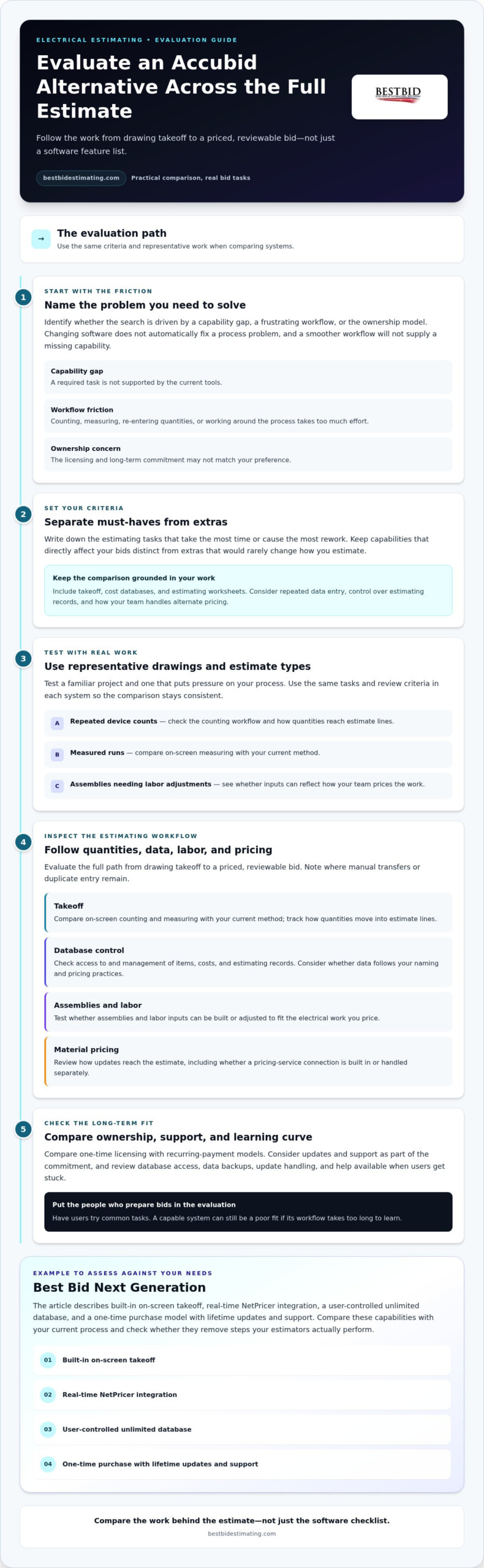
How to evaluate an Accubid alternative for electrical estimating
Evaluate the full estimating path, from drawing takeoff to a priced, reviewable bid. A feature may look useful in a demo but add friction if quantities, labor, material costs, and assemblies do not work the way your team estimates. Autodesk’s guide to how to choose the best construction estimating software offers broader selection context; the checks below focus on electrical estimating decisions.
Build a short checklist, then test it with representative drawings and estimate types. Include a familiar project and one that puts pressure on your process, such as a bid with repeated device counts, measured runs, or assemblies that need labor adjustments. Use the same tasks and review criteria in each system so the comparison is consistent.
Assess takeoff, estimating data, and pricing updates
- Takeoff: Compare on-screen counting and measuring with your current method. Track how quantities move into estimate lines, and note where manual transfers or duplicate entry remain.
- Database control: See how you can access and manage items, costs, and estimating records. Data that follows your established naming and pricing practices can make estimates easier to review and maintain.
- Assemblies and labor: Test whether you can build or adjust assemblies and labor inputs to reflect how your team prices actual electrical work. Flexibility matters when a standard assembly does not fit the job.
- Material pricing: Review how pricing updates reach the estimate, including whether a connection to a pricing service is built into the software or handled separately.
Best Bid Next Generation includes built-in on-screen takeoff and real-time NetPricer integration. Compare these capabilities with your current process and check whether they remove steps your estimators actually perform. For a closer look at electrical estimating tools, consider how those functions support the work you do most.
Check ownership, support, and learning curve
Licensing shapes the long-term relationship with your software. Compare one-time licensing with recurring-payment models, and consider updates and support as part of the total commitment. A model that suits one contractor may not suit another.
Also review database access, how estimates and data are backed up, how software updates are handled, and what support is available when users get stuck. Have the people who prepare bids try common tasks. A capable system can still be a poor fit if its workflow takes too long to learn. Best Bid Academy provides training that you can consider alongside the software decision.
Use your checklist to decide whether a particular accubid alternative fits your estimating practice. To explore Best Bid’s electrical estimating approach, visit Best Bid’s software and estimating resources.
Download as HTML
Accubid vs. an alternative: compare real estimating workflows
A useful comparison follows one job from drawing review to estimate assembly. Choose a representative project, then trace how each system handles the same takeoff, quantities, material costs, labor adjustments, and assemblies. Accubid features and licensing vary by product and version, so base your comparison on the specific version in your workflow.
What to compare
Best Bid Next Generation
Accubid
Workflow
Assembly-based estimating; test it with your own estimate sequence.
Compare the workflow for the product and version you use.
Built-in takeoff
Includes built-in on-screen takeoff.
Compare takeoff capabilities and how they connect to estimating.
Database flexibility
User-controlled unlimited database.
Compare how database access and customization work.
Pricing integration
Real-time integration through NetPricer.
Compare available integrations and any separate requirements.
Ownership
One-time purchase model with lifetime updates and support.
Compare current licensing and support terms.
Learning curve
Test common estimating tasks with the intended users.
Test the same tasks with the intended users.
Compare takeoff and estimate-building steps
Use the same drawing set in each system. Count devices, measure relevant runs, and follow those quantities into the estimate. Then build or adjust an assembly and review how labor and material data contribute to the bid.
Best Bid Next Generation combines built-in on-screen takeoff with assembly-based estimating. The practical question is whether that sequence matches your team’s habits and gives estimators the control they need.
Compare software ownership and day-to-day control
Licensing is part of the workflow decision. Best Bid uses a one-time purchase model with lifetime updates and support, while other products may use recurring-payment models. Compare the terms for the specific Accubid product and version you use. Database control and pricing integration matter as well: they affect how estimators maintain familiar cost information and bring updated material pricing into their regular process.
For product-specific details, read the Best Bid Next Generation overview. The right accubid alternative depends on your estimating requirements, team size, and preferred ownership model, not a universal feature ranking. Explore Best Bid electrical estimating software as one option in your comparison.
How to switch from Accubid without disrupting active bids
A software change does not have to put bids on hold, but it does need a plan. Before adopting an Accubid alternative, document the estimating sequence your team follows and identify active projects, upcoming deadlines, and estimates that should remain in the current system during the transition.
Parallel testing lets your team evaluate a new estimating workflow before relying on it for live bids. Treat the change as a staged process, not a single cutover. Do not assume estimate files, databases, or templates will migrate automatically or remain compatible. That depends on the specific software versions and data formats involved.
Prepare data and test representative estimates
First, record what your estimators rely on. Include estimate templates, database items and costs, assemblies, labor adjustments, and the routines used to back up bid files. Keep existing files accessible while you evaluate the new process, so the team can refer to past estimates without disrupting active work.
Next, prepare sample work using familiar project types and representative drawings. Recreate a few core tasks in the new software: review the drawings, complete takeoff, build the estimate, adjust an assembly, and save or back up the work. Compare the results and note where your team needs a different step, data setup, or review. Establish how information will be transferred and confirm compatibility for the specific versions in use before moving data.
Train estimators and protect bid-day continuity
Give estimators dedicated time to learn the workflow before using it for a live bid. Cover takeoff, estimate-building, saving and backup routines, and estimate review. Write down questions as users test the software, then resolve practical issues before expanding its use. Keep the existing process available for active bids until the team has a transition plan that protects deadlines.
Training is a separate part of adoption, not a substitute for checking software fit. Best Bid’s Online School for Electrical Estimating can support skills development, while users assess the software itself against their daily tasks. Use an electrical estimating training guide as a reference for training questions and adoption planning.
Once the sample work and core tasks are going smoothly, expand usage in stages and review the process as more estimators come on board. To explore Best Bid’s electrical estimating software as a potential fit for that transition, review Best Bid’s estimating software.
When Best Bid Next Generation fits as an Accubid alternative
Best Bid Next Generation is designed for electrical contractors who want on-screen takeoff within their estimating workflow, control over their estimating database, and an ownership model that does not depend on recurring software payments. Those priorities are not universal. The right fit depends on the tasks your team handles regularly and how you prefer to manage your estimating tools over time.
Match Best Bid capabilities to your estimating priorities
With built-in on-screen takeoff, estimators can work with drawings and quantities as part of the estimating process. A user-controlled unlimited database gives contractors room to manage estimating data around their own practices. Assembly-based estimating can help organize related materials and labor for repeatable work, while allowing estimators to build estimates around the job at hand.
Best Bid Next Generation includes real-time pricing integration through NetPricer. Consider how pricing updates fit your bid-preparation routine and the information you rely on. The combination of takeoff, assemblies, database control, and pricing integration supports a connected electrical estimating workflow. Test these capabilities against your actual estimates to see how they fit your projects.
Founder Steve Griffin brings more than five decades of electrical trade and estimating experience. That background informs Best Bid’s focus on electrical estimating. Your own workflow test remains the practical measure of software fit.
Choose a next step based on your team’s readiness
If the ownership model is a priority, Best Bid offers one-time licensing with lifetime updates and support. Review those terms alongside the everyday workflow: how takeoff moves into an estimate, how you manage database information, and how assemblies and material pricing support your bids. For a broader look at ownership considerations, read this non-subscription electrical estimating guide.
Before deciding, review the product details and test typical estimating tasks with representative drawings and estimate types. That gives your team a grounded basis for comparing Best Bid with its current process, without assuming one system works for every contractor. If its approach aligns with your priorities, see Best Bid Next Generation.
Choose an estimating workflow built for your business
The right accubid alternative is not simply the one with the most features. Compare how each option handles your real estimating tasks, database control, pricing, and software ownership. Test representative work before switching, and plan a gradual transition to protect active bids and give estimators time to learn.
Best Bid Next Generation includes built-in on-screen takeoff and a one-time purchase model with lifetime updates and support. Founder Steve Griffin brings more than five decades of electrical trade and estimating experience, a foundation in the trade behind the software. Your team’s own workflow test remains the best measure of fit.
Ready to take a closer look? Explore Best Bid Next Generation and see how its workflow aligns with your team’s estimating needs. A thoughtful comparison can help you move forward with confidence.
Frequently Asked Questions
What is a good alternative to Trimble Accubid for electrical estimating?
A good Accubid alternative depends on your takeoff needs, estimating workflow, database control, pricing updates, and preferred ownership model. Best Bid Next Generation is electrical estimating software with built-in on-screen takeoff, real-time NetPricer integration, and a user-controlled database. Compare these capabilities with the tasks your team performs on representative projects. That practical test will tell you more about fit than a feature count alone.
Does Best Bid include on-screen takeoff?
Yes. Best Bid Next Generation includes built-in on-screen takeoff, allowing estimators to count and measure from drawings as part of the estimating workflow. To assess how it fits your process, try representative plans and repeat the takeoff tasks your team handles regularly. Compare the steps and results with your existing method, using the software versions involved in your evaluation.
Can I switch from Accubid without interrupting current estimates?
You can reduce disruption by making the change in stages. Document your current estimating process, keep active bid information and existing files accessible, and test the alternative using representative drawings before shifting routine work. Do not assume files or databases will transfer automatically; compatibility depends on the software versions and data formats involved. Testing separately gives estimators time to learn while the team maintains visibility into active bids.
Does Best Bid require monthly subscription payments?
No. Best Bid uses a one-time purchase model rather than recurring subscription payments. Software licensing includes lifetime updates and support.
As you compare ownership models, consider more than the payment structure: review how updates, support, and access to estimating data fit your team’s needs over time. These factors help clarify the long-term commitment behind an estimating system.
How difficult is it to learn a different electrical estimating program?
The learning curve depends on the software, each estimator’s experience, and how closely its workflow matches familiar estimating tasks. Best Bid describes its learning curve as low to medium. Before adopting a system, practice common takeoff and estimate-building steps using representative work, and set aside time for users to learn. Best Bid Academy training and software support can help estimators work through questions as they adjust to a new process.
What should I compare when evaluating Accubid alternatives?
Compare the full estimating workflow, including takeoff, items and assemblies, labor adjustments, material pricing, database control, backups, support, and ownership terms. Test each option with representative drawings and familiar estimate types so you can see how the steps work in practice. Compare the capabilities of the specific software versions involved. A feature count or isolated speed claim alone will not show whether an accubid alternative fits your team’s estimating requirements.