Entries by Best Bid Electrical Estimating Software Team

Top Bluebeam Alternatives for Efficient PDF Management

Introduction


If you’re searching for the best Bluebeam alternatives, you’re not alone. While Bluebeam is renowned for its PDF management capabilities, such as advanced editing and collaboration, it has notable drawbacks. 

Limited compatibility with macOS and iPad, high costs, and feature gaps leave many professionals looking for better options. Whether you need a tool that works seamlessly on your device, fits your budget, or offers specialized features, there are alternatives to meet your needs. 

This article explores top alternatives to Bluebeam, offering solutions designed to suit different platforms, budgets, and workflows. Discover the option that aligns perfectly with your needs.

Key Features to Consider in a PDF Management Tool


Choosing the right PDF management tool is essential for professionals seeking efficiency and precision in their workflows. The ideal solution should address your specific requirements while offering flexibility and ease of use.

Here’s a breakdown of the key capabilities to look for when selecting an effective PDF management solution.


PDF Editing and Annotation

A powerful PDF management tool must offer seamless editing for text, images, and layouts, ensuring accuracy and professionalism. Annotation tools add value by enabling comments, highlights, and suggestions directly within the document. These features streamline revisions, making collaboration more efficient and ensuring documents remain polished and ready for sharing.

PDF Markup and Redlining

Markup and redlining tools are indispensable for tracking changes and emphasizing critical updates in documents. In industries like construction and design, these tools enhance precision by allowing detailed annotations on technical files, ensuring clarity and alignment among teams. They streamline collaboration and help maintain document accuracy throughout projects.


PDF Collaboration and Review

Efficient PDF collaboration tools enable real-time sharing and commenting, making teamwork seamless. These features are crucial for improving workflow efficiency by ensuring feedback is immediate and actionable. By reducing errors and keeping teams aligned, PDF collaboration tools are essential for professionals managing complex projects and collaborative document reviews.


PDF Form Creation and Data Extraction

PDF tools with form creation features simplify collecting and managing information digitally. They allow users to design, fill, and share forms effortlessly. Automated data extraction further streamlines workflows by minimizing manual entry, saving time, and reducing errors. These capabilities are essential for professionals handling repetitive data tasks efficiently.

Top PDF Management Tools as Bluebeam Alternatives

Finding the right PDF management tool can improve the way you handle documents, especially if Bluebeam isn’t the right fit for your needs. From cost-effective options to platform-specific solutions, there are several robust alternatives available.

Accura-CADD PDF Draw

Accura-CADD PDF Draw is an efficient and budget-friendly alternative to Bluebeam, designed to meet the needs of construction, engineering, and design professionals. This tool allows users to edit and create PDF drawings directly, saving time and avoiding the hassle of file conversions. With features like conduit layouts, as-built drawings, and lighting plans, it delivers exceptional precision while simplifying complex workflows.

AutoCad Acura bid PDF Draw

What sets Accura-CADD apart is its use of familiar AutoCAD tools within an intuitive interface, minimizing the learning curve for new users. Its functionality is both scalable and versatile, making it ideal for quick adjustments or large-scale projects. By offering these advanced features at a cost-effective price, Accura-CADD ensures that professionals get a powerful and efficient PDF management solution without exceeding their budget.

Adobe Acrobat Pro DC

Adobe Acrobat Pro DC is a powerful and advanced PDF management tool, designed for professionals who need precision and versatility. It offers robust editing tools for modifying text, images, and layouts, along with comprehensive annotation features to streamline collaboration. These capabilities make it an excellent choice for managing complex documents.

Its cross-platform compatibility stands out, offering seamless functionality on Mac, Windows, and iPad. This ensures flexibility for teams and individuals working across multiple devices. While Adobe Acrobat Pro DC is more expensive than many alternatives, its advanced features and reliability make it a strong option for users requiring top-tier performance.

Foxit PDF Editor

Foxit PDF Editor, previously known as Foxit PhantomPDF, is a highly affordable yet feature-packed alternative to Bluebeam. Designed for professionals who demand efficiency without overspending, it offers advanced tools for editing, annotating, and securing PDF documents. Users can make precise adjustments to text, images, and layouts with ease, ensuring professional results.

One of its standout features is robust collaboration support, including shared reviews and document tracking, which simplifies team communication. Foxit also excels in document security, offering encryption and password protection to keep sensitive files safe. While it doesn’t carry the premium branding of some competitors, Foxit delivers exceptional functionality and value, making it an ideal choice for cost-conscious professionals who refuse to compromise on quality.

PDFelement

PDFelement stands out as a top-tier alternative to Bluebeam, offering a balance of advanced features and an exceptionally user-friendly interface. Unlike more complex tools, it simplifies PDF management, allowing professionals to edit text, images, and layouts effortlessly while maintaining professional quality. Its annotation tools and form creation capabilities streamline workflows, making it ideal for collaborative projects.

What truly sets PDFelement apart is its seamless compatibility with macOS and iPadOS. Optimized for Apple’s M1 chip, it delivers a smooth, responsive experience for Apple users, unmatched by many competitors. For those prioritizing ease of use without sacrificing functionality, PDFelement offers an impressive solution that bridges simplicity with powerful features—at a fraction of the cost of premium tools like Bluebeam.

Choosing the Right Alternative

Finding the right Bluebeam alternative starts with understanding your specific requirements. Each tool offers unique strengths, so it’s essential to evaluate how well they align with your workflow and professional goals. 

The right choice will enhance efficiency and make managing PDFs a seamless experience.


Consider Your Specific Needs

Every industry has unique requirements. Whether it’s construction, design, or engineering, selecting a PDF tool that addresses your specific workflow ensures improved efficiency and better project outcomes.


Ease of Use

An intuitive interface can save time and reduce frustration. Tools with minimal learning curves are ideal for professionals seeking seamless adoption, ensuring efficiency without the need for extensive training.

Platform Compatibility

Choosing a cross-platform PDF tool ensures consistent performance on Mac, iPad, and Windows. This flexibility allows seamless workflows across devices, making it ideal for teams using diverse systems.

The Importance of Efficient PDF Management

Efficient PDF management is essential for maintaining streamlined workflows, reducing errors, and improving productivity. The right tools can simplify complex tasks, enhance collaboration, and ensure documents meet professional standards.

Streamlining Workflows

Efficient PDF tools eliminate repetitive tasks, allowing professionals to focus on critical work. By simplifying processes, they save time, reduce effort, and ensure smoother, more productive workflows.

Enhancing Collaboration

Real-time editing and shared access to PDF tools enable seamless teamwork. These features ensure immediate feedback, better alignment, and improved efficiency across collaborative projects.

Improving Productivity

PDF tools with batch processing and automation simplify repetitive tasks, enabling professionals to work faster and more efficiently. These features enhance productivity by saving time and minimizing manual effort.

Common Challenges in PDF Management

Common Challenges in PDF Management

Managing PDFs can be complicated, with challenges like limited editing options, inefficient collaboration, and security concerns. Addressing these issues is essential for improving workflows and ensuring document accuracy.

Difficulty in Editing and Annotating PDFs

Basic tools often lack the functionality required for precise editing and detailed annotations. These limitations can hinder productivity, making advanced PDF management solutions a necessity for professionals.


Inefficient Collaboration Processes

Static PDFs and the absence of real-time updates can disrupt teamwork. These limitations lead to delays, miscommunication, and increased errors, emphasizing the need for collaborative PDF management tools.

Security Concerns

PDFs often contain sensitive information, making security crucial. Tools with encryption and secure sharing options protect data, ensuring confidential documents remain safe during collaboration and distribution.

Conclusion: Why High-Performance PDF Tools Are Worth It

Finding the right alternative to Bluebeam is crucial for professionals who demand efficient PDF management tailored to their unique workflows. From cost-effective tools to platform-specific solutions, the options highlighted here cater to various industries, budgets, and functionality needs. 

Whether you need advanced editing, seamless collaboration, or compatibility with specific devices, there’s a solution to enhance your productivity. 

Accura-CADD PDF Draw is an excellent choice for a cost-effective, feature-rich PDF tool tailored to construction, engineering, and design. Explore its powerful features today to enhance your workflows. is this align 

Top Alternatives to AutoCAD for Businesses in 2024

AutoCAD has long been the go-to choice for professionals requiring computer-aided design (CAD) software. Its advanced tools and extensive functionalities make it a powerful modeling resource. However, while AutoCAD’s reputation as a robust design tool is well-deserved, it’s not always the best fit for every business or individual.

Whether you’re facing steep subscription fees, struggling with its complexity, or simply need software tailored to your industry, exploring alternatives can significantly benefit your workflow. This blog will guide you through why AutoCAD alternatives are worth considering and introduce some excellent options to match your specific needs.

Top Alternatives to AutoCAD for Businesses in 2024

Why Consider Alternatives to AutoCAD?

AutoCAD’s reputation comes with powerful features, but its usage isn’t without challenges. Here’s why professionals often explore alternatives:

1. Cost Concerns 

AutoCAD’s pricing structure can be prohibitive. Being subscription-based, it doesn’t offer a one-time purchase option, with licenses costing thousands of dollars annually. For small businesses or individuals, this can be a strain on budgets.

2. Complexity 

AutoCAD’s rich feature set can be overwhelming, particularly for those new to CAD. Simple drafting jobs often don’t require the advanced functionalities provided, leading to unnecessary complexities.

3. Industry-Specific Needs 

Different industries require tailored solutions. For example, architects may prefer specialized 3D tools, while electricians or contractors benefit from PDF-compatible drafting tools.

4. Payment Model Preference 

Not everyone prefers subscription-based software. Alternatives offering free plans or one-time purchases provide flexibility for various financial needs.

By seeking other options, businesses, and professionals can find tools better suited to their requirements without compromising their design processes.

Features to Consider When Choosing CAD Software

When evaluating AutoCAD alternatives, focus on the following features to ensure that it align with your needs:

autocad comparisn

  • User-Friendliness: 

For beginners or smaller teams, ease of use is crucial. Software offering straightforward interfaces and intuitive tools can minimize the learning curve.

  • 2D vs. 3D Capabilities: 

Identify whether you mainly need 2D drafting, 3D modeling, or both. While AutoCAD excels in offering both functionalities, some alternatives specialize in one area.

  • File Format Compatibility: 

For seamless collaboration, the ability to export or edit common CAD file formats like DWG or DXF is essential. Businesses exchanging drawings across platforms need this capability to avoid compatibility roadblocks.

  • Pricing Models: 

Evaluate the total cost, flexibility, and value offered by free, subscription-based, or one-time purchase plans. Affordable tools without hidden costs or mandatory upgrades can be ideal for startups or smaller teams.

  • Community and Support: 

Robust support resources like tutorials, user forums, and customer service will make onboarding and day-to-day use far more efficient.

Popular CAD Software Alternatives

Here are five outstanding CAD tools that serve as excellent AutoCAD replacements.

1. Accra-CADD PDF Draw

Accra-CADD PDF Draw stands out for professionals who frequently work with PDFs. It’s easy to use and cost-effective compared to AutoCAD. The software facilitates advanced PDF editing and direct drawing capabilities, giving users a simple solution to generate and modify professional-grade designs. Learn more about Accra-CADD PDF Draw.

Key Highlights: 

  • Direct PDF editing for as-built layouts, tenant fit-outs, and circuitry details. 
  • Versatile toolset catering to electricians, contractors, and HVAC professionals. 
  • Eliminates the steep learning curve of AutoCAD, providing a seamless experience. 

Accra-CADD is the perfect choice for tradespeople needing efficient, straightforward drafting software at a compelling price.

2. DraftSight 

DraftSight is another strong contender for professionals seeking cost-effective CAD software. Offering a clean interface and robust 2D drafting capabilities, it’s an ideal choice for architects, designers, and engineers. 

Key Highlights: 

  • Fully compatible with DWG file formats. 
  • Affordable pricing plans, including a free version for basic use. 
  • Minimalist design focuses on essential features. 

3. FreeCAD 

FreeCAD is an open-source, fully customizable tool tailored toward parametric modeling. Engineers and architects benefit greatly from its flexibility in creating complex designs. 

Key Highlights: 

  • Ideal for 3D modeling with no upfront costs. 
  • Frequent updates from a supportive open-source community. 
  • Perfect for industries requiring specialized 3D modeling frameworks. 

4. BricsCAD 

BricsCAD offers a blend of 2D drafting and advanced 3D modeling, similar to AutoCAD. It also provides AI-powered tools for enhanced productivity, making it popular across various industries. 

Key Highlights: 

  • Integrated 2D/3D environment for seamless design processes. 
  • AI-driven automation for repetitive tasks. 
  • Flexible pricing models catering to diverse budgets. 

5. SketchUp 

Known for its intuitive interface, SketchUp focuses heavily on 3D modeling, making it a favorite among architects and interior designers. With its extensive model library and rendering tools, it simplifies design processes. 

Key Highlights: 

  • Vast library of 3D models. 
  • Simple, beginner-friendly functionality. 
  • Specialized packages for design-intensive professionals. 

Comparison of Features and Pricing

Please install and activate TablePress plugin to work this widget.

User Experience and Community Support

Support and resources play a pivotal role when transitioning to new CAD software. Here’s how these alternatives compare in terms of onboarding and community engagement:

  • Accra-CADD PDF Draw: Offers video tutorials and tailored support, ensuring smooth adoption for businesses. 
  • DraftSight: Provides an extensive knowledge base and beginner-friendly guides. 
  • FreeCAD: Supported by a thriving community of developers and users who regularly share knowledge and updates. 
  • BricsCAD: Offers in-depth learning resources and reliable customer support. 
  • SketchUp: Known for its forum-based support and a large library of video tutorials. 

How to Choose the Right CAD Tool

Selecting the perfect AutoCAD alternative depends on your specific business needs. Ask yourself these questions:

How to Choose the Right CAD Tool

  • Do I primarily need 2D drafting or 3D modeling capabilities? 
  • Is cost or simplicity more important for my workflow? 
  • Does my industry have niche requirements, such as direct PDF editing or AI automation? 

Take advantage of free trials and demos where possible. This helps you test the functionality and compatibility of new tools before fully committing.

Wrap-up: Transition with Confidence

AutoCAD’s dominance doesn’t mean it’s the only option. Whether you’re seeking affordability, simplicity, or industry-specific functionality, the alternatives highlighted here cater to diverse business needs. Tools like Accra-CADD PDF Draw excel in flexibility and ease, while options like FreeCAD and SketchUp are perfect for specialized 3D design.

Need help finding the best CAD tool for your business? Explore Accra-CADD PDF Draw today or reach out to the Best Bid team for personalized assistance.

Top Alternatives to AutoCAD for Businesses in 2024

AutoCAD has long been the go-to choice for professionals requiring computer-aided design (CAD) software. Its advanced tools and extensive functionalities make it a powerful modeling resource. However, while AutoCAD’s reputation as a robust design tool is well-deserved, it’s not always the best fit for every business or individual.

Whether you’re facing steep subscription fees, struggling with its complexity, or simply need software tailored to your industry, exploring alternatives can significantly benefit your workflow. This blog will guide you through why AutoCAD alternatives are worth considering and introduce some excellent options to match your specific needs.

How to make Electrical Estimating Easy

The easiest way to make electrical estimating easy is simple.

“Learn how to estimate”.

Stop guessing and stop trying to make it hard.

You don’t need to make estimating complicated. The goal is to provide a price that is low enough to win the project but inclusive enough that when the project is over you made money.


You have to accept that you can’t control your competition. Strive for the perfect bid for your company, and let the prices fall where they fall. The low bid is often not the best bid. You must be confident in your bidding. You should never start changing the way you bid as soon as you lose a couple of jobs. I have often had estimators call and ask about their bidding techniques after losing a few projects. These are the same estimators that have won millions of dollars of work year after year and are very successful. You must have faith in your skills to estimate. Some people call it guesstimation but in reality, a lot of the estimate isn’t guesswork at all but solid written-in-stone information. Remember losing a job does not necessarily mean that you bid it wrong. Find what works for you and stay with it. Trust the numbers.


When you sit down and dissect an electrical estimate you will see that there are only a few parts.

Lighting, Gear, Devices, Branch Lighting, Branch Power, Motor Feeders or all Home Runs, Panel Feeders, Low Voltage if any, other Quoted Items, and Miscellaneous.


how to make electrical estimating easy

The Takeoff

You will start with your Takeoff. In simple words, this is all of your counts and measurements.

Counting will consist of:


Lighting

Lighting Controls

Gear

Devices

Fire Alarm if any

Data/Phone/Security/ETC


This is something that can be achieved at 100%.

Even a non-electrician can count how many lights and devices there are on a drawing.


As far as the Takeoff goes everyone should see this step the same.

For example, all of your competitors should have the same number of A Type light fixtures and the same number of duplex receptacles as you do.


By counting all items until you get the same results twice you can be confident that ½ the Takeoff can be 100%.


I am skipping Branch Lighting and Branch Power for now and moving to motor feeders and panel feeders. These are performed the same way.

Let’s start with Panel Feeders

For the most part, estimators don’t seem to enjoy this section +++BUT+++ it is easy and should not be dreaded.

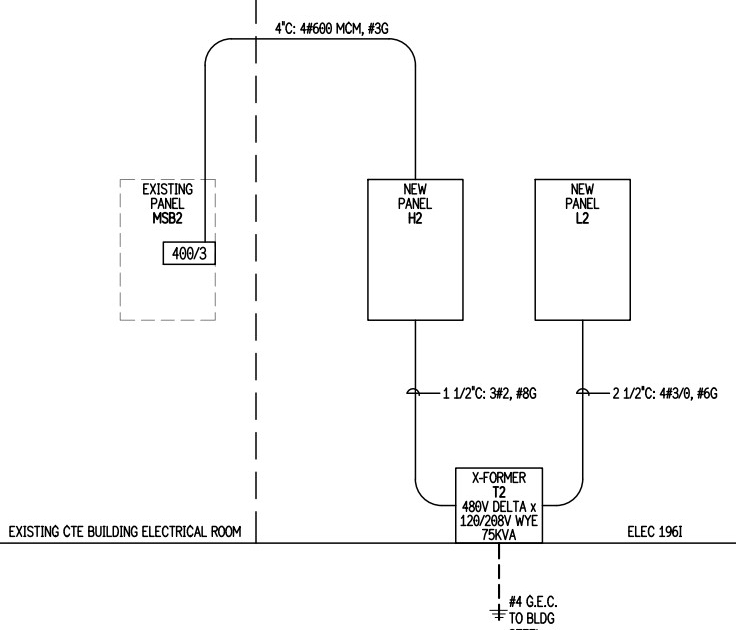
Just find the One-Line diagram.

You have already visited this sheet when you were counting your gear.

I start by writing down all of the feeders as they are shown.


This is a simplified One-Line but it works the same no matter how large the project is.

Example:

Existing Panel MSB2-400/3 to New Panel H2—4”C W/4-#600 MCM & 1-#3G

New Panel H2 to Transformer T2—1-1/2C W/3# 2 & 1-#8G

Transformer T2 to New Panel L2—2-1/2C W/4#3/0 & 1# 6G

#4 G to building steel.


You can also get Panel Feeders 100% but there is a couple more steps.


You must read the specifications to see the requirements such as Raceway types accepted, fitting types accepted, is ALU wire accepted as an alt etc.

What this means to you is will these runs be installed in EMT with set Screw fittings or GRS. Will you use Plastic Bushings or Grounding Bushings? Etc.

You should also decide how much conductor to include for termination. A general rule is between 15’ and 20’.

If you use the same adjustment you will not have to think about it.


After you have written down the distance of the Panel Feeders above you also need to include how many 90’s and in the case of the two transformers runs include flex.


For example;

Existing Panel MSB2-400/3 to New Panel H2—4”C W/4-#600 MCM & 1-#3G-1-LB-1-90-20’extra cond.

New Panel H2 to Transformer T2—1-1/2C W/3# 2 & 1-#8G 1-90-Flex-25’ extra conductor

Transformer T2 to New Panel L2—2-1/2C W/4#3/0 & 1# 6G 1-90-Flex-25’ extra conductor


This becomes a simple task when you attack it line by line.

Motor Feeders

Now let’s move on to Motor Feeders.

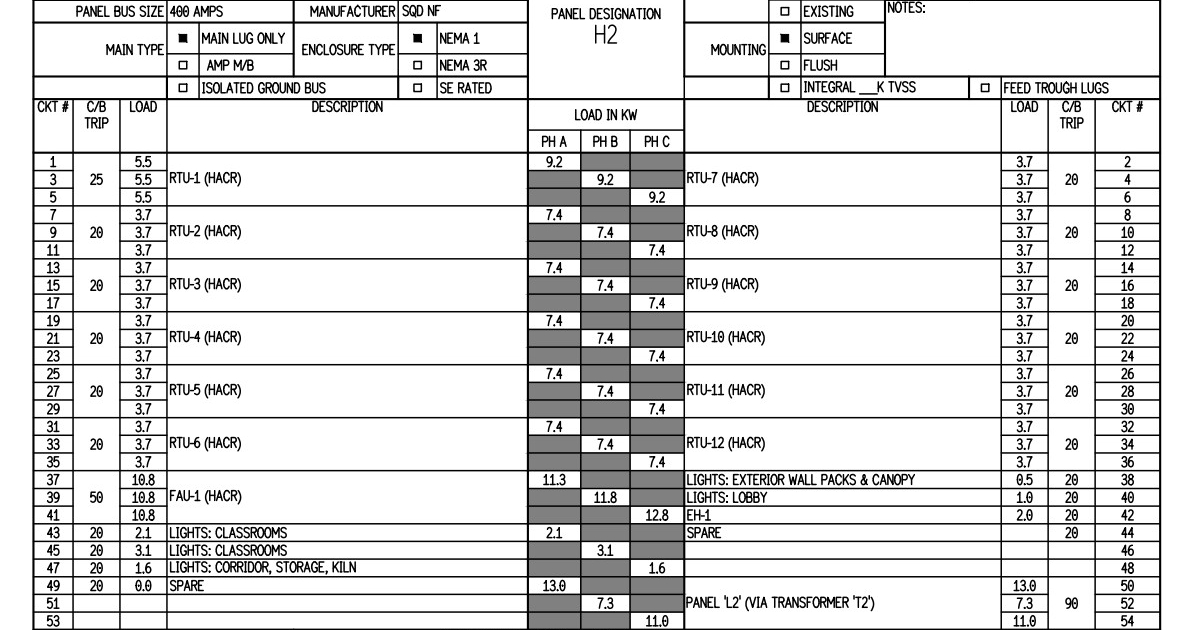
A simple hack to getting this right every time is to start with ALL of your panel schedules.

Without looking at the plans and trying to pick out all of the feeders it is easier to simply look at the panel schedules.


Write down all of the 2-pole and 3-pole items listed in the schedules.You now know that you will be covered because if there is a feeder there must be a breaker for it.

Looking at the schedule above we know we will be looking for

RTU-1

RTU-2

RTU-3

RTU-4

RTU-5

RTU-6

RTU-7

RTU-8

RTU-9

RTU-10

RTU-11

RTU-12

FAU-1

I also like to take note of the voltage, breaker size feeding the item, and the phase.

RTU-1-480V-25/3-3R

RTU-2-480V-20/3-3R

RTU-3 480-20/3-3R

RTU-4-480V-20/3-3R

RTU-5-480V-20/3-3R

 RTU-6-480V-20/3-3R

RTU-7-480V-20/3-3R

RTU-8-480V-20/3-3R

 RTU-9-480V-20/3-3R

 RTU-10-480V-20/3-3R

 RTU-11-480V-20/3-3R

 RTU-12-480V-20/3-3R

 FAU-1-480V-50/3-N1

From the information above I know the feeders that I must find. I also have a list of disconnects to check against. The final plus is just in case the feeders are not sized I have that recorded as well.

From this point all that is needed to do is find the item and record the distance.

We have addressed counting which is as easy as counting each item on the drawings, recording the Panel Feeders from the One-Line diagram, and Motor Feeders by taking these directly from the panel schedules.

So far there should not be any difference between you and your competitors Takeoff assuming that they took the time to get it correct like you did.

Now all that is left is the Branch Lighting and Branch Power to record and for the most part, the Takeoff is finished. There are many ways to accomplish these tasks. You can average, or scale each distance or you can average between items and scale the home runs. You may elect to set a distance apart to cover getting your device above the ceiling and then scaling the rest. There are many techniques to accomplish these tasks.

Of course, once the Takeoff is complete you must turn it into an estimate.

There is no better way to do this than with the Best Bid Hybrid Pro.

The Hybrid Pro makes performing your Takeoff with our built-in OST fast and easy. Then turning this information into an estimate is just as easy.

If you want more information on how to complete the Branch Lighting and Branch Power and complete your estimate just call or email.

Don’t pass up the chance to purchase the Best Bid Hybrid Pro for less than ½ price while you still can.

Bestbidestimating.com
Or
info@1CEES.com

We offer the best electrical estimating software on the market today.

We also have a school for estimating electrical projects.

We can help!

Why Trial Versions of Electrical Estimating Software Fail?

Our goal is to help electricians learn to estimate electrical projects. You may be the best electrician in the field but have never had the opportunity to work in the office under a senior estimator. We can teach you the skills that you need to become an estimator.

We also help seasoned electrical estimators move from pen and paper to computerized estimating. No matter how little or how much you know about estimating electrical projects you need estimating software to maximize your skills.

You will fail or succeed based on your ability to estimate.

electrical estimating software, success failer.jpg

I rarely make a statement like this but no one can estimate as quickly or as accurately manually as they can by using software.  

Just by entering a quantity, the software can instantly produce a material list, priced and extended without mistakes, and tell you how long it should take to install. This can be done before you could manually enter your first item.

Let’s just say there is no argument that most successful electrical contracting companies rely on electrical estimating software.

At Best Bid, we interact with electrical contractors every day. Our customer base ranges from people that have very little office skills and struggle to understand English to large shops with multiple electrical estimators. We understand your needs on multiple levels.

Once you learn to use electrical estimating software you could never convince anyone to go back to pen and paper.

This article is written for the people that have either tried to use software and failed or never tried at all.

Software companies have stopped providing trials due to the high rate of failure. No one will say this but it is true. Most of the time people that download a free trial will never purchase the software. This has nothing to do with the software it has to do with expectations. We have learned this over the past 25-plus years. This isn’t 100% true. Some people follow the instructions and do fantastic but people that interact with us and do a screen share to see what the software offers are the ones that seem to go on and take advantage of what software offers.

It is all about the expectations

In general, most electrical contractors fall into one of two categories. They are busy because they have so much work or they are busy because they are trying to get work.

Either way, most electrical contractors don’t have a lot of free time. They are looking for a better way to estimate. Something that will speed up the process and provide them with more time to do other things.

When you are despite for more time you want an instant fix. Software is the answer but it is not an instant fix. Just like when you started to learn how to bend conduit.

You didn’t master it the first day. When you studied to take your Masters license you didn’t just walk in and take the test. Learning software is also a process.

We still offer a free trial +++BUT+++

download electrical estimating software on trail

When you elect to download our software we offer the user (3) videos that show exactly how to download the software and access the help files just in case you are not comfortable downloading software.

 We also provide a picture profile showing what your computer screen should look like during the process.

 This is just downloading the software. We find that as many as 70% fail by just downloading the software.

Why?

They NEVER watch the videos and they do not follow the written instructions and they want to call and just ask for us to load it for them.

Out of the 30% that get the software downloaded only 15% of those open the software more than once.

The frustration

why manual electrical estimating is so frustrating?

Once you download the software we offer a Quick Start guide that goes step by step on how to use the software. We also have a help library with videos on every topic. The information is right there to learn how to use the software. We also offer screen share sessions to one on one answer questions.

 We often call and check up on a user and they say I couldn’t figure it out. When we ask did you follow the Quick Start guide? The answer most of the time will be I didn’t see a Quick Start guide. We ask did you watch the videos and the answer is often I didn’t know there were videos. If they allow us to get them started they get it right away.

The Truth

the reality behind electrical estimation

We have found out over the years an amazing amount of people have a pressing quote to turn in and they download a trial to do the estimate. I will wager to say 100% of these people fail. No matter how easy the software is you will not open it up and do a real estimate the same day. You are setting yourself up for failure.

Most people are in such a hurry that they never read or watch any of the help that is provided. They try to push enough buttons to figure it out on their own. They never understand how the software works.

We also provide an AI simulation of how to get started while you are prompted to select certain buttons to create your 1st assembly. Only about 1 in 50 ever go through this function.

How to succeed?

success of electrical estimators

All the information is available for the self-starter and we are available to answer questions via email. From time to time a screen share may be required. We will try harder than you to make sure that you succeed.

  • Do not expect to master the software on your first day.
  • Do not attempt to estimate a real project until you learn the software.
  • Allow time each day to learn something new.
  • Learn how to import a PDF-Then learn how to count.
  • Next, learn how to transfer the counts into the estimate.
  • Go slow and don’t get frustrated. Ask if you get stuck.
  • Setting up the software to estimate the way that you want it to is important.
  • Set up your company’s information-Tax rate-Labor Rate etc.
  • Learn how to read the reports.
  • Accept that you can only absorb so much at one time.
  • Watch the videos, YouTube Best Bid’s tip of the day.

Conclusion

If you go about it right you will master the software in no time at all. You will enjoy years of success. Every estimate will get easier and easier and you will become one of the ones that would never give up their software. It just takes an investment of time just like it did learning how to be an electrician.

The good news is you don’t have to do it alone. We are here to help.

Call Us: 800-941-7028